Help window black screen?

IbChristian

Member
Joined
Feb 26, 2026
Messages
84
Reaction score
21
Credits
760
Hello. Rank newbie here :) I switched to Linux Mint a few days ago from Windows 7. Yes, I said seven. o_O And while I have not had much trouble adapting, I have run into one problem that I cannot figure out. When I call up the help window, everything shows except the text screen. It's totally black and when I try and type something into it nothing shows. Is this something stupidly simple like black text on a black background? Or is it something else? And of course how can I fix it? Obviously, the help feature is a very important feature for me at the moment.

Thanks in advance very much for y'alls assistance.
 
Last edited:


G'day lbChristian, Welcome to linux.org

So, you have burned an .iso to a usb stick and booted to that usb.....the Linux Mint Live version has appeared and you have double clicked on 'Install Linux Mint' ....you now have a full install on your PC.

Have I got that right?

The first thing you should see when your pc boots, is the Welcome screen

What is the version of Linux Mint ?...22.3 Cinnamon ?

What are the specs of your PC?
 
KGill: It's the main help, the one for the Distro itself. Condobloke: Mate v.22.3 is the version I have. And yes, I believe I did the complete install; everything else, so far as I can tell, works fine. I've even managed to tweak a few things and install some stuff from the Software Manager.

There is another thread addressing this: https://www.linux.org/threads/help-page-black-screen.57671/#post-297514 but I was told to start a new one. Perhaps because it a different Distro than the OP's?
 
Mate v.22.3

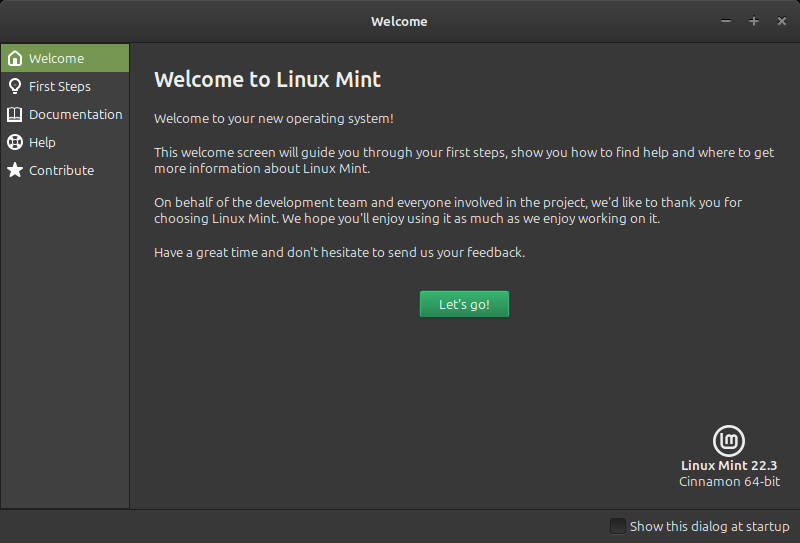
Hmm... I have Cinnamon, not MATE, installed. However, I think I figured out what you're referring to. There's a Welcome Screen (that can be disabled) and that has a help button.

Welcome_001.png


Is that the screen (similar to this screen) that you're referring to?

Have you changed the theme? That'd be my first guess: it's a bug in the theme you're using. Well, let's say 'misconfigured' instead of 'bug'.

If that's the only time you're having this issue, you can just ignore it. It is just a link to a chat room and to the official Linux Mint forum.

Chat room: relies on mintchat, which appears to not be installed by default and kind of pointless in the first place.
Forum: https://forums.linuxmint.com/

That's all that it contains. You can untick the box so that you don't get the welcome screen when you start your computer. If you ever need it again, it's in the application menu as 'Welcome Screen'.
 
Have you installed all available Updates since installing?

It may help with the black screen as well.
 
<snip!>

Welcome_001.png


Is that the screen (similar to this screen) that you're referring to?
</snip!>
No. Open up your file browser, for example. Look in the top menu for "Help" (last one on the list) Click that. The window that comes up is the one I'm referring to.
 
No. Open up your file browser, for example. Look in the top menu for "Help" (last one on the list) Click that. The window that comes up is the one I'm referring to.

There's a help > about that leads you to telling you the name of the software.

There's a help > keyboard shortcuts.

There's a help > all topics.

When I click that, it just opens a browser that leads me to this site:


Is it similar in MATE? If not, I can download it and spin up a VM to look into it further.
 
@ron.alan: Yes that's the menu item; Contents F1
 
Okay then, first thing is to confirm that you have mate-user-guide installed via Synaptic or Update Manager. (I hope it's as simple as not having it installed; if it is already installed, then the only other thing that could possibly be the problem is a theme causing it, although I really doubt that could be the case.)

Untitled.jpg
 
then the only other thing that could possibly be the problem is a theme causing it

That was what I'd theorized.

If need be, I can spin up a VM and apply the same theme they're using.

They can also just try another theme to see if that changes.
 
Okay then, first thing is to confirm that you have mate-user-guide installed via Synaptic or Update Manager. (I hope it's as simple as not having it installed; if it is already installed, then the only other thing that could possibly be the problem is a theme causing it, although I really doubt that could be the case.)

View attachment 30512
I'll try that when I get my laptop back from the repair shop.


Follow Linux.org

Members online

No members online now.

Top