
General Linux Forums General Linux forums
General Linux Topics
General Linux discussion
- Threads
- 7K
- Messages
- 64.3K
Getting Started
New to Linux? Feel free to post in here for installation help and other topics.
- Threads
- 4.2K
- Messages
- 42.8K
Distribution Specific
This section allows you to ask questions to specific distribution derivatives.
- Threads
- 4.1K
- Messages
- 38.9K

Dev-ops
This section is for discussion of tools like kubernetes, terraform, docker, ELK, etc..
- Threads
- 134
- Messages
- 891
Linux Networking
Linux networking topics in here including wired or wireless.
- Threads
- 1.1K
- Messages
- 7.2K

Desktop
General desktop Linux topics including X-Windows, Wayland, themes, gnome, kde, etc..
- Threads
- 566
- Messages
- 6.6K
Linux Gaming
Everything about gaming on Linux
- Threads
- 426
- Messages
- 4K
Linux Audio / Video
Audio/video topics
- Threads
- 514
- Messages
- 3.9K

Laptops / Netbooks
This section is for topics related to Linux on laptops, netbooks, etc..
- Threads
- 455
- Messages
- 4.5K

Command Line
How to get things done via command line (CLI).
- Threads
- 1.4K
- Messages
- 8.4K
Linux Hardware
Help with getting various hardware working correctly with Linux
- Threads
- 1K
- Messages
- 9.3K
General Computing
Please post topics relating to general computing in this section.
- Threads
- 772
- Messages
- 9.1K

- Threads
- 11K
- Messages
- 15.5K

Single board computers
This section if for single-board computer discussion - Raspberry Pi, ODROID, etc..
- Threads
- 160
- Messages
- 1.2K

Server Linux Linux server section
HomeLab
Self-hosted services, virtualization, NAS, networking, monitoring, and home server infrastructure.
- Threads
- 7
- Messages
- 40

General Server
General Linux server topics in here.
- Threads
- 550
- Messages
- 2.6K

Server Security
Linux server security topics
- Threads
- 104
- Messages
- 493

Web Server
Linux web server topics
- Threads
- 220
- Messages
- 1K
Mail Server
One big piece of the Linux server puzzle is maintaining mail servers. This section is to provide help to those who work with and maintain Linux mail servers.
- Threads
- 93
- Messages
- 390

Database
Linux database solutions / topics
- Threads
- 44
- Messages
- 176
Linux.org News, Tutorials and Articles
Linux News
Linux news aggregated from around the Internet
- Threads
- 7.1K
- Messages
- 7.2K
- Threads
- 55
- Messages
- 911

Linux Original Content
Original content from Linux.org (Only Linux.org staff can post new threads in here).
- Threads
- 1.1K
- Messages
- 4.4K

Front Office Linux Forum front office
Site Announcements
Keep an eye on this section for Linux.org site announcements!
- Threads
- 120
- Messages
- 1.8K

Forum Assistance
If you're having issues with the forum, post in here.
- Threads
- 264
- Messages
- 3K
Member Introductions
New here? Post an introduction thread!
- Threads
- 1K
- Messages
- 8.3K

Off Topic
We understand that you'd want to talk about other stuff in your life besides Linux.. here's the spot!
- Threads
- 1.4K
- Messages
- 20.4K



Trending content


Forum statistics
Latest profile posts

I have been building an automatic disc launcher for my GOG offline installers
I recently came across a video showing how to put GOG offline installers onto physical discs. I liked the idea, but I wanted to make something more complete, reusable and mostly automatic on Linux.
Over the last couple of days, I have therefore been building my own game-disc launcher and ISO builder on Ubuntu.
The main launcher is a Windows
The system now scans the files inside my project folder and automatically builds the launcher based on what it finds.
What it currently does
Reusable folder structure
After replacing the installer, cover, manuals and extras, I only need to run one command:
The script then:
Games I have tested so far
Each launcher gets its own colour scheme based on the cover instead of using the same fixed design for every game.
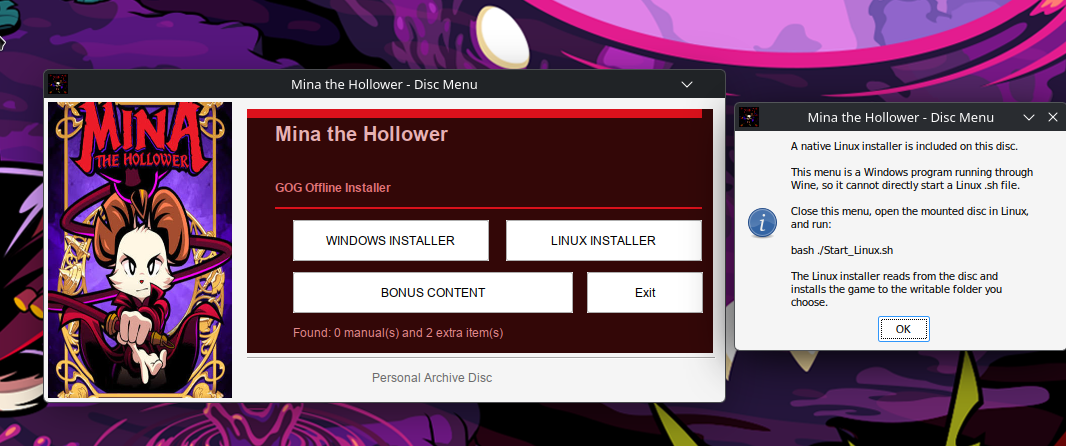
For example, the Soldier of Fortune launcher received dark brown and beige colours from its cover, while Mina the Hollower received a dark red theme.
Windows and Linux installers on the same disc
When both installer versions are present, the launcher displays:
The Windows installer can be launched directly from the NSIS menu.
The Linux side required a slightly different solution. The menu itself is a Windows program running through Wine, so it cannot reliably launch a native Linux shell script.
When the Linux button is selected, the launcher explains that the user should close the Wine menu, open the mounted disc in Linux and run:
Using
The Linux GOG installer can then read its data directly from the disc and install the game to a writable location on the hard drive.
Bonus content system
The launcher automatically counts the manuals and extra items found on the disc.
The bonus-content page lists all detected items and allows the user to:
By default, the files are copied somewhere similar to:
I decided not to install extras directly into the game directory because mods, patches, manuals and soundtracks often require different locations.
Physical-disc test
I tested the full process by creating and burning a 662 MB Empire Earth ISO onto a CD-R with my ASUS BW-16D1H-U Blu-ray drive.
The disc was written with:
I then verified the burned disc against the ISO:
The verification completed successfully. The custom menu ran directly from the disc, and the original GOG installer launched and installed normally.
Purpose of the project
This is mainly a personal archival project for my legally purchased GOG games.
I am not modifying or redistributing the GOG installers. The original installer files and matching BIN files remain unchanged. My custom launcher only detects and starts them.
It started as a basic menu with one installation button, but it has gradually developed into an automatic system for creating customised physical GOG game discs entirely on Linux.
I recently came across a video showing how to put GOG offline installers onto physical discs. I liked the idea, but I wanted to make something more complete, reusable and mostly automatic on Linux.
Over the last couple of days, I have therefore been building my own game-disc launcher and ISO builder on Ubuntu.
The main launcher is a Windows
.exe compiled with NSIS on Linux. It can run normally on Windows or through Wine on Linux. The ISO is created with xorriso, so the entire building process is performed on Ubuntu.The system now scans the files inside my project folder and automatically builds the launcher based on what it finds.
What it currently does
- Detects the game title from the GOG Windows installer.
- Falls back to creating a readable title from the installer filename.
- Automatically uses a smaller font and two lines for long game titles.
- Detects Windows
.exeinstallers. - Detects Linux
.shinstallers. - Shows separate Windows and Linux installer buttons when both are available.
- Uses the game cover as artwork in the launcher.
- Analyses the cover and automatically creates a matching colour scheme.
- Detects multiple PDF manuals.
- Detects ZIP files, normal files and folders placed in the Extras folder.
- Provides a bonus-content menu where files can be copied to the computer.
- Copies ZIP archives without extracting or modifying them.
- Automatically creates
autorun.inf. - Names the ISO after the detected game.
- Gives the mounted disc a matching volume label.
- Creates a native
Start_Linux.shlauncher when a Linux installer is included.
Reusable folder structure
Code:
GOG-DISC/
├── Artwork/
│   └── cover.bmp
│
├── Installer/
│   ├── setup_game.exe
│   ├── matching .bin files
│   └── gog_game_installer.sh
│
├── Manual/
│   ├── manual.pdf
│   └── reference-card.pdf
│
├── Extras/
│   ├── soundtrack.zip
│   ├── wallpapers/
│   ├── bonus-maps/
│   └── patches/
│
├── game.ico
├── autorun.inf
├── Start_Linux.sh
└── GameMenu.exe
After replacing the installer, cover, manuals and extras, I only need to run one command:
Bash:
python3 "$HOME/build_game_menu.py"The script then:
- Detects the game title.
- Finds the Windows and Linux installers.
- Analyses the cover colours.
- Compiles the customised NSIS launcher.
- Creates the Linux launcher when needed.
- Updates the AutoRun information.
- Creates an ISO named after the game.
- Sets a matching disc-volume label.
Games I have tested so far
- Empire Earth Gold Edition
- Soldier of Fortune: Platinum Edition
- Soldier of Fortune II: Double Helix – Gold Edition
- Mina the Hollower
Each launcher gets its own colour scheme based on the cover instead of using the same fixed design for every game.
For example, the Soldier of Fortune launcher received dark brown and beige colours from its cover, while Mina the Hollower received a dark red theme.
Windows and Linux installers on the same disc
When both installer versions are present, the launcher displays:
Code:
[ WINDOWS INSTALLER ] [ LINUX INSTALLER ]
[          BONUS CONTENT          ] [ Exit ]
The Windows installer can be launched directly from the NSIS menu.
The Linux side required a slightly different solution. The menu itself is a Windows program running through Wine, so it cannot reliably launch a native Linux shell script.
When the Linux button is selected, the launcher explains that the user should close the Wine menu, open the mounted disc in Linux and run:
Bash:
bash ./Start_Linux.shUsing
bash also works when the optical disc has been mounted with the noexec option.The Linux GOG installer can then read its data directly from the disc and install the game to a writable location on the hard drive.
Bonus content system
The launcher automatically counts the manuals and extra items found on the disc.
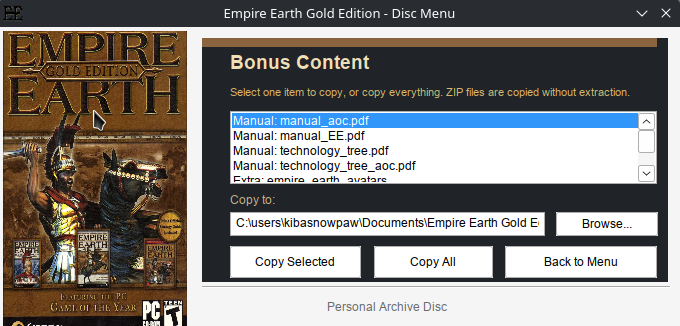
The bonus-content page lists all detected items and allows the user to:
- Copy one selected item.
- Copy every manual and extra.
- Choose a destination folder.
- Copy folders recursively.
- Keep ZIP files in their original form.
By default, the files are copied somewhere similar to:
Code:
Documents/
└── Game Title/
    └── Bonus Content/
        ├── Manuals/
        ├── Soundtrack/
        ├── Wallpapers/
        ├── Maps/
        └── Patches/
I decided not to install extras directly into the game directory because mods, patches, manuals and soundtracks often require different locations.
Physical-disc test
I tested the full process by creating and burning a 662 MB Empire Earth ISO onto a CD-R with my ASUS BW-16D1H-U Blu-ray drive.
The disc was written with:
Bash:
xorriso -as cdrecord \
  -v \
  dev=/dev/sr0 \
  speed=16c \
  -sao \
  -eject \
  "$HOME/Empire_Earth_Gold.iso"
I then verified the burned disc against the ISO:
Bash:
sudo cmp \
  -n "$(stat -c%s "$HOME/Empire_Earth_Gold.iso")" \
  "$HOME/Empire_Earth_Gold.iso" \
  /dev/sr0 \
  && echo "Disc verified successfully"
The verification completed successfully. The custom menu ran directly from the disc, and the original GOG installer launched and installed normally.
Purpose of the project
This is mainly a personal archival project for my legally purchased GOG games.
I am not modifying or redistributing the GOG installers. The original installer files and matching BIN files remain unchanged. My custom launcher only detects and starts them.
It started as a basic menu with one installation button, but it has gradually developed into an automatic system for creating customised physical GOG game discs entirely on Linux.
I Saw a Video About Making GOG Game Discs — So I Built My Own Better Version on Linux
I recently came across a video showing how to create a custom installer for GOG games and burn it to a disc. My first thought was: I can make something better than that on Linux.
After around 30 minutes of experimenting with NSIS, I had the basic design working and looking the way I wanted.
The result is a custom disc menu that includes:
That means every game disc can have its own appearance and content, while the underlying code remains unchanged. I only need to prepare the folder for the game and run the build process.
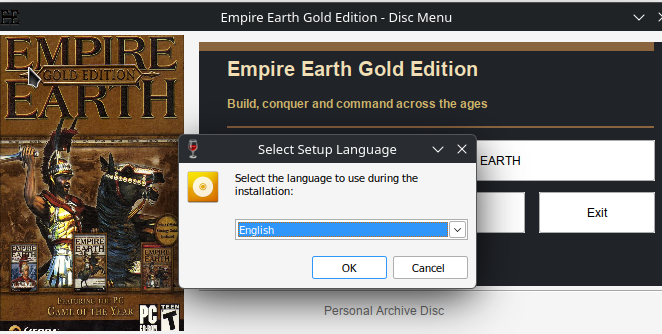
The game installation itself still uses the original installer, including its normal language-selection window. My menu simply acts as a cleaner front end for installing the game and accessing the archived extras.
This is mainly for my personal physical PC game archive. I like having the installer, manuals and bonus files together on a properly organised disc instead of just storing an installer file in a random folder.
I recently came across a video showing how to create a custom installer for GOG games and burn it to a disc. My first thought was: I can make something better than that on Linux.
After around 30 minutes of experimenting with NSIS, I had the basic design working and looking the way I wanted.
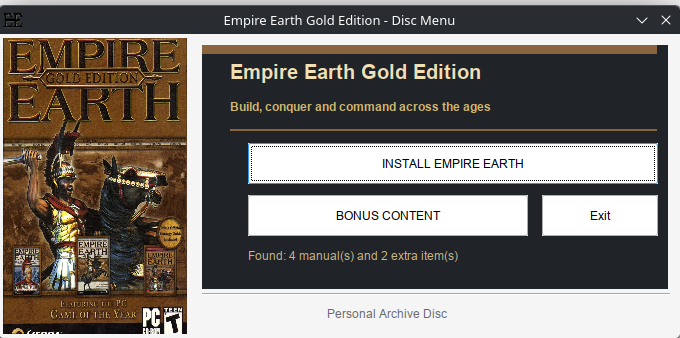
The result is a custom disc menu that includes:
- A separate design, cover image, title and description for each game.
- A button that launches the original game installer.
- Automatic detection of manuals and other bonus content.
- A bonus-content menu where individual files can be selected and copied.
- A “Copy All” option for copying everything at once.
- ZIP files are copied without being extracted.
- A default destination folder based on the game title.
- A counter showing how many manuals and extra items were found.
That means every game disc can have its own appearance and content, while the underlying code remains unchanged. I only need to prepare the folder for the game and run the build process.
The game installation itself still uses the original installer, including its normal language-selection window. My menu simply acts as a cleaner front end for installing the game and accessing the archived extras.
This is mainly for my personal physical PC game archive. I like having the installer, manuals and bonus files together on a properly organised disc instead of just storing an installer file in a random folder.
Yesterday I Bought 54 Physical PC Games for 440 DKK
A second-hand-store trip turned into a full excavation of PC gaming history.
A second-hand-store trip turned into a full excavation of PC gaming history.
Yesterday, 15 July 2026, I visited a second-hand shop called Loppen. I expected to look through a few shelves, perhaps find one or two interesting games, and then go home.
Instead, I walked out carrying 54 physical PC games.
The entire haul cost me approximately 440 Danish kroner.
That is roughly:
- €59 EUR
- £50 GBP
- $67 USD
That works out at only around 8.15 DKK per game, or approximately:
- €1.09 per game
- £0.93 per game
- $1.25 per game
My back was not especially pleased with this decision, but the old gamer inside me certainly was.
I Did Not Simply Buy Everything
Loppen had many more games than the ones I brought home. I could probably have filled several more bags, but I am extremely selective when buying second-hand games.
Cheap does not automatically mean worth owning.
I have been gaming since the 1980s and, by my own count, have played around 8,000 games. After that many years, I have learned that there is no reason to fill my shelves with games I do not care about merely because they cost almost nothing.
My normal limit is 10 DKK per game. Most of this haul cost either 5, 8 or 10 DKK per title.
I generally refuse to go above 10 DKK unless it is something difficult to find or a game I specifically want.
One exception in this haul was The Sims 2: University at 25 DKK.
I would rather leave twenty games behind than buy twenty games that mean nothing to me.
The Strategy, RPG and War-Game Pile
This part of the haul alone felt like opening a time capsule from several different periods of PC gaming:
- Anno 1602: Creation of a New World
- Atlantis III
- Battlefield 1942
- Battlefield 2
- Blitzkrieg Collection
- Command & Conquer 3: Tiberium Wars
- Codename: Panzers – Phase Two
- The Elder Scrolls III: Morrowind
- Emperor: Battle for Dune
- Forgotten Realms: Neverwinter Nights – Shadow of Undrentide
- Neverwinter Nights: Hordes of the Underdark
- Railroad Tycoon 3
- S.T.A.L.K.E.R.: Shadow of Chernobyl
- Silent Hunter 4: Wolves of the Pacific
- Warcraft III: Reign of Chaos
- Warhammer: Mark of Chaos
There are some proper pieces of PC gaming history in that group.
Seeing Morrowind, Warcraft III, Battlefield 1942, S.T.A.L.K.E.R. and Emperor: Battle for Dune sitting together in a second-hand shop is the kind of thing that makes an old PC gamer stop and begin digging through every single case.
These games came from a time when PC releases regularly arrived in large boxes or DVD cases, often with manuals, reference cards, multiple discs and enough installation problems to turn the player into an unpaid computer technician.
Simulators, Sport and Management Games
The management and simulation side of the pile included:
- Circus Empire
- Fly! II
- Championship Manager: Season 03/04
- Football Manager 2010
- Football Manager 2012
- Madden NFL 07
- Pro Cycling Manager 2006
- SimCity
- SimFarm
- Spore: Galactic Adventures
- Total Club Manager 2004
- Zoo Park Tycoon
This is a wonderfully strange section of the collection.
One moment you are operating a farm. The next you are managing a football club, running a circus, controlling a zoo, flying an aircraft or attempting to build an entire city without bankrupting it.
Old PC gaming was never afraid of extremely specific ideas.
Today, many large publishers chase the same fashionable genres. Older PC shelves could contain a submarine simulator, a cycling-management game, a city builder, a flight simulator and a collection of 25,000 Sudoku puzzles sitting directly beside one another.
That variety is one of the things I miss.
The Maxis and Sims Avalanche
A very large part of this haul was devoted to Maxis and The Sims:
- The Sims: Livin’ Large
- The Sims: House Party
- The Sims: Unleashed
- The Sims 2
- The Sims 2: Bon Voyage
- The Sims 2: Celebration! Stuff
- The Sims 2: Family Fun Stuff
- The Sims 2: Nightlife
- The Sims 2: Open for Business
- The Sims 2: Seasons
- The Sims 2: University
- The Sims 3: En introduktion
Together with SimCity, SimFarm and Spore: Galactic Adventures, this became a substantial Maxis-related haul.
There is something slightly absurd about returning home with this many Sims expansions from one second-hand shopping trip.
I did not plan to begin excavating an entire section of Maxis history, but apparently that was what the shelves had waiting for me.
Physical Sims releases are also a good example of why cataloguing matters. There are base games, large expansions, smaller Stuff packs, different regional editions and cases that may contain the wrong disc.
A box on a shelf can look complete until you open it and discover that half of the actual game is missing.
Disney, Hugo, Racing and the Wonderfully Strange Leftovers
The remaining games were an equally mixed collection:
- Fætter Kanin til Premiere
- 25,000 Sudoku Puzzles
- Agent Hugo
- Agent Hugo: Roborumblen
- Asterix: The Gallic War
- Disney’s Lilo & Stitch: Trouble in Paradise
- Disney’s Meet the Robinsons
- Need for Speed: Hot Pursuit 2
- WALL-E
That is the beauty of buying old PC games second-hand.
A serious strategy game can be sitting beside a Disney platformer, a racing game, a Danish children’s title and enough Sudoku puzzles to keep someone occupied until the end of civilisation.
Disney’s Meet the Robinsons was even catalogued as being in mint condition, despite costing only 5 DKK.
The Less Glamorous Part of Collecting
A large haul always looks impressive when everything is stacked together for a photograph.
The reality is less glamorous.
It means dust, fingerprints, scratched discs, cracked cases, water damage, missing manuals and occasionally discovering that somebody has placed the wrong game inside the box.
A few of these games already have problems:
- Command & Conquer 3: Tiberium Wars is missing a disc.
- Football Manager 2012 is also missing a disc.
- Emperor: Battle for Dune has damage to disc one.
- The Sims 2: Celebration! Stuff has water damage.
- WALL-E has severe scratches.
- S.T.A.L.K.E.R.: Shadow of Chernobyl is a loose copy.
- The base version of The Sims 2 is also a loose copy.
That is why I am still cleaning, checking and cataloguing everything.
The lists I have completed currently contain 49 entries, although I bought 54 games in total. The remaining games have not yet made it through the cleaning and cataloguing process.
Every disc must be examined.
Every case must be opened.
Every multi-disc game must be checked to make sure all the discs are present and actually belong to that release.
My New Collection Categories
I have also started separating problematic games from my normal collection.
Account Lock
This category is for physical games that still require an online account, launcher or activation service.
They may come on a disc, but the disc does not necessarily make the game independent.
Genkøb — Buy Again
This category is for copies that are missing an essential disc or are damaged badly enough that I eventually need to replace them with another copy.
Af med — Get Rid Of
This category is for duplicate or incomplete copies I no longer need after using parts from them to create one complete set.
This prevents a damaged, incomplete or account-dependent release from silently sitting among the fully functional games as though everything is fine.
Then Comes the Linux Battle
After everything has been cleaned and organised, the next question is how many of these old games can still be made to run on Linux.
Modern Linux gaming discussions normally concentrate on Steam and Proton.
Physical PC games are a different type of challenge.
They may involve:
- Old 32-bit installers
- Legacy DirectX components
- Disc-based copy protection
- Obsolete launchers
- Missing video and audio codecs
- Old configuration programs
- Installers designed for versions of Windows that disappeared many years ago
Some will probably work through Wine or Lutris with very little effort.
Others will fight me every step of the way.
That fight is part of the attraction.
Installing an old retail PC game on a modern Linux system can become a form of digital archaeology.
You are not merely pressing an install button.
You are examining what the installer expects, what files it needs, what protection system it uses and which parts of its original software environment have vanished.
Fifty-Four Pieces of PC Gaming History
Not every game in this haul is rare.
Not every copy is complete.
Not every title will remain permanently in my collection.
But for 440 DKK, I brought home 54 physical pieces of PC gaming history.
Some are classics.
Some are strange budget releases.
Some are children’s games.
Some are simulations that only the old PC market would have dared to publish.
Some require repairs, replacement discs or a great deal of patience.
That is what collecting means to me.
It is not about buying everything in sight.
It is about digging through hundreds of ordinary cases until something makes you stop.
It is about preserving the games that deserve a place, documenting exactly what is inside each box and discovering whether software from twenty or thirty years ago can still be persuaded to live again on a modern Linux machine.
Yesterday, I went to Loppen to look at a few games.
I returned with 54 of them.
A perfectly normal day for an old PC gamer.
I returned with 54 of them.
A perfectly normal day for an old PC gamer.

When you spend hours debugging and pulling your hair out of frustration only to find out there is
It's so hard to spot a single character that's otherwise not an error, but leads to really strange and unexpected program flow
if (a = b) instead of if (a == b)It's so hard to spot a single character that's otherwise not an error, but leads to really strange and unexpected program flow