New profile posts

I have been building an automatic disc launcher for my GOG offline installers

I recently came across a video showing how to put GOG offline installers onto physical discs. I liked the idea, but I wanted to make something more complete, reusable and mostly automatic on Linux.

Over the last couple of days, I have therefore been building my own game-disc launcher and ISO builder on Ubuntu.

The main launcher is a Windows .exe compiled with NSIS on Linux. It can run normally on Windows or through Wine on Linux. The ISO is created with xorriso, so the entire building process is performed on Ubuntu.

The system now scans the files inside my project folder and automatically builds the launcher based on what it finds.

What it currently does

  • Detects the game title from the GOG Windows installer.
  • Falls back to creating a readable title from the installer filename.
  • Automatically uses a smaller font and two lines for long game titles.
  • Detects Windows .exe installers.
  • Detects Linux .sh installers.
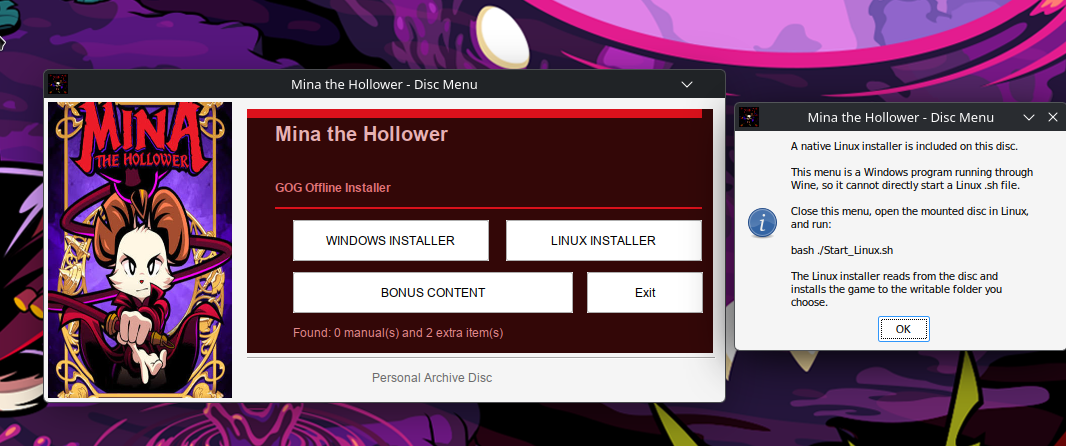
  • Shows separate Windows and Linux installer buttons when both are available.
  • Uses the game cover as artwork in the launcher.
  • Analyses the cover and automatically creates a matching colour scheme.
  • Detects multiple PDF manuals.
  • Detects ZIP files, normal files and folders placed in the Extras folder.
  • Provides a bonus-content menu where files can be copied to the computer.
  • Copies ZIP archives without extracting or modifying them.
  • Automatically creates autorun.inf.
  • Names the ISO after the detected game.
  • Gives the mounted disc a matching volume label.
  • Creates a native Start_Linux.sh launcher when a Linux installer is included.

Reusable folder structure

Code:
GOG-DISC/
├── Artwork/
│   └── cover.bmp
│
├── Installer/
│   ├── setup_game.exe
│   ├── matching .bin files
│   └── gog_game_installer.sh
│
├── Manual/
│   ├── manual.pdf
│   └── reference-card.pdf
│
├── Extras/
│   ├── soundtrack.zip
│   ├── wallpapers/
│   ├── bonus-maps/
│   └── patches/
│
├── game.ico
├── autorun.inf
├── Start_Linux.sh
└── GameMenu.exe

After replacing the installer, cover, manuals and extras, I only need to run one command:

Bash:
python3 "$HOME/build_game_menu.py"

The script then:

  1. Detects the game title.
  2. Finds the Windows and Linux installers.
  3. Analyses the cover colours.
  4. Compiles the customised NSIS launcher.
  5. Creates the Linux launcher when needed.
  6. Updates the AutoRun information.
  7. Creates an ISO named after the game.
  8. Sets a matching disc-volume label.

Games I have tested so far

  • Empire Earth Gold Edition
  • Soldier of Fortune: Platinum Edition
  • Soldier of Fortune II: Double Helix – Gold Edition
  • Mina the Hollower

Each launcher gets its own colour scheme based on the cover instead of using the same fixed design for every game.

For example, the Soldier of Fortune launcher received dark brown and beige colours from its cover, while Mina the Hollower received a dark red theme.

Windows and Linux installers on the same disc

When both installer versions are present, the launcher displays:

Code:
[ WINDOWS INSTALLER ] [ LINUX INSTALLER ]
[          BONUS CONTENT          ] [ Exit ]

The Windows installer can be launched directly from the NSIS menu.

The Linux side required a slightly different solution. The menu itself is a Windows program running through Wine, so it cannot reliably launch a native Linux shell script.

When the Linux button is selected, the launcher explains that the user should close the Wine menu, open the mounted disc in Linux and run:

Bash:
bash ./Start_Linux.sh

Using bash also works when the optical disc has been mounted with the noexec option.

The Linux GOG installer can then read its data directly from the disc and install the game to a writable location on the hard drive.

Bonus content system

The launcher automatically counts the manuals and extra items found on the disc.

The bonus-content page lists all detected items and allows the user to:

  • Copy one selected item.
  • Copy every manual and extra.
  • Choose a destination folder.
  • Copy folders recursively.
  • Keep ZIP files in their original form.

By default, the files are copied somewhere similar to:

Code:
Documents/
└── Game Title/
    └── Bonus Content/
        ├── Manuals/
        ├── Soundtrack/
        ├── Wallpapers/
        ├── Maps/
        └── Patches/

I decided not to install extras directly into the game directory because mods, patches, manuals and soundtracks often require different locations.

Physical-disc test

I tested the full process by creating and burning a 662 MB Empire Earth ISO onto a CD-R with my ASUS BW-16D1H-U Blu-ray drive.

The disc was written with:

Bash:
xorriso -as cdrecord \
  -v \
  dev=/dev/sr0 \
  speed=16c \
  -sao \
  -eject \
  "$HOME/Empire_Earth_Gold.iso"

I then verified the burned disc against the ISO:

Bash:
sudo cmp \
  -n "$(stat -c%s "$HOME/Empire_Earth_Gold.iso")" \
  "$HOME/Empire_Earth_Gold.iso" \
  /dev/sr0 \
  && echo "Disc verified successfully"

The verification completed successfully. The custom menu ran directly from the disc, and the original GOG installer launched and installed normally.

Purpose of the project

This is mainly a personal archival project for my legally purchased GOG games.

I am not modifying or redistributing the GOG installers. The original installer files and matching BIN files remain unchanged. My custom launcher only detects and starts them.

It started as a basic menu with one installation button, but it has gradually developed into an automatic system for creating customised physical GOG game discs entirely on Linux.

image.png
I Saw a Video About Making GOG Game Discs — So I Built My Own Better Version on Linux

I recently came across a video showing how to create a custom installer for GOG games and burn it to a disc. My first thought was: I can make something better than that on Linux.

After around 30 minutes of experimenting with NSIS, I had the basic design working and looking the way I wanted.

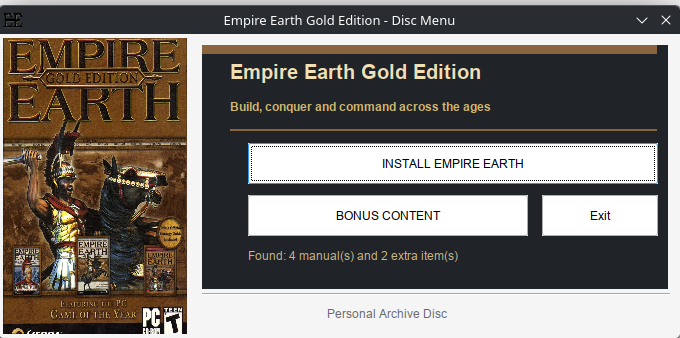
The result is a custom disc menu that includes:

  • A separate design, cover image, title and description for each game.
  • A button that launches the original game installer.
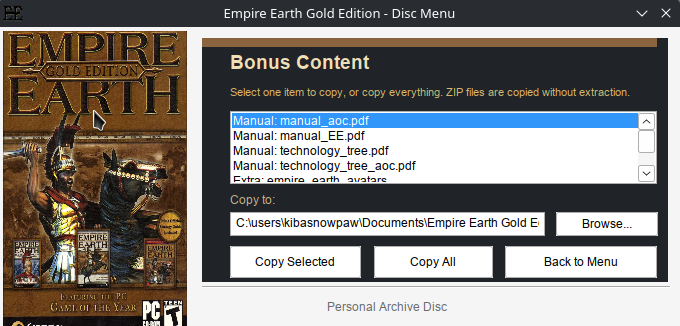
  • Automatic detection of manuals and other bonus content.
  • A bonus-content menu where individual files can be selected and copied.
  • A “Copy All” option for copying everything at once.
  • ZIP files are copied without being extracted.
  • A default destination folder based on the game title.
  • A counter showing how many manuals and extra items were found.
The main part I wanted was automation. I can replace the game installer, cover image, manuals and bonus files, then rebuild the disc menu without rewriting the program. It reads the new files and builds the menu around whatever is present.

That means every game disc can have its own appearance and content, while the underlying code remains unchanged. I only need to prepare the folder for the game and run the build process.

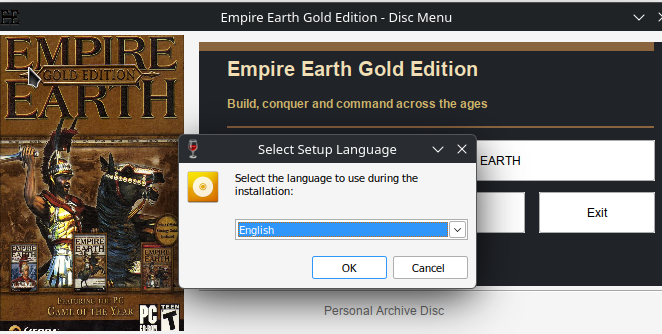
The game installation itself still uses the original installer, including its normal language-selection window. My menu simply acts as a cleaner front end for installing the game and accessing the archived extras.

This is mainly for my personal physical PC game archive. I like having the installer, manuals and bonus files together on a properly organised disc instead of just storing an installer file in a random folder.


image.png
image.png
image.png
Yesterday I Bought 54 Physical PC Games for 440 DKK

A second-hand-store trip turned into a full excavation of PC gaming history.


Yesterday, 15 July 2026, I visited a second-hand shop called Loppen. I expected to look through a few shelves, perhaps find one or two interesting games, and then go home.

Instead, I walked out carrying 54 physical PC games.

The entire haul cost me approximately 440 Danish kroner.

That is roughly:

  • €59 EUR
  • £50 GBP
  • $67 USD

That works out at only around 8.15 DKK per game, or approximately:

  • €1.09 per game
  • £0.93 per game
  • $1.25 per game

My back was not especially pleased with this decision, but the old gamer inside me certainly was.


I Did Not Simply Buy Everything

Loppen had many more games than the ones I brought home. I could probably have filled several more bags, but I am extremely selective when buying second-hand games.

Cheap does not automatically mean worth owning.

I have been gaming since the 1980s and, by my own count, have played around 8,000 games. After that many years, I have learned that there is no reason to fill my shelves with games I do not care about merely because they cost almost nothing.

My normal limit is 10 DKK per game. Most of this haul cost either 5, 8 or 10 DKK per title.

I generally refuse to go above 10 DKK unless it is something difficult to find or a game I specifically want.

One exception in this haul was The Sims 2: University at 25 DKK.

I would rather leave twenty games behind than buy twenty games that mean nothing to me.


The Strategy, RPG and War-Game Pile

This part of the haul alone felt like opening a time capsule from several different periods of PC gaming:

  • Anno 1602: Creation of a New World
  • Atlantis III
  • Battlefield 1942
  • Battlefield 2
  • Blitzkrieg Collection
  • Command & Conquer 3: Tiberium Wars
  • Codename: Panzers – Phase Two
  • The Elder Scrolls III: Morrowind
  • Emperor: Battle for Dune
  • Forgotten Realms: Neverwinter Nights – Shadow of Undrentide
  • Neverwinter Nights: Hordes of the Underdark
  • Railroad Tycoon 3
  • S.T.A.L.K.E.R.: Shadow of Chernobyl
  • Silent Hunter 4: Wolves of the Pacific
  • Warcraft III: Reign of Chaos
  • Warhammer: Mark of Chaos

There are some proper pieces of PC gaming history in that group.

Seeing Morrowind, Warcraft III, Battlefield 1942, S.T.A.L.K.E.R. and Emperor: Battle for Dune sitting together in a second-hand shop is the kind of thing that makes an old PC gamer stop and begin digging through every single case.

These games came from a time when PC releases regularly arrived in large boxes or DVD cases, often with manuals, reference cards, multiple discs and enough installation problems to turn the player into an unpaid computer technician.


Simulators, Sport and Management Games

The management and simulation side of the pile included:

  • Circus Empire
  • Fly! II
  • Championship Manager: Season 03/04
  • Football Manager 2010
  • Football Manager 2012
  • Madden NFL 07
  • Pro Cycling Manager 2006
  • SimCity
  • SimFarm
  • Spore: Galactic Adventures
  • Total Club Manager 2004
  • Zoo Park Tycoon

This is a wonderfully strange section of the collection.

One moment you are operating a farm. The next you are managing a football club, running a circus, controlling a zoo, flying an aircraft or attempting to build an entire city without bankrupting it.

Old PC gaming was never afraid of extremely specific ideas.

Today, many large publishers chase the same fashionable genres. Older PC shelves could contain a submarine simulator, a cycling-management game, a city builder, a flight simulator and a collection of 25,000 Sudoku puzzles sitting directly beside one another.

That variety is one of the things I miss.


The Maxis and Sims Avalanche

A very large part of this haul was devoted to Maxis and The Sims:

  • The Sims: Livin’ Large
  • The Sims: House Party
  • The Sims: Unleashed
  • The Sims 2
  • The Sims 2: Bon Voyage
  • The Sims 2: Celebration! Stuff
  • The Sims 2: Family Fun Stuff
  • The Sims 2: Nightlife
  • The Sims 2: Open for Business
  • The Sims 2: Seasons
  • The Sims 2: University
  • The Sims 3: En introduktion

Together with SimCity, SimFarm and Spore: Galactic Adventures, this became a substantial Maxis-related haul.

There is something slightly absurd about returning home with this many Sims expansions from one second-hand shopping trip.

I did not plan to begin excavating an entire section of Maxis history, but apparently that was what the shelves had waiting for me.

Physical Sims releases are also a good example of why cataloguing matters. There are base games, large expansions, smaller Stuff packs, different regional editions and cases that may contain the wrong disc.

A box on a shelf can look complete until you open it and discover that half of the actual game is missing.


Disney, Hugo, Racing and the Wonderfully Strange Leftovers

The remaining games were an equally mixed collection:

  • Fætter Kanin til Premiere
  • 25,000 Sudoku Puzzles
  • Agent Hugo
  • Agent Hugo: Roborumblen
  • Asterix: The Gallic War
  • Disney’s Lilo & Stitch: Trouble in Paradise
  • Disney’s Meet the Robinsons
  • Need for Speed: Hot Pursuit 2
  • WALL-E

That is the beauty of buying old PC games second-hand.

A serious strategy game can be sitting beside a Disney platformer, a racing game, a Danish children’s title and enough Sudoku puzzles to keep someone occupied until the end of civilisation.

Disney’s Meet the Robinsons was even catalogued as being in mint condition, despite costing only 5 DKK.


The Less Glamorous Part of Collecting

A large haul always looks impressive when everything is stacked together for a photograph.

The reality is less glamorous.

It means dust, fingerprints, scratched discs, cracked cases, water damage, missing manuals and occasionally discovering that somebody has placed the wrong game inside the box.

A few of these games already have problems:

  • Command & Conquer 3: Tiberium Wars is missing a disc.
  • Football Manager 2012 is also missing a disc.
  • Emperor: Battle for Dune has damage to disc one.
  • The Sims 2: Celebration! Stuff has water damage.
  • WALL-E has severe scratches.
  • S.T.A.L.K.E.R.: Shadow of Chernobyl is a loose copy.
  • The base version of The Sims 2 is also a loose copy.

That is why I am still cleaning, checking and cataloguing everything.

The lists I have completed currently contain 49 entries, although I bought 54 games in total. The remaining games have not yet made it through the cleaning and cataloguing process.

Every disc must be examined.

Every case must be opened.

Every multi-disc game must be checked to make sure all the discs are present and actually belong to that release.


My New Collection Categories

I have also started separating problematic games from my normal collection.

Account Lock

This category is for physical games that still require an online account, launcher or activation service.

They may come on a disc, but the disc does not necessarily make the game independent.

Genkøb — Buy Again

This category is for copies that are missing an essential disc or are damaged badly enough that I eventually need to replace them with another copy.

Af med — Get Rid Of

This category is for duplicate or incomplete copies I no longer need after using parts from them to create one complete set.

This prevents a damaged, incomplete or account-dependent release from silently sitting among the fully functional games as though everything is fine.


Then Comes the Linux Battle

After everything has been cleaned and organised, the next question is how many of these old games can still be made to run on Linux.

Modern Linux gaming discussions normally concentrate on Steam and Proton.

Physical PC games are a different type of challenge.

They may involve:

  • Old 32-bit installers
  • Legacy DirectX components
  • Disc-based copy protection
  • Obsolete launchers
  • Missing video and audio codecs
  • Old configuration programs
  • Installers designed for versions of Windows that disappeared many years ago

Some will probably work through Wine or Lutris with very little effort.

Others will fight me every step of the way.

That fight is part of the attraction.

Installing an old retail PC game on a modern Linux system can become a form of digital archaeology.

You are not merely pressing an install button.

You are examining what the installer expects, what files it needs, what protection system it uses and which parts of its original software environment have vanished.


Fifty-Four Pieces of PC Gaming History

Not every game in this haul is rare.

Not every copy is complete.

Not every title will remain permanently in my collection.

But for 440 DKK, I brought home 54 physical pieces of PC gaming history.

Some are classics.

Some are strange budget releases.

Some are children’s games.

Some are simulations that only the old PC market would have dared to publish.

Some require repairs, replacement discs or a great deal of patience.

That is what collecting means to me.

It is not about buying everything in sight.

It is about digging through hundreds of ordinary cases until something makes you stop.

It is about preserving the games that deserve a place, documenting exactly what is inside each box and discovering whether software from twenty or thirty years ago can still be persuaded to live again on a modern Linux machine.

Yesterday, I went to Loppen to look at a few games.

I returned with 54 of them.

A perfectly normal day for an old PC gamer.
Rocketing-warp9
Rocketing-warp9
I'm somewhat shocked games are so cheap! Some of the ones online (ebay/whatnot) seem to sell for a lot more!
kibasnowpaw
kibasnowpaw
It is definitely possible to find much higher prices online, but an online asking price is not necessarily the same as what a game actually sells for.

I currently have around 290 physical PC games, and I have paid approximately 1,845 DKK in total for them. That is about €247, £211 or $282 altogether. It works out at an average of only 6.36 DKK per game roughly €0.85, £0.73 or $0.97 each.

The most I have paid for a single game so far was 75 DKK about €10, £8.60 or $11.50 for Black & White 2. I only paid that much because it is difficult to find locally. Ordering it online could easily cost considerably more once shipping is added.

I have also seen some rather unrealistic prices. One shop wanted 300 DKK around €40, £34 or $46 for an opened copy of Counter-Strike 1.5. Because the package had already been opened, I would treat the key as potentially used or already connected to an account unless proven otherwise. Simply being old does not automatically make a game valuable, and a seller listing something for a high price does not prove that anybody will actually buy it.

The main reason my average is so low is that I set myself a normal maximum of 10 DKK per game about €1.34, £1.14 or $1.53 and I am willing to wait. I regularly search charity and church-run second-hand shops such as Røde Kors, Blå Kors, Kirkens Korshær, Dansk Folkehjælp and local church shops. Their priority is normally raising money for a good cause rather than researching the collector value of every old PC game.

At several of these shops, I have paid only 1-3 DKK per game approximately €0.13 - €0.40, £0.11 - £0.34 or $0.15 - $0.46. Some normally charge 20 DKK around €2.68, £2.29 or $3.06 but I wait for their 50% DVD and CD sales, which often include PC games, and then buy them for 10 DKK.

So it is mostly about patience, being stubborn enough to stick to a price limit, checking many different shops and being willing to travel around Denmark for the right deals. I leave far more games behind than I buy. That is why my collection has remained inexpensive despite now being close to 300 games.
Hello to everyone in the Linux community. I am new to Linux but not to Computers. I ready to get my feet wet with a reliable OS and moving away from Windows.
Rocketing-warp9
Rocketing-warp9
Welcome to the bunch! you would probably be best off posting in the "Member introductions" as this part of the site is less-used compared to others.

Anyways, Welcome to the Bunch! and I hope you enjoy.
I was looking at an old page from Privat Computer PC, 20th year, issue 7, June 30th 2004, and it reminded me of something I think a lot of people forget when they talk about Linux today.


Many people say Linux is difficult because you sometimes have to install drivers, understand your hardware, use the terminal, fix permissions, read error messages, or search for the right solution. But for those of us who grew up with computers through the MS-DOS, Windows 3.x, Windows 95, Windows 98, Windows 2000, and Windows XP era, that kind of struggle was not unusual at all. That was just normal PC life.


Back then, Windows was not this polished thing where everything just worked. You could install Windows and still have no sound, no proper graphics driver, no network, no modem, no printer, and sometimes not even the correct chipset drivers. Device Manager could be full of yellow question marks, and you had to figure out what the machine actually had inside it before you could even begin to fix it.


One of the most ridiculous problems was when you needed to go online to download a driver, but the driver you needed was for the modem or network card. So Windows was basically telling you to use the internet to get the driver that would allow you to use the internet. I have been there many times. You had to use another computer, find the driver, save it to a floppy disk, burn it to a CD, put it on a USB stick, or later download it on a phone and move it over with a USB cable. And even then you just hoped Windows could read the device you copied it from.


That was normal. That was not some strange advanced-user thing. If you had a PC in that era, you learned that computers were machines you had to understand a little. You learned what a graphics card was, what a sound card was, what a modem was, what DirectX was, what drivers were, and why the exact model number mattered. You learned by fighting with the machine until it finally worked.


This is why I think the way some people talk about Linux is a little unfair. Linux today is not perfect, and yes, it can still be difficult depending on your hardware and what you want to do. But a lot of what people call “too hard” in Linux is very similar to what Windows users had to deal with for years. The difference is that many modern users only know Windows after it became much more automatic.


If someone started using computers in the Windows 7, Windows 10, or Windows 11 era, I can understand why Linux feels strange. They are used to the system hiding most of the ugly parts. They are used to drivers being pulled from Windows Update, software being installed with one click, and hardware usually being detected automatically. But for people who lived through the older PC years, Linux does not feel like some alien world. In many ways it feels like the old PC world never fully disappeared.


You still sometimes have to know what hardware you have. You still sometimes have to read documentation. You still sometimes have to search forums. You still sometimes have to fix something manually. That can be annoying, but it also means you are closer to the machine. You are not just clicking through a locked-down system and hoping the company behind it allows you to do what you want.


The funny thing is that Windows used to teach people computers because it was messy. Today Windows hides the mess, while Linux still lets you see it. That is probably why Linux feels harder to some people. Not always because it is impossible, but because it expects the user to be involved in a way many people are no longer used to.


For me, the old Windows era from MS-DOS to XP was a training ground. It taught patience, troubleshooting, drivers, file systems, boot disks, safe mode, command lines, and the pain of trying to get online when the modem driver was missing. So when people say Linux is difficult, I often think that yes, it can be, but old Windows was difficult too. People have just forgotten because they remember the nostalgia more than the problems.


Linux today is not really the strange one. In some ways, Linux is just closer to what personal computing used to be: open, messy, powerful, sometimes frustrating, but also far more honest about what the computer is doing.


And maybe that is why I respect it. Not because it is always easy, but because I remember when Windows was not easy either.

81-EB773-A-79-C3-465-D-97-BF-967-EF9903-F1-B.jpg
Rocketing-warp9
Rocketing-warp9
Even though I grew up in the 7-8.1-10 era, before I switched to a more unix-based setup (mOS and linux) I still remember me wrestling with windows XP often( Yes, I did use XP in 2019....) Old Drivers, trying to get wifi to work (even though there was no wifi hardware onboard.... What can I say? I was 9.) Twenty different drivers that were close but not the right one.. (even the modem drivers on 7-- same PC)

"For me, the old Windows era from MS-DOS to XP was a training ground. It taught patience, troubleshooting, drivers, file systems, boot disks, safe mode, command lines, and the pain of trying to get online when the modem driver was missing. So when people say Linux is difficult, I often think that yes, it can be, but old Windows was difficult too. People have just forgotten because they remember the nostalgia more than the problems."

I guess XP sort-of prepared me for the Jump I guess.
Good way of thinking!
T
theLegionWithin
oh yeah, I remember many times in the early 90s when I had to edit startup files to get enough free memory to run specific games. the best I was ever able to get was 631kb free conventional ram (I think I had 4mb ram at the time?). its been so long that I dont remember all of the details but it heavily relied on EMS and XMS.

I've not had any real meaningful problems with linux at all in the ~18 months since I switched over from WinOS. especially with ai prompting, it's rather trivial to find what I'm looking for most of the time.
I was looking through an old Danish CD-ROM magazine page from CD-ROM 3rd year, issue 11, covering the period from October 15 to November 11, 1998, and it hit me how different PC gaming and software culture used to be.


This page is not just nostalgia. It is almost like a small time capsule from late 90s PC gaming.


On the page you can see games like Railroad Tycoon 2, Caesar III, Get Medieval, Carmageddon 2, Superbike World Championship, and Speed Busters. These were the kinds of games that made PC gaming feel massive and varied. Strategy, racing, arcade action, medieval fantasy, simulations — all living side by side on one magazine CD.


What really stands out to me is how much practical value these CD-ROMs had. This was not just a demo disc. It had tools, patches, fixes, walkthroughs, trainers, savegames, video clips, and extra files.


Under the software section, there are things like:


Netscape Communicator 4.05
Netscape Navigator 4.05

for Windows 95 and Windows 3.x


That alone says a lot about the era. Netscape was still important. The browser war was alive. The internet still felt new, strange, exciting, and not yet fully controlled by a handful of giant platforms.


The page also lists useful programs like DirectX 6.0 for Windows 95 and 98, GameSpy 1.52, ICQ, WinZip, Panda Antivirus, Apple QuickTime, and Microsoft Internet Explorer 4.0.


That is such a late 90s software snapshot. You needed DirectX because games often required the newest version. You needed WinZip because files were everywhere in archives. You had ICQ for chatting. GameSpy was part of online multiplayer before everything became built directly into Steam, Discord, launchers, and modern matchmaking systems.


Then there is the patch section, and this is where the old PC gaming feeling really comes back.


The CD includes patches for games like:


Blade Runner
Descent 3dfx
Extreme Assault
Final Fantasy VII video fix
Panzer Commander v1.2
Quake II v3.19
Rainbow Six v1.02a
Sanitarium Level 2 Fix
Seven Kingdoms: Ancient Adversaries
Tonic Trouble savegame patch
Unreal editor runtime files


This is the kind of thing that reminds me how PC gaming worked back then. You did not always just click “update” and let a launcher do everything. Sometimes you had to get the patch from a magazine CD, a website, an FTP server, or a friend. A patch felt like an event. It could fix a broken level, improve compatibility, add 3dfx support, or simply make the game playable on your machine.


There is also a “Secrets” section with walkthroughs, trainers, savegames, and cheats for games like Dune 2000, House of the Dead, Jazz Jackrabbit 2, MechCommander, Rage of Mages, X-Files, Need for Speed 3, Wargames, and others.


Today, most of that would be scattered across websites, wikis, YouTube guides, mod pages, and old forum posts. Back then, it was all bundled together on a physical disc. You bought the magazine, took the CD-ROM home, put it into the drive, and suddenly you had a whole little world of gaming material to explore.


The screenshots also say a lot.


Railroad Tycoon 2 represents that older style of deep PC strategy and management gaming.
Caesar III is classic city-building from an era where PC strategy games had a very distinct identity.
Get Medieval shows that late 90s fantasy/action style.
Carmageddon 2 is pure chaotic old-school PC attitude, from a time when games were allowed to be rough, violent, weird, and controversial.
Superbike World Championship and Speed Busters show how racing games were also part of that PC CD-ROM culture.


The page even has a video section mentioning ECTS footage. That was another part of the old gaming world: getting small video clips from trade shows and previews on CD-ROMs because streaming video online was not realistic for most people yet. A short video on a disc could feel special.


Looking at this now, it is hard not to compare it to modern gaming.


Today everything is faster and more convenient, but also more disposable. Updates happen automatically. Games are tied to accounts. Launchers control access. Physical manuals are mostly gone. Demo discs are gone. Magazine CDs are gone. Even patches do not feel like something you collect or archive anymore.


Back then, PC gaming felt more hands-on. You had to understand your system. You had to install drivers, DirectX, patches, sometimes even mess with compatibility. It could be annoying, but it also made you feel closer to the machine. You were not just consuming a product. You were maintaining your own little gaming ecosystem.


This page is from 1998, but it shows a whole culture:


physical media,
offline access,
patches you could keep,
tools you could install,
games you discovered by browsing a disc,
and a feeling that PC gaming was something you explored instead of something that was simply delivered to you by a launcher.


For me, this is why old CD-ROM magazines still matter. They are not just old paper and plastic. They are archives of how gaming and computing used to feel.


A single page like this can bring back an entire era.


The late 90s PC world was messy, unstable, experimental, and sometimes frustrating — but it had character. And when I look at something like this, I miss that character.


18-D00884-B47-E-4-A0-A-9712-7-BF5-B8-E5-A7-E1.jpg
Wow!! What a change. Long time CachyOS user. I re-installed my xfce a while back, with only bash as a shell. Today I installed zsh & kitty, got them set up to my liken'. Looks and runs sweet.
My Pop's Getting a 2006 Silverado soon! Needs a new motor (Possibly-- Soft cammed' Chevys!)
Possibly going for a LS Crate motor (I Hope-- then that' be a fleet of sleepers!)
Happy Belated 4th to all whom celebrate, And stay cool out there! It's roasting!
Back With a Real Mic After About 4 Years Without One

For around 4 years, maybe a bit more, I have mostly livestreamed without a proper microphone. I finally fixed that now.

My old setup started back on 1 November 2016, when I bought an Audio-Technica AT2020 cardioid condenser microphone from Amazon UK. This was back when the UK was still part of the EU, so ordering from Amazon UK to Denmark was a lot less annoying than it became after Brexit.

The AT2020 order cost me:

£79.99 for the mic
£19.99 postage and packing
£99.98 total
DKK 861.55 paid total

Around the same time I also bought my first proper audio interface setup from Amazon UK:

Focusrite Scarlett Solo 2nd Gen USB Audio Interface
Neewer NW-35 boom arm / scissor arm stand
Mudder double-layer pop filter

That order cost:

£109.18 item subtotal
£6.94 postage and packing
£116.12 total
DKK 1,000.63 paid total

So it was not random cheap gear. It was a real entry-level recording setup, and for a time it worked.

But I never really liked the Focusrite Scarlett Solo 2nd Gen that much. About a year or two later, I got a Yamaha AG01 instead. I do not remember exactly where I bought the AG01 from, and I do not have the exact receipt in front of me, but from memory I think it was around 800 DKK or something close to that.

The strange part is that I originally thought the Yamaha AG01 might have been the problem. I had opened it before, moved it around, had it in boxes, and it had not exactly been treated like museum gear. But after testing it now, it seems the Yamaha was probably not the real problem.

The old AT2020 setup started giving me weird issues when I was livestreaming on Linux. Sometimes my voice would almost disappear and sound like it was underwater. There would still be a low hum or noise, so the mic was clearly “on”, but my voice was almost impossible to hear properly. I changed XLR cables a lot near the end, maybe once a year and later maybe even twice in one year, but the problem kept coming back.

So I stopped trusting it.

At some point I just threw the AT2020 out and never really got around to buying a new mic. After that I mostly just livestreamed without one.

Now I finally got a new setup.

Delivered 4 July 2026:

SE ELECTRONICS V7 Black - Vocal Microphone
NearStream ST20 Microphone Boom with 360° rotating swivel arm
AA AUDIO ACCESSORY XLR Cable, 2 m, pack of 2, with Neutrik REAN connectors

The new mic is different from the old AT2020. The AT2020 is a condenser microphone, which is more sensitive and can pick up more room noise, keyboard noise, breath and plosives. The sE V7 is a dynamic vocal microphone, which makes more sense for how I use it: gaming, livestreaming, talking close to the mic, and not yelling like a YouTube salesman.

I tested the new setup with my Yamaha AG01 in a CS2 livestream, and it worked like a charm. No random underwater sound, no weird dropouts, no sudden dead mic. The only issue was that my voice was a bit too low compared to the game audio, but that is more about gain, game volume and how I talk. I am not a loud talker.

Here is the test stream:


There is also a Denmark/EU angle to all this. Back in 2016, buying from Amazon UK was still fairly normal for me because the UK was still inside the EU. A lot of audio gear prices people talk about online are also US or UK prices, but when you live in Denmark the real price is the final price after shipping, VAT, currency conversion and import rules. That is why I like keeping the real numbers from my own orders.

For me, this was not about having studio gear for music. I just wanted something reliable for Linux gaming livestreams. I have been gaming for decades, I run Linux, and I just want my voice to be there when I talk over gameplay. The old setup became unreliable, so I gave up on it. The new sE V7 setup already feels like a better fit for what I actually do.
Developing AI for OpenTTD, ATM in full swing with no sight to stop. repo counts 1000's of LOC already, I want it to be bad ass :cool:
My Ubuntu Server home network setup + testing a security camera

I still find it a bit strange that I managed to build this setup, because I would still call myself limited when it comes to deep networking knowledge. But somehow I got it working, and I keep learning as I go.

My server is not just a normal NAS or media box anymore. It is basically the main brain of my home network.

It runs Ubuntu Server 26.04 LTS and handles several jobs:

  • Router
  • Firewall/NAT
  • Pi-hole DNS filtering
  • DHCP
  • Plex Media Server
  • Docker/services
  • Local storage
  • Backups/SFTP/rsync-style transfers
  • WireGuard/VPN-style access

So instead of letting a normal ISP router handle everything, the Linux box is in control. My fiber/ONT box goes into the server, then the server goes out to my LAN/switch/Wi-Fi access point. Pi-hole controls DNS and DHCP, and the firewall decides what is allowed in or out.

I try to keep the setup local-first and locked down. I do not want random services exposed to the internet unless there is a real reason. Plex is what I use for media. Jellyfin may be installed, but Plex is the active one. For remote access, I prefer a VPN-style setup instead of opening a bunch of ports.

The next thing I want to test is a security camera.

I have ordered one camera first, just as a test. If it works well, I may build a proper camera setup for the whole apartment. Not because I have had major problems. I have lived here for around 20 years and have never had a break-in. But for most of that time, there was usually someone in the apartment. The last few years I have lived alone, so having a camera system would give me a little extra peace of mind, especially when I am away.

My plan is not to make the camera some cloud-connected mess if I can avoid it. The safer design I want is something like:

  • Camera on LAN
  • Server records video
  • Camera does not get open internet access unless needed
  • Remote viewing only through VPN/trusted access
  • No unnecessary port forwarding

Basically, I want the camera to be part of the local network, not another random smart device talking to the internet all day.

I know my setup is not a professional enterprise design. It is a self-built home server that grew over time. But it works, and the structure makes sense to me: Linux router/firewall first, Pi-hole for DNS/DHCP, Plex for media, storage for backups, and now maybe local camera recording.

The main things I still want to improve are documentation and hardening:

  • Document all services and ports
  • Backup firewall, Pi-hole, and mount configs
  • Check what is listening on the network
  • Keep cameras isolated as much as possible
  • Avoid exposing admin panels to the internet
  • Make sure remote access is VPN-based

It is rough and self-made, but that is also what I like about Linux. I did not buy a closed black box. I built something, broke parts of it, fixed parts of it, and learned from it.

Now I just need to test if the camera side can be added without making the whole setup messy or unsafe.
Top