
Need advice on a Wide Screen Monitor

CptKrf

Member
Joined
Dec 6, 2022
Messages
98
Reaction score
75
Credits
1,300
Looking for any advice/experience for super-wide monitors.

I have a simulation that I have been tinkering with for years that is effectively a virtual model railroad. Specifically a CTC panel to control it. If you are not a railfan, ignore the description, but my need is for a much wider monitor than a "mere" 32" 4k, toned down to 1080p.

Right now I use two monitors side by side and the experience is so-so with the big bezel gap in the middle. Its a hobby so I will spend what I need.

I use basic Debian with XFCE4, only loading what I use, and PerlTK for the GUI. (And on occasion, RubyTK) I know that Tk is obsolete, but it works fine, I know it well and it is fun to use. AND, it does not change with the phases of the moon so that my recent code doesn't stop working until a day of research is made. (Looking at you Xcode!)

My GPU card is some ancient Radon, but I like it because it came with 4 HDMI ports. Don't need any kind of high end gaming capability. In fact, my simulation is placid enough that it can run fine on an old Intel integrated gpu. I just want lots of wide monitor real estate.

All of my searching just naturally finds gamers needing the last bit of pixel refresh and nothing about what Linux thinks of wide monitors.

So... Anybody got any experience with wide displays?


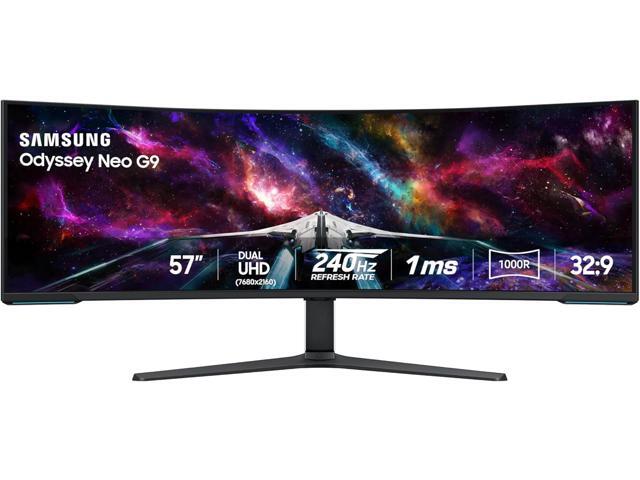
Well, there are monitors like this, if you have the $$ and the space.


I'm not sure what you mean by "toned down to 1080p". I suspect you can change the resolution on most any monitor, even 57 inch one. But if you lower it back to 1080p, doesn't that defeat the purpose of a hi-rez monitor?

Hi-rez isn't really about gaming. I have a 2k monitor that does 165Hz, it could be a good gaming monitor.
I have a 4k monitor that only support 60Hz. It wouldn't make a great gaming monitor. It's been my experience
most of the newer monitors are moving to Display Port over HDMI. (I haven't audited all of them) but many I've looked at seem to be going that direction. Not a big deal, you can get HDMI to DisplayPort adapters pretty cheap.

I dont have any 57 inch monitor, and dont foresee getting one any time soon (maybe if I was rich like @wizardfromoz )
But if I did have one, I would run it at max native resolution.
 
I meant that I have a fairly good LG 4k 32" monitor that is set to 1080p. Otherwise the icons and text are tiny, and for my old eyes, 1080p is plenty clear enough. I have the $$ and will spend what is necessary, but I would like to have some idea that it might work. And the best way is to find someone who has made the trip and can say yea or nay to a particular brand or model.

57"??? Didn't even know they came that wide as of yet? Largest I have seen is a 49 and that seemed to wrap around the room. Probably a curved 40 is the sweet spot for me.
 
(maybe if I was rich like @wizardfromoz )

That one is lost on me, Ray...went right over my head. I am on Social Security payments until the day I last draw breath, lol.

Me mate in the post above ^^^^^ is the richer one. I'm hoping he'll adopt me but he hasn't taken the hint so far.

Cheers
 
Of course, the bit that always amuses me is the way these firms try to label everything they possibly can as a 'gaming' item. Probably because it's then justification for banging another 40 % on top of whatever the 'normal' price happens to be...

Gamers WILL bitch & moan about those prices.....but they invariably end up paying them.

Cynical, aren't I?

(shrug...)


Mike. o_O
 
Cynical, aren't I?

(shrug...)


Mike. o_O
Nope, you aren't, IMO.

Last year sometime, or maybe the year before, I started building my new system. Hadn't done so in a long time because a good hardware with Linux doesn't need upgrading on a regular schedule like some that I have heard of. Mostly in the northwestern USA, I think.

Firstly was a good case, but I could find almost none with any quality that did not have a glass side panel. That was confusing - who needs to look into a running system?

Then I discovered the LED craze and that obviously gave the answer about the glass. How can you run an OS efficiently without seeing the blinking lights on your memory Dimms??? Or fans. Or just blinking leds hooked to nothing. Hospital ERs must have quite an influx of young men who are experiencing mysterious seizures.

Then I started looking for a mobo but could not find one that wasn't labeled Gaming Motherboard. Backing up, I started doing research and finally discovered the "Gaming Tax" that you referred to. Instead of a day or so of ordering parts, it took a week or more as I remember, to sort out the good from the chaff but I finally did, and my Debian system is solid. And for a long time I hope.

NOTE...

warning to certain types!!!
Do not take this post literally!
/warning

I have noticed that there are a lot of Sheldon Cooper types on the forums - i.e., posters who cannot recognise either hyperbole or sarcasm. I had a boss like that once. Everyone had to be very careful about making jokes within his hearing as the translation of water-cooler gab into supposed literal fact sometimes had unpleasant results.
 
posters who cannot recognise either hyperbole or sarcasm.

It's often hard to pick up sarcasm when it is in printed text. Some folks won't see it.

There's a long accepted, but nonstandard -- and not well known across all sites -- way of doing it. You use the /s after it.

So, it'd look like:

<sarcastic text>. /s

That might be something we could adopt as a forum. It is effective elsewhere.
 
Looking for any advice/experience for super-wide monitors.

I have a simulation that I have been tinkering with for years that is effectively a virtual model railroad. Specifically a CTC panel to control it. If you are not a railfan, ignore the description, but my need is for a much wider monitor than a "mere" 32" 4k, toned down to 1080p.

Right now I use two monitors side by side and the experience is so-so with the big bezel gap in the middle. Its a hobby so I will spend what I need.

I use basic Debian with XFCE4, only loading what I use, and PerlTK for the GUI. (And on occasion, RubyTK) I know that Tk is obsolete, but it works fine, I know it well and it is fun to use. AND, it does not change with the phases of the moon so that my recent code doesn't stop working until a day of research is made. (Looking at you Xcode!)

My GPU card is some ancient Radon, but I like it because it came with 4 HDMI ports. Don't need any kind of high end gaming capability. In fact, my simulation is placid enough that it can run fine on an old Intel integrated gpu. I just want lots of wide monitor real estate.

All of my searching just naturally finds gamers needing the last bit of pixel refresh and nothing about what Linux thinks of wide monitors.

So... Anybody got any experience with wide displays?
I would keep it simple. go get a TV. one that has the resolution and size your want. make sure it has the external plug in for RGB or hdmi or whatever you need. Keep in mind you can get adapters from one to the other for about $15.
I use TV for monitor in many places because a monitor of a larger size is expensive where the same thing as a TV is usually 30% of the price of the monitor. Both work the same. Finding a nonsmart tv is best because you don't need any of the "smart" when it is on a computer.
 
Back in the day, when I was doing WFH, the company I worked for provided me with a laptop and a docking station but they only provided multiple external monitors for the desk in their office. So I picked up a couple of Samsung 32 inch curved monitors for my home office. I never had any single window spanning the bezel/gap - just plenty of room for more windows. The thing I found disconcerting about the curved monitors was that they focused sound waves to right about the same place my head would be for optimum viewing so, at times, the ambient noise of a fan or air conditioner running would seem thunderous until I moved my head just a few inches.

I'm still using those monitors and, side-by-side, they need at least a five foot wide desk - I'm currently using a six foot banquet table for a desk. Perhaps strangely, only one of the big monitors is hooked up to my daily driver as it's a laptop with only one port for an external monitor. The other big monitor is hooked up to whatever other system I might be using at any given time (currently the Win7 box).

I've never tried a wide screen monitor myself, though my son built a gaming rig with one and I think he likes it pretty well. I dunno what brand or model he has.
 
I would keep it simple. go get a TV. one that has the resolution and size your want. make sure it has the external plug in for RGB or hdmi or whatever you need. Keep in mind you can get adapters from one to the other for about $15.
I use TV for monitor in many places because a monitor of a larger size is expensive where the same thing as a TV is usually 30% of the price of the monitor. Both work the same. Finding a nonsmart tv is best because you don't need any of the "smart" when it is on a computer.
I have strolled though the stores looking at TVs for the purpose. They are certainly cheap enough for the real estate, but any that are wide enough, say 40 - 44 inches are TALL also. And I don't need - or like - having to cock my head back to look up at stuff. If you are old enough, you will know what I mean. Of course, any that are in Walmart or Target or such will not be non-smart and the cheaper they are the more "Smart" garbage is included. That wouldn't matter since I would never let my TV see the 'Net, but even offline some are infuriating in their operation, with a missed-placed thumb on the remote bringing up some new configuration that takes a hour to undo.

I like the look of the low profile really wide monitors. As to how I would like them on my desk is still to be determined.
 
I'm still using those monitors and, side-by-side, they need at least a five foot wide desk - I'm currently using a six foot banquet table for a desk. Perhaps strangely, only one of the big monitors is hooked up to my daily driver as it's a laptop with only one port for an external monitor. The other big monitor is hooked up to whatever other system I might be using at any given time (currently the Win7 box).

I've never tried a wide screen monitor myself, though my son built a gaming rig with one and I think he likes it pretty well. I dunno what brand or model he has.
Side by side monitors would work fairly well with my really wide sim window, but they have to be the same size and almost the same model or the joining images can be off by inches. And I don't really want another to match my big 32" just for that purpose. My storage is already full of old displays going clear back to VGA and that need to be sent to recycling but the day after I would find a need for some old monitor. I well know that a clean up of "unneeded" equipment usually winds up with me at the store buying what I just dumped.
 
My storage is already full of old displays going clear back to VGA...
In my case, several old monitors were in very poor condition due to "wet basement" issues. I found out the hard way that the trash collectors here won't take old CRT monitors unless they're obscured in a box or some such. I also found out that if you break up three such monitors and put them in a reasonably compact box, they make a -really- heavy package! Tip for the day: Contain monitor in a box -before- using the hammer or you get glass everywhere. Then dump the remains into an intact box as the first box will be in poor condition because of the hammer.
 
I meant that I have a fairly good LG 4k 32" monitor that is set to 1080p. Otherwise the icons and text are tiny, and for my old eyes, 1080p is plenty clear enough.

I have the same issue - bad eyes, need glasses, etc. I have been using a samsung 49" 4k uhd tv as a monitor for about a decade now and have zero complaints - but, if you dont want to have to "look up" at stuff you may want to look into portrait-oriented digital signage, and then just flip it on it's side so it's short but wide.

something like this (though probably smaller and cheaper ;)) --> https://solutions.lg.com/us/digital-signage/lg-86bh5f-m


Follow Linux.org

Staff online

Members online


Top
