Linux Kodachi V9.01 Released — It’s Back!

BlackwolfOz

New Member
Joined
May 30, 2026
Messages
11
Reaction score
6
Credits
92
Linux Kodachi V9.01 Released — It’s Back!
Hey folks

Just a quick heads-up for anyone who’s been following Linux Kodachi over the years — after nearly two years of silence, it’s officially been re-spun and revived by Warith!
That means it’s now available again for everyone to download.

Download / Info: https://www.kodachi.cloud/wiki/bina/index.html

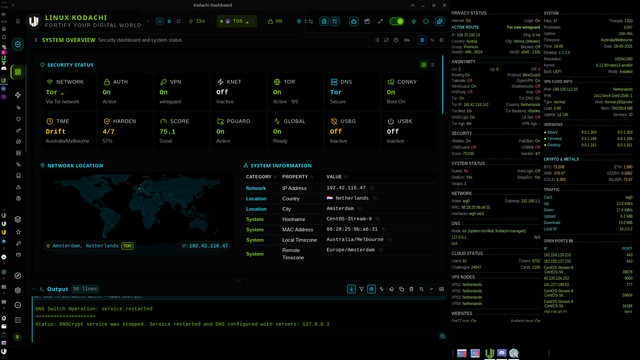
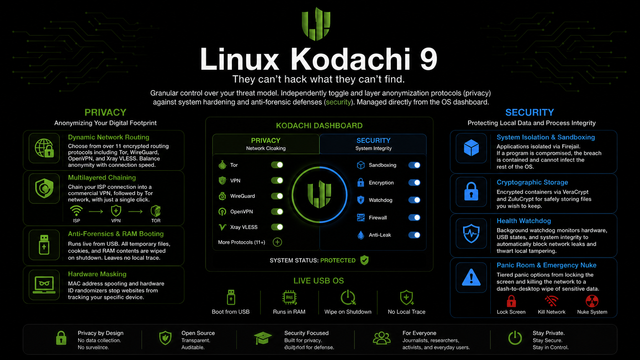
Kodachi remains a hardened, privacy-focused Debian-based distro built for users who want strong anonymity without wrestling with complex setups.
It ships with a fully pre-configured security stack: failover VPN routing, Tor integration, DNSCrypt, leak-prevention mechanisms, and anti-forensic protections.
The goal is simple — secure out-of-the-box computing with enough depth for power users who want to dig deeper.

If you’ve been waiting for Kodachi to return, it’s back.


Okay - thanks for the clarification!
Much appreciated.
 
One important point about Kodachi: routing through Kodachi servers is optional, not required. Kodachi is designed so users can bring their own infrastructure and avoid Kodachi nodes completely if that fits their threat model better.

The dashboard supports custom VPN and tunnel configs, including WireGuard, OpenVPN, Shadowsocks, VLESS, VMess, Trojan, V2Ray, Xray, sing-box, Clash/Mihomo, Hysteria2, Mieru, Dante, IPsec/L2TP, OpenConnect, stunnel, ZeroTier, Tailscale, and Tor transports such as obfs4, snowflake, and meek. You can load your own config and route traffic through your own server.

It also includes dashboard support for third-party providers such as ProtonVPN, Mullvad, IVPN, NordVPN, ExpressVPN, Surfshark, PIA, Windscribe, RiseupVPN, and Cloudflare WARP. In those cases, the traffic path is between the user and the selected provider, not Kodachi infrastructure.

So the trust model is not “trust Kodachi servers or do not use Kodachi.” It is much closer to: use Kodachi as the control layer, then choose the route you trust.

On the proprietary parts, I understand the concern. But proprietary does not automatically mean blind trust. Kodachi provides hashes, signatures, public-key verification, inspectable scripts/components where available, and the ability to avoid Kodachi nodes entirely.

Also, I personally see accountability as a strength here. Warith is not hiding behind an anonymous team name. He publishes Kodachi under his real identity, with his name, background, reputation, and public presence attached to it. That does not remove the need for verification, but it does create more accountability than a completely anonymous operator who can disappear at any time.

In the end, Kodachi gives users options: use the parts you trust, replace the parts you do not, and choose the routing path that matches your own threat model.
 
I was thinking I'll use the live USB option for now to kick Kodachi's tires a bit. Will I need to remove anything else currently on there just like I would making an ISO for any other distro, or is this a different case?
 
Yes — making a Kodachi live USB is the same as making a live USB for any other Linux distro. Whatever is currently on the USB stick will be wiped.
 
For assistance.
 
That's as far as I could get because both of the passwords given to me simply didn't work at all. Anyone have and good ideas?
 

Attachments

  • 20260619_195449.jpg
    20260619_195449.jpg
    1.9 MB · Views: 13
That's as far as I could get because both of the passwords given to me simply didn't work at all. Anyone have and good ideas?
1000057428.png
 
Last two are lower-case l for lima
Security4All
 
Well, somon3 who was supposedly helping me with the install took the ×[=<3[÷ USB which was a live copy, so now, I get to do it ALL. OVER. AGAIN.

Are there any good gideo tutorials I can buyer as a guide?
 
If you are using Windows, download Rufus and the Kodachi iso and burn it to a new USB.
 
My day turned out much differently than anticipated, so I'll get to it tomorrow. I am curious though because, if I understood what I was reading correctly earlier, some have chosen not to install LUKS. Maybe it was problematic for them or whatever, but maybe someone here can shed some light on that.

The whole LUKS issue just reminded me of something else: I know that most Linux distros protect data at-rest, but , if something does get though the firewall, someone has to hope the AV/Anti-malware measures installed are enough. Before I knew Kodachi had been released, I'd started looking for solutions that could encrypt my system's data while it's in-use, and found a couple of possibilities, but there was always some degree of concern in terms of it's ability to exist on the same machine with LUKS (even though LUKS isn't fully active when the system's in-use, I guess it is just enough to butt heads with what I've found so far).

I'll confess I haven't done the deep dive into documentation and reviews from regarded sources I was planning to have completed by now, so for all I know Kodachi has solved the "In-use riddle." If it has not however, have any of you found an answer yourselves?
 
LUKS on Kodachi only protects data at rest. Once you unlock the system, everything in use is decrypted in RAM, so it won’t stop malware or a live compromise. That’s why some people skip it — usually because they’re running Kodachi live‑only, using a VM, or don’t want the overhead or recovery risks.Kodachi itself doesn’t solve the “in‑use encryption” problem. No Linux distro does. The best you get today is hardening (AppArmor, sandboxing, RAM wipe on shutdown) and isolation.
I have Kodachi installed to hardrive, so have LUX'S enabled.
 
I got hit by some nasty malware a while back that destroyed my motherboard, so my thinking is that if anything does get through in the future, it won't have many places to hide if I have things locked down reasonably well.

I have to do some more research to gage thier viability, but there are a few possible like eCryptfs that automatically encrypts files as they're written and crcrypts them as they're be8ng utilized. If that doesn't work out, I suppose I could always use a took like Cryptomator for the important stuff, and PicoCrypt-NG for thr really important stuff.


Follow Linux.org

Staff online


Top