sofasurfer
Active Member
I'm using Ubuntu. I have never used the key ring. Starting today every time I log on the key ring sign in window comes up over the desktop. Can I just disable the key ring login? How do I do that?


Just to refrain you from disabling it completely: the keyring is not usually something you use intentionally. Whenever you check the box "remember this password" anywhere in the desktop environment (p.e., for wifi networks, for network shares,...) the desktop environment will use the keyring.I'm using Ubuntu. I have never used the key ring.
for wifi networks
/etc/NetworkManager/system-connections/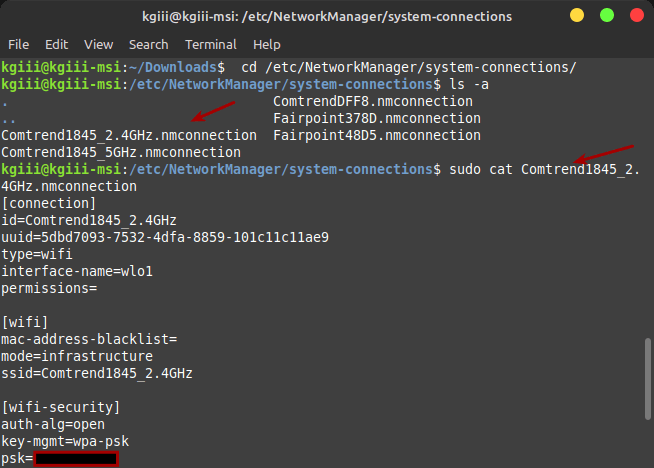
 linux-tips.us
nmcli device wifi show-passwordUnder /etc/NetworkManager/system-connections/ per wifi-network.I wonder where the wifi passwords are stored
A way to get it broken is to useIt is usually unlocked when you log in (by typing your password, not with a fingerprint), and that's probably what has gone broken somehow.
passwd. Login still works, because that's authenticated to /etc/shadow but gnome-keyring gets out of sync. If that happens, you can change the password again via system settings GUI for the user and it should syncronise back.
Under /etc/NetworkManager/system-connections/ per wifi-network.
It's still valid here on more than one distro. Which distro changed it?That no longer works on any OS I have here.
Which distro changed it?

If you break KDE or Gnome keyrings, then you're asked the question every time. I guess that for other desktop environments or even plain window managers the situation may vary if they use a network manager that can default to plaintext files.I wonder where the wifi passwords are stored on the system that has a broken keyring?
If you break KDE or Gnome keyrings, then you're asked the question every time. I guess that for other desktop environments or even plain window managers the situation may vary if they use a network manager that can default to plaintext files.
Interesting, yes. My system-connections paths are still populated. As you wrote earlier, one does not necessarily need to sudo authenticate anymore. Perhaps, nmcli might save them in ~/.config/ in this case, or so. I don't know, do a find for the connection name in the home directory.As you can see, it's blank. There are no files there.
Try what I wrote earlier, changing/reconfirm user login password via system settings. It should pick whatever the browser later wants to access.That system has not just the Mint keyring, but it also has the Gnome keyring.
Perhaps, nmcli might save them in ~/.config/ in this case, or so. I don't know, do a find for the connection name in the home directory.
Try what I wrote earlier, changing/reconfirm user login password via system settings. It should pick whatever the browser later wants to access.
Hm, I thought if you don't tick the "make connection available to all users" during setup, it might save it in the user home-dir.That was one of the things I've tried. It may not be storing it in plain text. It could be hashed, salted, and encrypted, maybe?
path | The location where keyfiles are read and stored. This defaults to "/etc/NetworkManager/system-connections". |
rename | NetworkManager automatically chooses a filename when storing a new profile to disk. That name depends on the profile's name (connection.id). |
Hm, I thought if you don't tick the "make connection available to all users" during setup, it might save it in the user home-dir.
NM indeed switches to a new keyfile format, away from the ifcg .conf file format. Still, https://www.networkmanager.dev/docs/api/latest/NetworkManager.conf.html
is default. So you should find the connection by name, regardless how the wifi-password is stored. After all the other settings relating to the connection (dhcp, dns, etc etc) are stored in it.
pathThe location where keyfiles are read and stored. This defaults to " /etc/NetworkManager/system-connections".renameNetworkManager automatically chooses a filename when storing a new profile to disk. That name depends on the profile's name (connection.id).
Debian/Ubuntu on ARM arch additionally using netplan to create and manage the NM configuration (might make sense for automation; strange convolut for desktop-users though), but have no idea if that is used to configure wireless too. For ethernet netplan indeed stores the connection on raspPiOS. It took me much too long to figure that out to adjust an interface configuration.
sudo grep -rnw '/' -e '<password>'/run/NetworkManager/system-connections/That can also be due to a program installed that is pulling Gnome Keyring as a dependency. When this happens, you end up with an unlocked, blank-password keyring for that program in particular. I think this is a packaging issue and, depending on what the program is for, it can be a big problem.That system has not just the Mint keyring, but it also has the Gnome keyring.
I think this is a packaging issue and, depending on what the program is for, it can be a big problem.





