How do I disable keyring

sofasurfer

Active Member
Joined
May 24, 2022
Messages
345
Reaction score
121
Credits
3,041
I'm using Ubuntu. I have never used the key ring. Starting today every time I log on the key ring sign in window comes up over the desktop. Can I just disable the key ring login? How do I do that?



What happens if you just click cancel a couple of times?

Also, you can do that with browsers that want to use the keyring. (The hitting cancel a few times thing.) They'll still store passwords, but they won't be stored in an encrypted format inside your keyring.
 
I'm using Ubuntu. I have never used the key ring.
Just to refrain you from disabling it completely: the keyring is not usually something you use intentionally. Whenever you check the box "remember this password" anywhere in the desktop environment (p.e., for wifi networks, for network shares,...) the desktop environment will use the keyring.

It is usually unlocked when you log in (by typing your password, not with a fingerprint), and that's probably what has gone broken somehow.
 
Last edited:
for wifi networks

Has that recently changed?

Huh... I decided to check. Until very recently, wireless passwords were stored in plain text!

You'd go here to find the file matching your SSID: /etc/NetworkManager/system-connections/
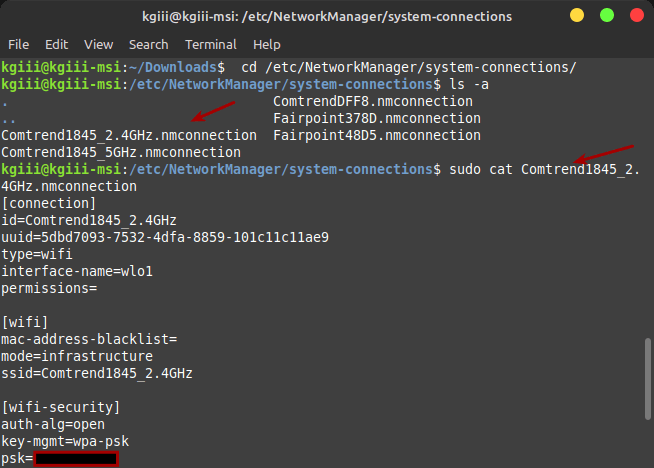
In that directory would be a file that matched the SSID. Inside that file was your wireless password. This worked until very recently. In fact, I wrote an article about it.


Not to worry. You can still get that password in plain text. I'm just not sure where it's being stored. One of the computers, I hit the cancel button when it asks for the keyring password. I do that twice, and it leaves me alone. My keyring directory has been removed.

But you don't even need sudo to read the current wireless connection's password. Use this command:

nmcli device wifi show-password

Heck, it even spits out a QR code.

Ha! Neat! I just checked the QR code with my phone and it offered to automatically set the phone up with that information.

That's actually pretty awesome. If you've got guests over, or maybe a business, and you can just give them a QR code. They can just use that to automatically tie into the wireless network.

I did not know this...

Note: It shows only the current information (from what I tried). Obviously, wifi must be on, and you must be connected to a network. Otherwise, the above command does not work.

Anyhow, to continue with what was topical (before I got distracted by a squirrel), I wonder where the wifi passwords are stored on the system that has a broken keyring? It happily still remembers passwords.

Once upon a time, it was stored in a plain text file.
 
I wonder where the wifi passwords are stored
Under /etc/NetworkManager/system-connections/ per wifi-network.

It is usually unlocked when you log in (by typing your password, not with a fingerprint), and that's probably what has gone broken somehow.
A way to get it broken is to use passwd. Login still works, because that's authenticated to /etc/shadow but gnome-keyring gets out of sync. If that happens, you can change the password again via system settings GUI for the user and it should syncronise back.
 
Under /etc/NetworkManager/system-connections/ per wifi-network.

I'm not sure if you read my post, or if I wrote it poorly.

That no longer works on any OS I have here. That's no longer valid. I mentioned exactly that same method (and linked to a whole article on it).
 
Which distro changed it?

I checked in Mint and a beta version of Lubuntu, which was what I had immediately at hand.

I'll show you...

GctnVwu.png


(I'm using Mint at the moment.)

As you can see, it's blank. There are no files there. There are two wireless networks configured on that system. Both remember the password, so they're getting it from somewhere.

It must be stored in a keyring. I misspoke earlier. I have keyrings but I don't log into them (on this computer).

The OS popped up a keyring prompt when I logged in. I pressed the cancel button a couple of times, mostly just to see what happened, as I don't care about that computer. When I log in now, it doesn't ask me for a keyring password.

On that computer, browsers are annoying. They ask for the keyring, and I cancel it. I have to cancel those a few times before the browsers load as normal.

But, as you can see, there's nothing in that directory.
 
I wonder where the wifi passwords are stored on the system that has a broken keyring?
If you break KDE or Gnome keyrings, then you're asked the question every time. I guess that for other desktop environments or even plain window managers the situation may vary if they use a network manager that can default to plaintext files.
 
If you break KDE or Gnome keyrings, then you're asked the question every time. I guess that for other desktop environments or even plain window managers the situation may vary if they use a network manager that can default to plaintext files.

I did some looking, and it looks like I wasn't paying attention while installing some software and ended up with multiple keyrings on that computer. That system is one I don't care about, so I often install stuff that I don't really need -- often to answer a question posed here. That system has not just the Mint keyring, but it also has the Gnome keyring.
 
As you can see, it's blank. There are no files there.
Interesting, yes. My system-connections paths are still populated. As you wrote earlier, one does not necessarily need to sudo authenticate anymore. Perhaps, nmcli might save them in ~/.config/ in this case, or so. I don't know, do a find for the connection name in the home directory.
That system has not just the Mint keyring, but it also has the Gnome keyring.
Try what I wrote earlier, changing/reconfirm user login password via system settings. It should pick whatever the browser later wants to access.
 
Perhaps, nmcli might save them in ~/.config/ in this case, or so. I don't know, do a find for the connection name in the home directory.

That was one of the things I've tried. It may not be storing it in plain text. It could be hashed, salted, and encrypted, maybe? I haven't got a clue where it's being stored now.

Try what I wrote earlier, changing/reconfirm user login password via system settings. It should pick whatever the browser later wants to access.

Thanks! I'm sure I could fix it with some effort. The reality is that I just don't care about that system at all. I plan on wiping it soon and using a different distro. It only had Mint on it because it is a popular distro here.

Let's just say that I've treated that OS very poorly. I've installed piles of software to test stuff. I've changed all sorts of system settings, again just for testing. That sort of stuff... Most of that has been so that I could check things for Mint users.
 
That was one of the things I've tried. It may not be storing it in plain text. It could be hashed, salted, and encrypted, maybe?
Hm, I thought if you don't tick the "make connection available to all users" during setup, it might save it in the user home-dir.
NM indeed switches to a new keyfile format, away from the ifcg .conf file format. Still, https://www.networkmanager.dev/docs/api/latest/NetworkManager.conf.html
pathThe location where keyfiles are read and stored. This defaults to "/etc/NetworkManager/system-connections".
rename NetworkManager automatically chooses a filename when storing a new profile to disk. That name depends on the profile's name (connection.id).
is default. So you should find the connection by name, regardless how the wifi-password is stored. After all the other settings relating to the connection (dhcp, dns, etc etc) are stored in it.

Debian/Ubuntu on ARM arch additionally using netplan to create and manage the NM configuration (might make sense for automation; strange convolut for desktop-users though), but have no idea if that is used to configure wireless too. For ethernet netplan indeed stores the connection on raspPiOS. It took me much too long to figure that out to adjust an interface configuration.
 
Hm, I thought if you don't tick the "make connection available to all users" during setup, it might save it in the user home-dir.
NM indeed switches to a new keyfile format, away from the ifcg .conf file format. Still, https://www.networkmanager.dev/docs/api/latest/NetworkManager.conf.html
pathThe location where keyfiles are read and stored. This defaults to "/etc/NetworkManager/system-connections".
rename NetworkManager automatically chooses a filename when storing a new profile to disk. That name depends on the profile's name (connection.id).
is default. So you should find the connection by name, regardless how the wifi-password is stored. After all the other settings relating to the connection (dhcp, dns, etc etc) are stored in it.

Debian/Ubuntu on ARM arch additionally using netplan to create and manage the NM configuration (might make sense for automation; strange convolut for desktop-users though), but have no idea if that is used to configure wireless too. For ethernet netplan indeed stores the connection on raspPiOS. It took me much too long to figure that out to adjust an interface configuration.

I solved it last night. (I was bored.) I fired up this command:

sudo grep -rnw '/' -e '<password>'

The password is stored in:

/run/NetworkManager/system-connections/
 
That system has not just the Mint keyring, but it also has the Gnome keyring.
That can also be due to a program installed that is pulling Gnome Keyring as a dependency. When this happens, you end up with an unlocked, blank-password keyring for that program in particular. I think this is a packaging issue and, depending on what the program is for, it can be a big problem.
 
I think this is a packaging issue and, depending on what the program is for, it can be a big problem.

That's largely what I've concluded. I figure I could dig around for a bit to find a solution, but I really don't care enough about that system. One of these days, I'll get around to installing a different distro. I'm not sure which distro I'll go with.

I think I might go with one of the Fedora Spins. It has been a minute since I've used a distro with DNF or YUM.


Follow Linux.org

Members online


Top
