Audio detected by pulseaudio control, but is not playing through speakers - Mint XFCE 22.2

jerf

New Member
Joined
Oct 27, 2025
Messages
12
Reaction score
5
Credits
88
I am on Linux mint Xfce 22.2 and am new to Linux as a whole. Audio is not playing through speakers or wired headphones, despite being detected by pulseaudio volume control. This affects all programs. This is not an issue on the windows 11 installation which I have dual booted alongside mint, but has been an issue in the live session of mint.

Thank you,

Jerf


G'day jerf, Welcome to linux.org

The first thing worth checking is whether or not the sound system has been muted. To check that one can run in a terminal:
Code:
alsamixer
and hit F5 to show all controls and make sure the volumes are high and nothing is muted. Elements that are muted would have: MM, at the base of the bars which can be toggled off using the m key.

Another check can be made with the GUI program: pavucontrol where you can click off the mute boxes if they are showing that mute is on.

Credit to @osprey, for the above.
 
Thank you for the reply,

I have completed these steps, no MM's on alsamixer when selecting default sound card or manually selecting the sound card & mute boxes show that nothing is muted, however sound does still not output.
 
Try reinstalling the audio drivers with the command :

Code:
sudo apt-get install --reinstall alsa-base pulseaudio
 
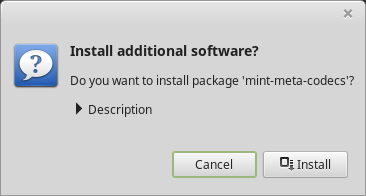
When installing xfce, did you tick the option to install Multimedia Codecs?

if you did they are already installed.

If not...:

  1. Launch Menu ‣ Sound & Video ‣ Install Multimedia Codecs.
_images/mint-meta-codecs.png

  1. Click Install.
  2. Enter your password and wait for the codecs to be installed on your compute
 
Was pulse audio already installed?...if not how was it installed.?

to remove it :

Code:
sudo apt purge pulseaudio

Then reinstall with :

sudo apt install pavucontrol
 
I have reinstalled pulseaudio, multimedia codecs (was already installed) & audio drivers with terminal commands, restarted, no fix to the problem yet
 
What are the audio drivers ?.....they usually come with the Linux Kernel.
 
using inxi -a in terminal,

Code:
Audio:
  Device-1: Intel Alder Lake-S HD Audio driver: snd_hda_intel
  API: ALSA v: k6.14.0-33-generic status: kernel-api
  Server-1: PipeWire v: 1.0.7 status: active
 
I will ask one of the other members here to take a look for us.

@osprey

Be patient, time zones vary world wide....he may take as long as 15 hours to respond
 
I have Mint xfce 22.1 running on my Laptop and the sound is just fine...

1761640796858.png


This button will mute the sound if clicked and will show on the Panel...sometimes you need to play around a little.
1761641100500.gif


1761640882421.png

Click it again to unmute the sound.
 
You can likely also run pavucontrol in your terminal. When that opens, muck about in the various tabs to make sure nothing is turned down, muted, or disabled.

Those look like the right drivers, or at least look consistent with others.
 
I am on Linux mint Xfce 22.2 and am new to Linux as a whole. Audio is not playing through speakers or wired headphones, despite being detected by pulseaudio volume control. This affects all programs. This is not an issue on the windows 11 installation which I have dual booted alongside mint, but has been an issue in the live session of mint.

Thank you,

Jerf
Welcome. You mention you are new to linux, which may be a challenge in relation to the following investigation of the sound system, but since it's the most efficient way I'm familiar with, perhaps you can run with it. It's all done in a terminal to provide output on screen to see what the situation is in relation to sound, so here goes.

From the output in post #9 it looks like the system is running pipewire, rather than pulseaudio, so the re-installation of pulseaudio mentioned in post #7 isn't likely to be effective.

The first consideration is to have the latest kernel the distro offers because drivers are often being tweaked and improved so it can make a difference. Other than that, some basics worth checking are the following. Included in some of the commands are the outputs from a machine here that has working sound, so that you can compare what you see:

What is controlling the sound devices?
One can run the following and see if the output is similar:
Code:
[~]$ lsof /dev/snd/*
COMMAND    PID USER FD   TYPE DEVICE SIZE/OFF NODE NAME
pipewire  1183  ben 52u   CHR  116,1      0t0  337 /dev/snd/seq
pipewire  1183  ben 53u   CHR  116,1      0t0  337 /dev/snd/seq
wireplumb 1187  ben 20u   CHR 116,12      0t0  545 /dev/snd/controlC0
wireplumb 1187  ben 22u   CHR 116,11      0t0  540 /dev/snd/controlC1

Next you could check the status of the sound server with these commands as user:
Code:
$ systemctl status --user pipewire.service
$ systemctl status --user wireplumber.service
If either is not running, you can start them with:
Code:
systemctl --user start pipewire.service
systemctl --user start wireplumber.service

After starting the sound server, you could check again to see the output of the lsof command above to see if it changed.

Just to make sure the drivers are loaded one can run:
Code:
[~]$ lspci -nnkd ::403
00:1f.3 Audio device [0403]: Intel Corporation Raptor Lake High Definition Audio Controller [8086:7a50] (rev 11)
        Subsystem: ASRock Incorporation Device [1849:1897]
        Kernel driver in use: snd_hda_intel
        Kernel modules: snd_hda_intel, snd_soc_avs, snd_sof_pci_intel_tgl
01:00.1 Audio device [0403]: NVIDIA Corporation GK208 HDMI/DP Audio Controller [10de:0e0f] (rev a1)
        Subsystem: Micro-Star International Co., Ltd. [MSI] Device [1462:8c93]
        Kernel driver in use: snd_hda_intel
        Kernel modules: snd_hda_intel

If that command shows no output, you can run:
Code:
lspci -nnk |grep -A3 -i aud
which should show output if all is well on that front.

Check the default sound card:
Code:
[~]$ aplay -L | grep sysdefault -A3
sysdefault:CARD=PCH
    HDA Intel PCH, ALC897 Analog
    Default Audio Device
And check that the the default is chosen in alsamixer when one presses the F6 key. In this case the default is: "HDA Intel PCH"

At each point checking one can run the following in the terminal, or another terminal, to check if sound is happening:
Code:
speaker-test
which will send white noise through the speakers and can be stopped immediately with the ctrl+c keys if you don't want to listen to the whole test. If it sounds for a few seconds, that's all that's usually needed to show that sound is working.

If you show the outputs back here using code tags as described here: https://linux.org/threads/the-code-tag-and-why-it-matters.57746/#post-276419, then readers may be in a better position to make some further diagnoses.

 
Last edited:
Hi osprey, thank you for the reply

I forgot to mention, but if it helps, I am on a HP pavillion all-in-one desktop 24-ca1xxx

Code:
lsof /dev/snd/*
COMMAND    PID  USER   FD   TYPE DEVICE SIZE/OFF NODE NAME
pipewire  1137 kylie  mem    CHR  116,2           840 /dev/snd/pcmC0D0p
pipewire  1137 kylie   59u   CHR  116,1      0t0  465 /dev/snd/seq
pipewire  1137 kylie   60u   CHR  116,1      0t0  465 /dev/snd/seq
pipewire  1137 kylie   62u   CHR 116,10      0t0  854 /dev/snd/controlC0
pipewire  1137 kylie   64u   CHR  116,2      0t0  840 /dev/snd/pcmC0D0p
wireplumb 1140 kylie   36u   CHR 116,10      0t0  854 /dev/snd/controlC0

Code:
lspci -nnkd ::403
0000:00:1f.3 Audio device [0403]: Intel Corporation Alder Lake-S HD Audio Controller [8086:7ad0] (rev 11)
    DeviceName: Onboard - Sound
    Subsystem: Hewlett-Packard Company Alder Lake-S HD Audio Controller [103c:89e9]
    Kernel driver in use: snd_hda_intel
    Kernel modules: snd_hda_intel, snd_soc_avs, snd_sof_pci_intel_tgl

Code:
aplay -L | grep sysdefault -A3
sysdefault:CARD=PCH
    HDA Intel PCH, ALC274 Analog
    Default Audio Device
front:CARD=PCH,DEV=0

speaker-test shows output in the terminal but does not play sound through hardware
 
update: I have found that when using bluetooth speakers, there is a very faint static sound whenever they are connected
 
In the GUI audio mixer under the Configuration tab check that hdmi audio is turned off, it often takes precedence over other audio devices.
 
Hi osprey, thank you for the reply

I forgot to mention, but if it helps, I am on a HP pavillion all-in-one desktop 24-ca1xxx

Code:
lsof /dev/snd/*
COMMAND    PID  USER   FD   TYPE DEVICE SIZE/OFF NODE NAME
pipewire  1137 kylie  mem    CHR  116,2           840 /dev/snd/pcmC0D0p
pipewire  1137 kylie   59u   CHR  116,1      0t0  465 /dev/snd/seq
pipewire  1137 kylie   60u   CHR  116,1      0t0  465 /dev/snd/seq
pipewire  1137 kylie   62u   CHR 116,10      0t0  854 /dev/snd/controlC0
pipewire  1137 kylie   64u   CHR  116,2      0t0  840 /dev/snd/pcmC0D0p
wireplumb 1140 kylie   36u   CHR 116,10      0t0  854 /dev/snd/controlC0

Code:
lspci -nnkd ::403
0000:00:1f.3 Audio device [0403]: Intel Corporation Alder Lake-S HD Audio Controller [8086:7ad0] (rev 11)
    DeviceName: Onboard - Sound
    Subsystem: Hewlett-Packard Company Alder Lake-S HD Audio Controller [103c:89e9]
    Kernel driver in use: snd_hda_intel
    Kernel modules: snd_hda_intel, snd_soc_avs, snd_sof_pci_intel_tgl

Code:
aplay -L | grep sysdefault -A3
sysdefault:CARD=PCH
    HDA Intel PCH, ALC274 Analog
    Default Audio Device
front:CARD=PCH,DEV=0

speaker-test shows output in the terminal but does not play sound through hardware
Thanks for that output.
This line appears to be implicated: Kernel modules: snd_hda_intel, snd_soc_avs, snd_sof_pci_intel_tgl

For the snd_sof_pci_intel_tgl module, one needs to have the sof-signed firmware installed. I'm at a disadvantage with linux mint, but in debian it is in the package: firmware-sof-signed. There's some debian info on it here: https://forums.debian.net/viewtopic.php?t=153813 , but that forum may not be available or hard to access at the moment for reasons having to do with attacks I believe.

For snd_soc_avs, my reading suggests it might be worth considering blacklisting it and letting snd_sof_pci_intel_tgl take over.

In any case, it would be very useful to run the following command to see if the kernel has information on missing firmware, including sound related elements. This may need to be run as root, or sudo:
Code:
dmesg | grep -i firmware

It may be wise to also have installed in addition to the already installed alsa packages these, if they are not already installed:
alsa-topology-conf
alsa-ucm-conf
 
Last edited:
Just a case of throwing my hat into the ring, (and I would first try whatever @osprey has suggested, I would back him about 6.8 days out of 7) ;)

... I had a similar experience with my Cinnamon version of LM 22.2 Zara that took me a few days to notice after I installed it on 15 August.

I was able to resolve it after a little bit of mucking around.

My inxi output is as follows

Code:
chris@ZaraCinnamon-HDD:~$ inxi -A
Audio:
  Device-1: Intel Sunrise Point-LP HD Audio driver: snd_hda_intel
  API: ALSA v: k6.14.0-33-generic status: kernel-api
  Server-1: PipeWire v: 1.0.5 status: active

...which you can see is almost identical to that of the OP.

So sing out if I can be of use.

@jerf welcome to linux.org - @osprey , Brian @Condobloke and @bob466 and I are Aussies, so allow for our timezone differences, won't you?

I believe you are in good hands here.

Cheers

Chris Turner
wizardfromoz
 
It appears f-s-s is already installed


Code:
sudo apt -y install firmware-sof-signed

[sudo] password for kylie:                           

Reading package lists... Done

Building dependency tree... Done

Reading state information... Done

firmware-sof-signed is already the newest version (2023.12.1-1ubuntu1.10).

0 to upgrade, 0 to newly install, 0 to remove and 0 not to upgrade.


Code:
sudo dmesg | grep -i firmware

[    0.893597] wmi_bus wmi_bus-PNP0C14:02: [Firmware Info]: 8F1F6436-9F42-42C8-BADC-0E9424F20C9A has zero instances

[    0.893601] wmi_bus wmi_bus-PNP0C14:02: [Firmware Info]: 8F1F6435-9F42-42C8-BADC-0E9424F20C9A has zero instances

[    0.893603] wmi_bus wmi_bus-PNP0C14:02: [Firmware Info]: 7391A661-223A-47DB-A77A-7BE84C60822D has zero instances

[    0.893604] wmi_bus wmi_bus-PNP0C14:02: [Firmware Info]: DF4E63B6-3BBC-4858-9737-C74F82F821F3 has zero instances

[    3.923567] rtw_8822ce 0000:02:00.0: WOW Firmware version 9.9.4, H2C version 15

[    3.923705] rtw_8822ce 0000:02:00.0: Firmware version 9.9.15, H2C version 15

[    3.947597] i915 0000:00:02.0: [drm] Finished loading DMC firmware i915/adls_dmc_ver2_01.bin (v2.1)

[    3.970125] i915 0000:00:02.0: [drm] GT0: GuC firmware i915/tgl_guc_70.bin version 70.36.0

[    3.970130] i915 0000:00:02.0: [drm] GT0: HuC firmware i915/tgl_huc.bin version 7.9.3

I have blacklisted snd_soc_avs by appending blacklist snd_sov_avs to /etc/modprobe.d/blacklist.conf, albeit this did not work. I have since unblacklisted it
 
Last edited:


Follow Linux.org

Staff online

Members online


Top