My SSD is trash :(

Debian_SuperUser

Active Member
Joined
Mar 18, 2024
Messages
161
Reaction score
41
Credits
1,949
The SSD in this machine I have is hot garbage. If I am updating through pacman, the system becomes extremely slow to open anything that it is very unusable. I will see if I can upgrade but before that I need to try something.

I want to make the drive buffer smaller. pacman starts with unpacking packages really fast and then slows down a lot. That is because initially the buffer in memory is filled and then slowly it starts dumping it to the drive. If I experiment with dd with its oflag=direct option, I can see that the writes don't really start with that higher speed whereas without that option, it starts with a lot higher speed and quickly starts falling down. If I try to quit dd without the oflag=direct option while it is writing, it takes a while for the command to cancel as it only happens once the drive buffer is fully emptied of that process and with that option, it quits immediately because there is no buffering. This happens with all other programs as well. Unpacking a tar file shows that it has been unpacked but in the background I can still see the drive activity. I always have a habit to run sync to make sure all data has been written to the drive.
If I make the drive buffer smaller, there will be less latency for the I/O requests of other programs.

The other option would be to lower the I/O priority of a program like pacman so that other programs also get I/O time when invoked. I tried ionice but that didn't work. Opening other programs still took a very long time when my SSD was at 100%.

It's a SATA SSD (in a freaking M.2 form factor), and a really bad one. The reads are good, reaches 450 MB/s in sequential, not sure about random, but the writes are really bad. Fluctuates a lot to not even be measurable. As my SSD is filling up to the brim, I feel like it is getting even slower and slower for daily use. I do sometimes run fstrim.

I don't remember this was the case on Windows actually. I still yet to have to dual boot with Windows (yuck, but necessary) to check. Could it actually be a driver or a Linux issue that the performance is so bad?


well, they are not exactly expensive. May be better to spend a bit of money to get a good one rather than spend hours pissing about with one that makes you to want to scream.

I have come to a point where if something is a real ass to do and the its taking too long, I would rather spend £50-£100 to fix the problem quickly rather then fartarsing around for weeks.
 
Last edited:
well, they are not exactly expensive. May be better to spend a bit of money to get a good one rather than spend hours pissing about with one that makes you to want to scream.
I wouldn't be asking if I could upgrade. Maybe answering my questions would be better.
 
fstrim isn't recommended for ssd made in the last 5 or 6 years.

Have you ran smartctl, or fsck (you'll have to do that while booted from a Live USB)
Sometimes, you simply need to rebuild the partition table, re-format and start all over. (backup everything forst).
 
As my SSD is filling up to the brim, I feel like it is getting even slower and slower for daily use. I do sometimes run fstrim.
Mm. D'you understand the principles by which an SSD works? Because it's very different to that of an HDD....

An HDD will overwrite data immediately. An SSD works rather differently; before it will write data, it first has to make sure there's enough space to do so. If it can't find enough immediate space, it first has to delete existing 'pages' in memory to 'free-up' space.....before then writing fresh data to that page, or block of pages.

To do all this takes up room.....and it's for this reason that the recommendation is to leave between 10-15% of your total drive space unformatted. This gives the controller 'breathing space', and means it has enough room in which to perform these background gymnastics. This stuff is going on in the background all the time anyway, and is essential for proper operation......but filling any SSD up 'to the brim' is a sure-fire recipe for eventually wrecking the controller.

Yes, you COULD see this as 'wasted space'.....but it's a procedure that will ensure a long & happy life for your SSD. They do NOT like being stuffed full of data; it's akin to somebody slowly tightening their hands around your neck.....slowly but surely, you WILL choke to death.

There are SSDs, and then there are SSDs. As with anything in this life, you get what you pay for.....not all work as well as others do, and more expensive ones tend to use better-quality NAND flash & better controllers to start with. Cheaper ones are often using 'seconds' (stuff that's been discarded during the initial binning process at time of manufacture). It'll work, yes.....but it won't work so well.


Mike. o_O
 
Last edited:
If you look after your tools, they'll look after you. The same applies to SSDs...I'm no expert but there are a few things you should do, so your SSD will last for many years.

1. Optimize the SSD to run more efficiently...https://easylinuxtipsproject.blogspot.com/p/ssd.html
2. Buy well know brands...have at least 20% of free space at all times and set Trim to run daily...always buy an SSD larger than you need.

You should read this...https://ultimatelytech.com/what-happens-ssd-full/

I have two internal 500GB SSDs one running Mint Cinnamon 21.1 which is 6 years old and the other is running Cinnamon 22.1 and is 4 years old...I've never had problems.

There are ways to free up space...https://www.linux.org/threads/do-you-really-need-to-clean-mint.43752/

Hope this helps.
1748906462824.gif
 
Last edited:
Are you sure?

I didn't say it couldn't be done.
But @MikeWalsh is right, even if you want to do it manually, you have to have enough space to do it.
All of the distro's I use, do this automatically in the background. I suppose it's possible there are some distro's that don't.
But I never have the need to do it manually.
 
@dos2unix :-

All of the distro's I use, do this automatically in the background. I suppose it's possible there are some distro's that don't.
But I never have the need to do it manually.

Well, Puppy doesn't now - and never has - used systemd.

Util-linux has also always been left to the discretion of the user as to whether they want to install it or not (this contains, amongst other things, fstrim itself). This was always largely due to the desire to keep Puppies as small & lightweight as possible.

Of course, more of the community members are steadily migrating to SSDs, and many new machines come with nothing else now. So util-linux - with fstrim - is getting installed and used by more people.

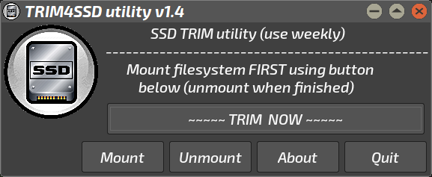
The "TRIM4SSD" utility I put together was always intended to be a standalone item, for use on an as-and-when basis. I realised it was necessary when buying my own first SSD, a 1TB Crucial MX500, so researched the necessary requirements and built the thing within 24 hrs.

Screenshot-170.png


(The user does need to install util-linux themselves, as it's compiled on a per-distro basis. TRIM4SSD is merely a wee GUI that makes using fstrim simpler, directly accessing the existing items.)

Since 'options' need to be set first before running the 'trim' command - deciding which drive you want to work on, for instance - a cron job won't run it directly.....so I have a cron job set up to show me GTK-dialog banners every hour, for 24 hrs, once a week. This reminds me it needs doing; once a week is fine for the use my rig gets.

It works for us.


Mike. ;)
 
Last edited:
It's a SATA SSD and ahci is not loaded by seeing from lsmod. Grok says scsi_mod could be loaded due to the dependencies but that is also not shown in lsmod. Could this be a driver issue?
 
If ahci isn't showing up in the output of lsmod than it's not loaded.

-:- Has it been blacklisted? Look in the output of /etc/modprobe.d.
-:- Does the dmesg output show any errors in respect to ahci?
-:- And is the ahci driver installed?

Try manually running the module with elevated privileges.
Code:
modprobe ahci

It's been my experience that if the wrong module is loading first it well cause the device to not work.

Try S.M.A.R.T. to ensure the drive is truly trash.


Perform a back up now if you haven't already.:)


Follow Linux.org

Staff online

Members online


Top