Modding Chromebook

Encypted_decoder02

New Member
Joined
Feb 17, 2026
Messages
14
Reaction score
5
Credits
98
I have begun modding my Chromebook but installing a new Version on Chrome OS would make the Chromebook laggy.
I have installed a version on windows but it is not compatible with the version ACER c733.
I Wanted to see if anyone has a Chrome os Image for redownloading Chrome.
For some reason the Linux downloaders will not work on a Chrome Os File.
PLEASE I need a chrome os Image file I have 64gb file usb


For some reason the Linux downloaders will not work on a Chrome Os File.
Welcome

What is the spec of your machine? it came with 3 different eMMC cards for hard drive use, the base model only had 16 GB this is not enough for any full-fledged Linux and so it will refuse to load, the options were a 32 GB eMMC this will be OK with most distributions but you won't have much storage space left, finally the 64 GB eMMC card would fit the bill
did you make a rescue drive when you got your acer, if so use that, if not see https://www.aboutchromebooks.com/chrome-os-iso/ Oh and you may need to reinstall the hardware drivers from Acer
 
I took the speakers out and put in a 128 GB eMMC card...:LOL:

Wish it were that easy! It was a challenge until I learned a trick or two.
 
The reason I am modding this computer because I am trying to convert it to windows. But I would need a LINUX file/launcher
to launch windows 10. Windows 10 would be compatible on a chrome book with the components.
 
Can you send me the ISO for Linux:)

If that is possible

You can get Mint, here: https://www.linuxmint.com/download.php?pubDate=20260207
But there are many different distributions available, all you have to do is choose what you want - by that I mean, what you want it for. Mint suits me well because I just needed a general computer - office, etc. I'm a writer. And I'm a lightweight, not a code warrior by any stretch of the imagination. But there are MANY flavors of Linux in the world.
 
Here you go, Encrypted_decoder02:

1771371025040.png
 
You can't install Windows, nor Linux, on a chromebook without modding the BIOS. Find MrChromebox and follow his instructions. Be aware that not all chromebooks are supported. Trying to run Windows on a chromebook seems a fool's errand to me, but good luck with it anyway.
 
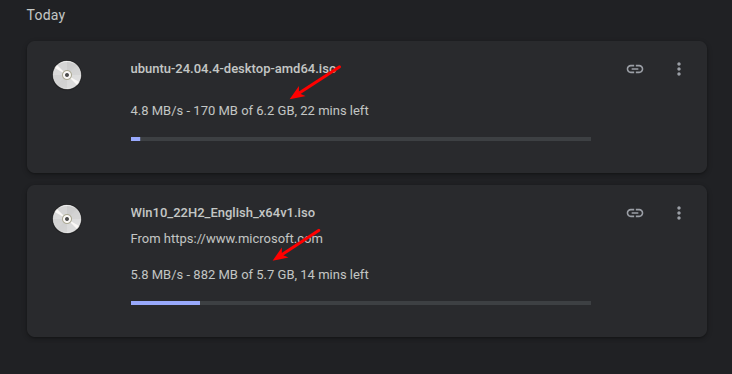
the windows 10 ISO is even bigger than Linux

Sometimes... (Unless you're referring to just the kernel, which I don't think is accurate given the post.)

I had to start downloads, as I couldn't find a mention of the file's size on either of their respective download pages. I have since canceled the downloads, but here you go:

Selection_050.png


Some distros are getting pretty darned bloated!

I don't mind. Though, I have seen people claim that Linux is meant to be light and fast, but I don't think that has ever been true. Specifically, I don't think it was ever an objective of the kernel devs (or even many software devs). There are lightweight distros out there, but they don't define what Linux is meant to be.

Then, there are the extreme ends -- like Endless OS. Their 'full' .iso is like 25 GB!
 
You can’t just use any Chrome OS image-official images for your Acer C733 are only available via the Chromebook Recovery Utility. Use that tool on another computer to create a USB recovery stick.


Follow Linux.org

Staff online

Members online


Top