
kibasnowpaw
Reaction score
435

Profile posts Latest activity Postings About

  • Getting there slowly, one game at a time.

    This is my little Wine/Lutris shelf right now, and everything you see here works.

    Code of Honor 2: Conspiracy Island from disk works.
    Conflict: Desert Storm 2 from disk works.
    Delta Force: Black Hawk Down from disk works.
    Dungeon Keeper Gold from GOG works, and I also installed KeeperFX.
    Of Orcs and Men from disk works.
    StarCraft from disk works.
    StarCraft with cnc-ddraw works.
    Epic Games Store works in Wine.
    TextAloud 3 works in Wine.
    Winamp works in Wine.

    I have even live streamed most of them for about an hour each just to prove they are not only launching, but actually playable. The only one I have not streamed this time around is Dungeon Keeper, because I just installed it again, but I do have an old stream from the last time I played it.

    It has not all been plug and play. Some of the old games have needed the usual Linux/Wine fighting: DXVK off, MangoHud off, old resolution handling, Wine virtual desktop, sound fixes, old installers, broken online registration junk, dead services, and all the other classic old PC game nonsense. But that is also kind of the fun part for me. I grew up with PC games on disk, and I like getting them running again instead of just letting them sit on a shelf doing nothing.

    My plan is to slowly build up a proper old-game setup on Linux with as many of the games I played through the years as I can get working. I also want to install all the physical disk games I still own. If I fall over more old PC games at a price I actually want to pay, I may pick them up too.

    I am not trying to make the cleanest or most modern setup. I am trying to rebuild my own old PC gaming history, but running on Linux.

    One game at a time.
    2026-05-09-06-16.png
    Old PC game installer tries to speedrun contract law

    So I was installing Code of Honor 2 in Wine, and the installer does something I have to laugh at.

    On the first setup screen there is an option called:

    Express Install

    Sounds normal enough, right? Just a quick install option.

    But under it, the installer says:

    Choosing the “Express install” mode is equivalent to accepting the license.

    And the best part?

    It is ticked by default.

    So according to this installer, I did not click “I accept the license agreement.” I did not get a proper license screen. I did not actively agree to anything. The installer just put a default tick in a box called “Express Install” and then said, “Congratulations, you agreed.”

    That is not consent. That is the installer doing legal parkour.

    There is a reason most companies use wording like:

    I accept the terms of the license agreement

    or make you press an actual I Agree button.

    They do that because it is much cleaner legally. The user can see that they are accepting a license, and the company can later say, “You clicked accept.” It is not hidden inside some default install option that most people would understand as “install this faster.”

    If companies could safely get away with “we pre-ticked a setup option, therefore you accepted the contract,” far more of them would do it. They love removing friction when it benefits them.

    But this one is just funny.

    Express Install: installs the game faster.
    Also Express Install: apparently makes me sign a legal agreement by existing near the Next button.

    Old PC gaming really had everything:
    bad DRM, weird installers, questionable DirectX errors, and now legally ambitious checkboxes.

    2026-05-07-19-38.png
    • Like
    Reactions: CaffeineAddict
    CaffeineAddict
    CaffeineAddict
    You have a point, but software licenses are meaningful only if software vendor wants to sue you, e.g. because you cracked and redistributed it without their consent.
    In that case you could say something like "I wasn't present a license".

    In all other cases they're pretty much moot point, nobody reads them and nobody verifies what users do.
    kibasnowpaw
    kibasnowpaw
    You are right but I still find it funny.
    CaffeineAddict
    CaffeineAddict
    yes, it's not correct, license should be displayed and user forced to explicitly agree.
    My first gameplay test had sound problems, because for some reason when I started streaming with OBS, the sound would mess up and just disappear.

    So I finally set up my dedicated streaming PC, something I had not gotten around to doing before. That ended up taking about 4 hours, mostly because making a bootable Windows 10 USB from Linux turned into way more pain than it should have been. Ventoy gave me problems, the ISO/USB setup caused issues, and I ended up having to do it the manual way with the Windows ISO, FAT32, and split install files before it would finally boot and install.

    But I got Windows 10 installed, got the NVIDIA driver working, got the AVerMedia 4K PCIe capture card working, and got OBS running on the streaming PC.

    I also had to clone the screen instead of using passthrough through the capture card. I think that is part of why things got a little messy, or maybe it is because I could only clone the screen properly on X11, at least with the method I know. For some reason X11 also gives me problems with fullscreen in some games. Some games just do not want to behave properly in fullscreen, and that is not something I want to fight with right now.

    So for now I am just playing in windowed mode and letting the streaming PC handle OBS. It was annoying to set up, but it works.


    Old multi-disc Windows games in Wine can still be a pain.

    I was installing Conflict: Desert Storm II through Lutris/Wine from the original physical CDs. Disc 1 installed fine, but when the installer asked for Disc 2, Wine seemed to keep the optical drive busy. Because of that, Linux could not properly unmount/remount the drive in a way the installer would accept.

    The system could see Disc 2, but the installer still refused to continue. The mount path also got messy, where it still looked like the old Disc 1 mount even though the label showed Disc 2.

    Instead of fighting Wine and the physical CD drive, I worked around it by making an ISO of Disc 2 and mounting that manually. That way Wine could keep using what it thought was the same CD drive, but the content was actually Disc 2.

    Basically:

    1. Install from Disc 1.
    2. When the installer asks for Disc 2, create/mount a Disc 2 ISO.
    3. Point Wine/Lutris at the mounted ISO path.
    4. Continue the installer.

    It is one of those classic Linux/Wine moments where the game itself is not really the problem — the old installer and disc swapping are.

    Still, I got around it. Physical old PC games can be annoying under Wine, but with Lutris, ISO mounting, and a bit of manual work, they can still be made to run.
    2026-05-06-09-03.png
    Running old programs through Lutris is honestly one of the reasons I still keep messing with Linux.
    Some of my older programs still work fine, but only if I go back far enough in Wine.

    That’s also why I’m using Wine 8 in Lutris for some of them.
    A lot of the newer Wine setups moving over to WOW64 is not something I’m a fan of at all. I hate WOW64. For newer stuff it may be fine, but for old programs that already barely work, it just becomes one more thing that can break them.

    So yeah, while others move forward, I’m over here dragging myself back to Wine 8 just to keep my old programs alive and running the way I want.

    At the moment I’ve got stuff like TextAloud 3, Winamp, Epic Games Store, and Of Orcs and Men sitting in Lutris, and honestly it feels a bit stupid and a bit beautiful at the same time.
    If it works, it works.

    Sometimes Linux is not about using the newest thing.
    Sometimes it’s about finding the one old setup that still does the job and refusing to let it die.

    2026-05-06-07-51.png
    When i was on vacation in my own contra i fall over Of Orcs and Men on original Disk never been a fan of games like this really but i don't mind try new kind of games so i installed it on wine and it worked.
    Small update on my Audiobook Shelf Manager project.

    I made some big changes to the app and it is finally starting to work the way I wanted.

    What changed:
    • Moved the old “Set Library Root” action out of the main toolbar
    • Added a real Settings menu
    • Built a proper Settings window with left-side navigation, kind of like a game settings screen
    • Added support for multiple library folders instead of only one
    • The app now remembers those folders when I open it again
    • Multiple folders are scanned into one combined gallery
    • Added better support for duplicate artist names across different roots
    • Artist grouping now works better for albums with multiple authors/artists
    • Albums can show under more than one artist when the metadata has multiple names
    • Grouping now prefers Album Artist, then falls back to Artist, then folder names if tags are missing
    This was a pretty big quality-of-life upgrade for me because I had been jumping back and forth between folders before. Now I can keep things like my homemade audiobooks and other audiobook folders together in one place.

    I’m running it as a Flatpak on Ubuntu 26.04 with KDE X11, and it’s feeling a lot closer to how I wanted the app to behave from the start.

    Still more I want to improve, but this was a huge step forward.


    Hi everyone,

    I wanted to share a small update on my app, Audiobook Shelf Manager.

    This is still a work-in-progress audiobook metadata app, but I made some nice improvements to the UI.

    The biggest update is the artist view. I changed the artist cards so they now show series completed out of total series directly on the card in a cleaner way. Before, the artist tiles felt more cluttered and repeated information. Now the layout is tighter, easier to read, and fits the style of the rest of the app much better.

    I also updated the app name to Audiobook Shelf Manager, which reflects what the app does a lot better.

    Right now the app is focused on:
    • editing audiobook metadata
    • cover/gallery handling
    • tracking progress
    • organizing audiobook libraries better
    Tracking is still going to improve over time, but the UI is starting to come together in a way I am much happier with.

    Here is what I worked on in this update:
    • renamed the app to Audiobook Shelf Manager
    • improved the artist card layout
    • added a cleaner series completed X/Y display on artist cards
    • tightened spacing so the artist view looks less loose and more polished
    • kept the album/series cards working the way I wanted while only tightening the artist UI
    It is still under development, but it is getting closer to the look and feel I wanted.

    Feedback is welcome.
    Github
    2026-03-30-19-48.png
    What I am sick of is not change by itself. It is things being forced before they are ready for the people still using what already worked.

    Wine is the best example I have right now. Wine 10 introduced the new WoW64 architecture as experimental, and Wine 11 moved further in that direction by saying pure WINEARCH=win32 prefixes are deprecated and not supported in the new WoW64 mode. On top of that, the separate wine64 loader is gone in favor of one wine loader. That may look clean on paper, but for older 32-bit software and older install chains it is not a harmless change. It breaks assumptions people have been relying on for years.

    I ran straight into that with TextAloud and an old NextUp/Acapela voice. My old working setup only worked because I had already built a real 32-bit prefix the old way. That was not some random lucky install. It took time to get right, and once it worked, it worked because it was a proper 32-bit environment. With the newer WoW64 path, I could still get TextAloud itself to launch, but the setup no longer behaved the same. I had to force-install speechsdk, and even then it only half-worked. The built-in voices showed up, but my own installed voice did not register properly, so the program could not use it the way it did before. That is not a real replacement. That is a partial workaround that breaks exactly where it matters.

    And what makes it worse is the mixed messaging. Winetricks will throw warnings like “You are using a 64-bit WINEPREFIX. Note that many verbs only install 32-bit versions of packages,” and there is a current issue specifically about speechsdk still insisting on a WIN32 prefix. That is exactly the sort of thing that tells users the transition is not finished, no matter how much people want to pretend it is. If the new path was actually ready, it would not be tripping over old 32-bit speech components and old verbs like this.

    I tried more than just one thing. I tested the newer WoW64 route. I forced speechsdk. I compared the registry from the old working prefix with the new one. I copied over the parts that were obviously missing. I manually added Acapela-related registry entries. I got far enough that TextAloud opened and the default Microsoft voices appeared, but the custom voice still would not come through properly. In the end, the only thing that actually worked for me was launching the app through Lutris with Wine-GE 8-26 x86_64. That is the only path I found that got me back to something usable. Everything else on the new forced path either failed outright or only half-worked.

    That is why I hate this kind of forced transition. I do not care how nice it sounds in release notes if the real effect is that older working setups get turned into debugging projects. If something worked before, and the replacement still cannot cover the same ground, then it is being pushed too early. That is not “fear of change.” That is people being told to accept regressions because the project wants to move on.

    And it is not just Wine. KDE has already said Plasma 6.8 will be Wayland-only, with the Plasma X11 session supported only into early 2027 through the Plasma 6.7 line. So the same pattern is showing up there too: the old path is being shut down, and users are expected to move whether their use case is fully covered or not.

    So my view is simple. If developers are going to force people off an old path, the new path needs to be ready first. Not “good enough for most users.” Not “fine unless you use older 32-bit software, old voices, old speech components, or old workflows.” Ready. If it is not ready, then they should not force it yet. And if enough real use cases break, then people should keep filing bugs, keep making noise, and keep pushing back until the replacement actually does the job.

    Wine Bug Report

    Chat-GPT-Image-28-mar-2026-21-25-26.png
    Just finished setting up Jellyfin on my own Linux network fully self-hosted, local-first, and locked down

    I recently deployed Jellyfin inside Docker on my home server and got it running exactly how I want: LAN-only access, no WAN exposure, and controlled outbound traffic. The goal wasn’t just “it works” it was understanding and controlling every layer.

    What I did:
    • Installed Jellyfin in Docker
    • Mounted multiple large local drives into the container
    • Configured nftables firewall manually
    • Allowed LAN → Jellyfin (port 8096)
    • Blocked WAN → Jellyfin completely
    • Carefully allowed Docker → WAN only for required outbound traffic (metadata, plugins)
    • Verified everything through logs and container shell access
    I also run a Pi-hole setup handling DNS and DHCP, placed logically between my switch and upstream router/fiber box. That gives me:
    • Full visibility into DNS queries
    • Network-wide ad and tracker blocking
    • Control over device resolution and behavior
    • A central point for filtering and logging
    Why I do it this way:

    I’m very strict about what I allow in and out. Even if I’m not a “target,” that doesn’t mean I should run an open network. When you actually have control over your infrastructure, it makes sense to use it.
    • Inbound traffic = real exposure → keep it blocked unless needed
    • Outbound traffic = controlled, not unrestricted
    • Local services = stay local unless there is a clear reason otherwise
    Most people rely entirely on consumer routers and default configs. That works, but it also means:
    • no visibility
    • no control
    • no understanding of what’s happening on your network
    What surprised me is how not hard this actually is once you start:
    • Docker simplifies deployment
    • nftables is consistent once you understand flow (input/forward/output)
    • Tools like ChatGPT help you learn while doing, not just copy commands blindly
    Why more people should consider this:

    Running your own router/firewall + DNS layer:
    • improves privacy (you decide what leaves your network)
    • improves security (reduced attack surface)
    • improves reliability (no dependency on external services for local media)
    • builds actual understanding of your system
    You don’t need enterprise hardware. You need:
    • a Linux box
    • some time
    • willingness to learn
    And honestly, that last part is the only real barrier.

    I wish more people realized this isn’t out of reach. It just sounds harder than it is.

    85926798-ae74-4d91-9e8d-b7bd62173087.png
    L
    LlNUX
    It certainly is very impressive, sounds rather complex to a newbie such as I . Here to learn so I will try to understand the technology and terminology via screenshot and searching.
    Thanks for posting this .
    kibasnowpaw
    kibasnowpaw
    Thanks, and yeah I get why it sounds complex from the outside.

    The Jellyfin part itself is not really that bad. Docker makes that fairly simple once you understand mounts, ports, and where the config lives.

    The part that makes my setup sound more complex is that I am not just running Jellyfin. I also built my own router/firewall setup with DHCP and Pi-hole handling DNS for the network. So I am controlling more layers myself instead of just letting a normal consumer router do everything in the background.

    So the setup is more like:

    Jellyfin = media server
    Docker = container running Jellyfin
    nftables = firewall rules
    Pi-hole = DNS filtering / ad blocking
    DHCP = handing out IP addresses
    Linux router/firewall = controlling traffic between my LAN and the outside

    Once you split it up like that, it becomes easier to understand. It is not one giant magic thing. It is just several small systems working together.

    Also small side note: you may want to think about changing your username a little. “LlNUX” with the letters looking like Linux can make some people think it is a bot/spam account, even if you are real. Just saying it so people don’t ignore you by mistake.
    • Like
    Reactions: LlNUX
    L
    LlNUX
    Thanks for the reply.
    Appreciate what you say about the name, being ignored suits me.
    I went from Ubuntu Server 25.10 to 26.04 prerelease. 26.04 comes out next month while I’m on vacation, so I just jumped on it early and took the hit now instead of later. I already knew I was going to run into problems, and I did almost right away.

    The first thing that broke was internet after boot. I had no connection until I manually ran sudo systemctl restart NetworkManager. After checking logs, it looked like some boot-order mess involving NetworkManager, netplan-configure, nss-user-lookup.target, and winbind. I was not really using winbind for anything useful, so it was just pointless baggage on my system, and after disabling/removing it, the network side started acting normal again.

    Then came the Steam and gaming side. I also had old Flatpak Steam leftovers still hanging around, like com.valvesoftware.Steam.Utility.gamescope and com.valvesoftware.Steam.CompatibilityTool.Proton, both throwing end-of-life warnings even though I do not even use Flatpak Steam anymore. Not a fatal issue, but still more leftover junk causing noise.

    Wine on 26.04 prerelease has also been a mess so far. It behaved badly, especially when I tried to run Steam through it. It spent way too much time on locale-related nonsense, and some .exe installers that used to work fine just started hanging or acting wrong. I also had to deal with old Wine cleanup, reinstall confusion, and the usual “is this Flatpak Wine, native Wine, or just old broken leftovers?” mess. Lutris and glxinfo were part of that confusion too, because what the system saw and what I expected it to use were not always the same thing.

    Then I hit the MangoHud and GOverlay problem, and that one was the most obvious because it straight up wrecked the image in-game. Bright Memory: Infinite started looking completely broken, with blown-out reflections, giant light bloom, and pixelated garbage all over reflective surfaces. Wayland made it even worse. X11 fixed part of it, especially the “light source looks like the sun exploding in my face” issue, but not all of it. In the end, it turned out my old manually installed MangoHud and GOverlay were part of the problem. I removed the old installs, wiped the old configs so nothing stale got reused, then recompiled both on the new system. After that, the game started looking normal again.

    I also had to install missing 32-bit libraries along the way, because Linux gaming still loves to remind you that one missing library can be the difference between “works fine” and “why is this broken now?” The ones I ended up installing were: libgtk2.0-0:i386, libpipewire-0.3-0:i386, libxcb-res0:i386, libc6:i386, libstdc++6:i386, libgcc-s1:i386, libgl1:i386, libvulkan1:i386, libx11-6:i386, libxext6:i386, libxrandr2:i386, libxrender1:i386, libxfixes3:i386, libxi6:i386, libxcb1:i386, libxss1:i386, libasound2:i386.

    That is one of the reasons Linux gaming still annoys me sometimes. Two people can have what looks like the same distro, same hardware, same desktop, and still get a very different result just because one system has the right libs, the right rebuilds, the right leftovers cleaned out, or the right bits installed by accident. Once it works, it can work great. But getting there can still be stupid.

    To be fair, not everything I hit was a real 26.04 fault. The phased cloud-init update message was just Ubuntu doing phased rollout stuff. The broken audiobook-manager.service was just an old user systemd service pointing to a deleted Python virtualenv, so that was cleanup, not really an Ubuntu bug. But the actual 26.04 problems I hit first were definitely network boot issues, Wine acting badly, Steam/runtime leftovers, MangoHud/GOverlay breaking visuals, and missing libraries.

    There will probably be more problems I have not hit yet. These were just the first ones.

    Chat-GPT-Image-16-mar-2026-04-41-47.png
    I just got done troubleshooting a really stupid graphics issue in Bright Memory: Infinite on my Linux setup, and it turned out to be a good reminder that sometimes the problem is not the game itself, not Proton itself, and not even Vulkan itself sometimes it is the stuff around it.

    In my case, MangoHud was the main problem.

    The first video shows how broken it looked before. Reflections were completely messed up, bright light sources looked like the sun exploding in my face, and a lot of surfaces turned into a pixelated mess. On top of that, the whole image looked far worse than it should. X11 helped with part of it compared to Wayland, especially with the insane blown-out reflection/light effect, but it did not fix the full problem. The really ugly pixel mess and broken look turned out to be tied to MangoHud on my system.


    What fixed it for me was doing a proper cleanup and rebuild instead of just poking at random settings. I removed my old manually installed MangoHud and GOverlay, wiped the old configs so nothing stale got reused, then recompiled both on my current setup. I also ended up installing some missing 32-bit libraries while cleaning up the system:

    libgtk2.0-0:i386
    libpipewire-0.3-0:i386
    libxcb-res0:i386
    libc6:i386
    libstdc++6:i386
    libgcc-s1:i386
    libgl1:i386
    libvulkan1:i386
    libx11-6:i386
    libxext6:i386
    libxrandr2:i386
    libxrender1:i386
    libxfixes3:i386
    libxi6:i386
    libxcb1:i386
    libxss1:i386
    libasound2:i386

    After that, the game started looking the way it should. That is what the second video shows. The broken lighting, the weird pixelated reflections, and the “what the hell am I even looking at” image quality were gone. After that I was mostly left with the usual kind of stutter I have seen from this game before under VKD3D/DX12, and I also ran out of VRAM because I was playing on max settings while livestreaming from the same machine at the same time, so that part is on me.


    This is also one of the reasons Linux gaming can be frustrating. Two people can run what looks like the same distro, same desktop, same GPU, and still get very different results because one system has the right libs, the right rebuilds, the right runtime, or just less old junk left behind from upgrades. Once it works, it can work great. But getting there can still be way more annoying than it should be.

    For reference, this was on my own setup, not some clean prebuilt gaming distro. I run Ubuntu Server with KDE on top, and because I tinker, compile things, and upgrade over time, I know full well that old builds and old configs can come back and bite me later. That is pretty much exactly what happened here.

    First video: broken mess
    Second video: fixed after cleanup, rebuild, and library cleanup

    If anyone else on Linux gets bizarre overblown reflections, pixelated lighting, or graphics that suddenly look far worse only when MangoHud is active, do not just assume the game is dead. Check your MangoHud build, your config, and whether you are dragging old installs across distro upgrades.
    So yeah, I ended up installing Winamp in Wine on my Linux setup just to see if it would still work, and it actually does.

    I am running Ubuntu Server 25.10 with KDE Plasma, made a dedicated Wine prefix for Winamp, installed it there, and it started up without much drama. Classic skin, playlist editor, media library, the whole old-school setup. It plays fine and honestly looks exactly like it should.

    The weird part is not that it works.
    The weird part is how instantly familiar it feels.

    The second I saw that layout again, it was like getting punched in the face by pure early-2000s nostalgia. Same buttons, same playlist window, same look, same whole vibe. And now I am sitting here on a modern Linux system using Winamp through Wine like some time traveler that missed the exit ramp back to 2004.

    It works, and I am not even going to pretend it is the most logical thing I have installed on Linux.
    But damn, I feel old as fox using this again.

    Still, there is something kind of beautiful about seeing Winamp alive and working on Linux in 2026.

    2026-03-11-11-31.png
    • Like
    Reactions: Rocketing-warp9
    KGIII
    KGIII
    It really whips the llama's arse.
    KGIII
    KGIII
    Also, you reminded me of my favorie player from back in the day. It was JetAudio (COWON), which I actually paid for -- even though it was meant for people who used their MP3 players.

    They made MP3 players pretty early on and made some great hardware. It looks like they still do.
    kibasnowpaw
    kibasnowpaw
    I remember jetaudio just never really used it.
    571498228_1309126411225903_6683223687257329601_n.jpg
    • Like
    Reactions: KGIII
    I should probably not have started making AI album art for my audiobook series cards… because now it turned out so good that I feel like I have to do it for all of them

    But honestly, the default “series cover” for audiobooks is usually just Book 1 reused, and it doesn’t always look that great when you’re trying to build a clean overview.

    So this is probably what I’ll do:
    slowly, series by series, I’ll make custom album art for them over time.

    The nice part is that my homemade BookLibConnect setup now gives me a much better overview anyway:
    • Read
    • Own/in Album
    • Goodreads Review
    So even before everything gets custom art, it already works way better for tracking progress.

    It’s one of those “I made the system better… and now I accidentally created more work for myself” moments
    But honestly, I like how it looks now.

    Also, I own almost all of Daniel Schinhofen’s books. I thought I was only missing 2 series, but I didn’t notice he had started a new one, so I’m actually missing 3 series now.

    I’m also missing the last book in Aether’s Revival, because it came out shortly after I finished the series, so I never got around to it. I still need to buy it and listen to it.

    But yeah I’m really close to having finished almost all of his books by now.


    990d171b-654a-43a0-9bf1-580e843e8880.png
    Been up since 4 AM and still going.

    Worked more on BookLibConnect today, and it’s starting to come together in a way I can actually use.

    A few things I’m really happy with now:
    • R = Read (so R3/14 means I’ve read/listened to 3 out of 14)
    • 14/14 = how many tracks/files are there out of how many I own/expect for that album
    • The metadata box is more or less done now
    • The artist view shows progress too:
      • one number = how many completed
      • the other number = how many I have total
    That kind of visual overview is exactly what I wanted. I don’t want to dig through menus every time just to see what’s finished and what’s missing.

    It’s still a lot of testing, rescanning, checking metadata, fixing UI stuff, and doing small adjustments over and over, but that’s the part that makes it usable instead of just “it runs.”

    Been a long day already, but this is the kind of progress that feels worth it.
    2026-02-24-12-06-1.png
    2026-02-24-12-06.png

    2026-02-24-12-06-2.png
    BookLibConnect – Development Progress (PySide6 / Wayland / Metadata Handling)

    Quick dev update on BookLibConnect.

    Stack:
    • Python 3
    • PySide6 (Qt 6)
    • mutagen for audio metadata
    • Native Linux target (Wayland-first, X11 fallback)
    • Flatpak packaging in progress
    What’s currently stable:

    • Album view with cover detection (folder + per-track sidecar fallback)
    • Embedded cover writing
    • Metadata editing (title, artist, album, album artist, year, genre, track #)
    • Track progress tracking (14/14 indicator)
    • Auto-rename on save (optional)
    • Selection model behavior mostly normalized

    Recent fixes:
    • QTableWidget selection signal loop causing metadata pane desync
    • First-item selection not loading metadata unless re-selected
    • Signal blocking cleanup with QSignalBlocker
    • Wayland rendering alignment inconsistencies
    • Horizontal scroll + dynamic column width behavior
    Still refining:
    • Edge-case selection state after rescan
    • Metadata reload consistency vs. in-memory state
    • Model/view refactor consideration (may migrate away from QTableWidget)
    • Performance under large libraries
    • Better separation between UI state and file state
    The goal isn’t to build “another media player.”
    It’s a Linux-native metadata control tool for audiobook libraries that doesn’t fight the filesystem.

    No Electron. No cloud dependency. No subscription model. Just files, metadata, and control.

    Closer than it was last month. Not done yet.

    2026-02-22-20-03.png
    2026-02-22-20-02.png
    I’m getting there… slowly.

    I’ve been rebuilding my old audiobook tool into a proper Flatpak desktop app (BookLibConnect), and honestly: so far it’s been easier to work on than my old “Flask + Python web app” setup. No weird web UI juggling, no constant “why did this break now” feeling. There haven’t been any real problems yet it’s just slow progress, one piece at a time.

    Right now the app is still early, but the basics are starting to come together. Set library root, rescan, and it pulls in my library structure and shows the author view (see screenshot). It’s not feature-complete, not polished, and definitely not ready for anyone to depend on… but it’s moving in the right direction.

    If this works out the way I want, I might actually share it later. I like the idea of having a clean, installable Linux app instead of a pile of scripts and a browser page.

    So far it’s only tested and built on KDE Wayland (Qt: wayland). I know that doesn’t mean much until it’s tested on other desktops/distros, but one thing at a time.

    2026-02-21-21-06.png
    Title: From my old Flask/Python web app to a real Flatpak desktop app (BookLibConnect) PT1

    I’ve been running an audiobook manager/tracker as a Python + Flask web app for a while, and honestly… I’m tired of it being “a pile of scripts + a web UI” that I constantly have to babysit.

    The old project was very “me” in style. I built a full theme system with CSS variables, instant theme switching (no reload), and I went a bit crazy with it:

    • Dark Mode for night listening (my default)
    • Winter Mode with a colder look, frosted-glass UI, and a subtle snow overlay/particles
    • Cover-focused browsing, track lists, metadata workflow ideas, the whole “this is my personal library hub” vibe
    It looked great, and the theme engine was fun to build… but maintaining it as a Flask web tool is just annoying long-term. Dependencies, browser weirdness, “is this running on the server / is it local / what broke this time”, and it always ends up feeling like a project held together with duct tape.

    So I’m rebuilding it as an actual desktop app, packaged as a Flatpak.

    New app name: BookLibConnect.
    Goal: a clean local library manager that doesn’t need a browser, doesn’t need random setup steps, and can be installed like a normal app.

    Current status (PT1):

    • Set Library Root
    • Rescan library
    • Shows author/book + cover art
    • Track list with file name, size, and modified date
    So far I’ve only tested this on KDE Wayland (Qt: wayland). It’s early, it’s rough, and it’s nowhere near what my Flask app grew into, but it’s finally going in a direction that feels sustainable.

    PT1 screenshot is attached.

    If anyone here has practical Flatpak advice (Qt + Python, file access/portals, “don’t do it like this” warnings), I’m all ears.

    1210f9cd-3fdb-4fca-9592-07de3f7ab736.png
    How I Got Resident Evil 2 (Classic GOG) Working on Linux + MangoHud
    After fighting with this way longer than I expected, I finally got Resident Evil 2 (original, not the remake) working properly on Linux with:
    • Wine (not Proton)
    • DXVK
    • MangoHud
    • NVIDIA GPU
    • Proper 32-bit support
    Posting this in case it saves someone else the headache.


    The Game​

    This is the original 1998 Resident Evil 2 (GOG version) — not RE2 Remake.

    The GOG version uses old DirectDraw / Direct3D 7/9, which can be tricky on Linux.


    The Problems I Had​

    1. ❌ “Failed to initialize DIRECTX(R)” error
    2. ❌ MangoHud not showing at all
    3. ❌ Weird libMangoHud_shim.so preload errors
    4. ❌ Lutris runtime complaining
    5. ❌ DXVK not always hooking correctly

    ✅ What Actually Fixed It​

    1️⃣ I Had To Enable DXVK​

    The game will not behave correctly on plain Wine’s DirectDraw.

    In Lutris:
    • Enable DXVK
    • Use Vulkan
    • Make sure NVIDIA Vulkan drivers are installed
    After that, the DXVK overlay appeared, confirming D3D9 → Vulkan translation was working.


    2️⃣ I Had To Activate Voodoo (Important)​

    Without Voodoo / proper DDraw handling, the game threw:

    Failed to initialize DIRECTX(R)
    After enabling Voodoo (or proper DDraw override), the DirectX error disappeared.


    3️⃣ The BIG One: MangoHud Was Missing 32-Bit Support​
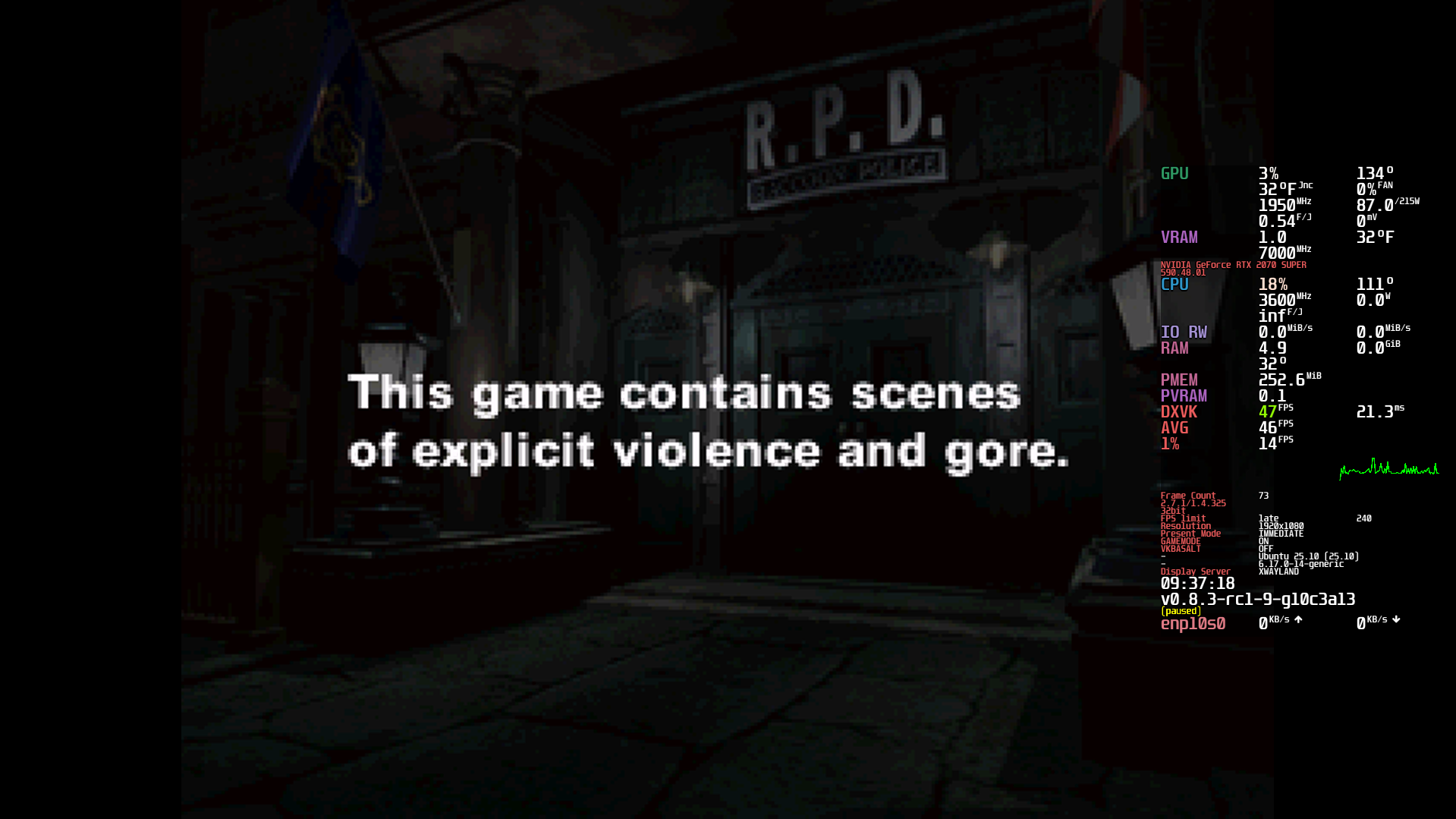
    This was the real problem.

    Classic RE2 is a 32-bit game.

    My MangoHud installation only had 64-bit libraries, so Wine couldn’t hook into it.

    That’s why I kept getting:
    Code:
    ERROR: ld.so: object 'libMangoHud_shim.so' from LD_PRELOAD cannot be preloaded
    It wasn’t a Lutris issue.
    It wasn’t a game issue.
    It was missing 32-bit MangoHud.


    The Fix: Recompile MangoHud With 32-bit Support​

    I cloned MangoHud and rebuilt it properly:

    Code:
    git clone --recurse-submodules https://github.com/flightlessmango/MangoHud.git
    cd MangoHud
    ./build.sh clean
    sudo ./build.sh install
    After installing, I verified:
    Code:
    /usr/lib/mangohud/lib64<br>/usr/lib/mangohud/lib32
    Both must exist.

    Especially:
    Code:
    lib32/libMangoHud.so
    lib32/libMangoHud_shim.so
    Once both were present, MangoHud finally worked in RE2.


    Final Working Setup​

    • Wine (not Proton)
    • DXVK enabled
    • Voodoo enabled
    • MangoHud compiled with 32-bit support
    • NVIDIA Vulkan driver active
    • Waylands
    Now it runs:
    D3D9 → DXVK → Vulkan → MangoHud overlay
    And everything works perfectly.


    Important Lessons​

    • Old Windows games = almost always 32-bit
    • MangoHud MUST have lib32 installed
    • If you see preload shim errors, check 32-bit libs
    • DXVK works even for classic RE games
    • DirectDraw errors are usually DDraw/Voodoo related

    Result​

    Resident Evil 1-3 classic GOG now run on Linux with:
    • FPS overlay
    • GPU monitoring
    • Vulkan backend
    • No DirectX errors
    Honestly feels amazing getting a 1998 game running cleanly on modern Linux + Vulkan.

    2026-02-15-09-37.png
  • Loading…
  • Loading…
  • Loading…
Top