
kibasnowpaw
Reaction score
395

Profile posts Latest activity Postings About

  • I’m getting there… slowly.

    I’ve been rebuilding my old audiobook tool into a proper Flatpak desktop app (BookLibConnect), and honestly: so far it’s been easier to work on than my old “Flask + Python web app” setup. No weird web UI juggling, no constant “why did this break now” feeling. There haven’t been any real problems yet it’s just slow progress, one piece at a time.

    Right now the app is still early, but the basics are starting to come together. Set library root, rescan, and it pulls in my library structure and shows the author view (see screenshot). It’s not feature-complete, not polished, and definitely not ready for anyone to depend on… but it’s moving in the right direction.

    If this works out the way I want, I might actually share it later. I like the idea of having a clean, installable Linux app instead of a pile of scripts and a browser page.

    So far it’s only tested and built on KDE Wayland (Qt: wayland). I know that doesn’t mean much until it’s tested on other desktops/distros, but one thing at a time.

    2026-02-21-21-06.png
    Title: From my old Flask/Python web app to a real Flatpak desktop app (BookLibConnect) PT1

    I’ve been running an audiobook manager/tracker as a Python + Flask web app for a while, and honestly… I’m tired of it being “a pile of scripts + a web UI” that I constantly have to babysit.

    The old project was very “me” in style. I built a full theme system with CSS variables, instant theme switching (no reload), and I went a bit crazy with it:

    • Dark Mode for night listening (my default)
    • Winter Mode with a colder look, frosted-glass UI, and a subtle snow overlay/particles
    • Cover-focused browsing, track lists, metadata workflow ideas, the whole “this is my personal library hub” vibe
    It looked great, and the theme engine was fun to build… but maintaining it as a Flask web tool is just annoying long-term. Dependencies, browser weirdness, “is this running on the server / is it local / what broke this time”, and it always ends up feeling like a project held together with duct tape.

    So I’m rebuilding it as an actual desktop app, packaged as a Flatpak.

    New app name: BookLibConnect.
    Goal: a clean local library manager that doesn’t need a browser, doesn’t need random setup steps, and can be installed like a normal app.

    Current status (PT1):

    • Set Library Root
    • Rescan library
    • Shows author/book + cover art
    • Track list with file name, size, and modified date
    So far I’ve only tested this on KDE Wayland (Qt: wayland). It’s early, it’s rough, and it’s nowhere near what my Flask app grew into, but it’s finally going in a direction that feels sustainable.

    PT1 screenshot is attached.

    If anyone here has practical Flatpak advice (Qt + Python, file access/portals, “don’t do it like this” warnings), I’m all ears.

    1210f9cd-3fdb-4fca-9592-07de3f7ab736.png
    How I Got Resident Evil 2 (Classic GOG) Working on Linux + MangoHud
    After fighting with this way longer than I expected, I finally got Resident Evil 2 (original, not the remake) working properly on Linux with:
    • Wine (not Proton)
    • DXVK
    • MangoHud
    • NVIDIA GPU
    • Proper 32-bit support
    Posting this in case it saves someone else the headache.


    The Game​

    This is the original 1998 Resident Evil 2 (GOG version) — not RE2 Remake.

    The GOG version uses old DirectDraw / Direct3D 7/9, which can be tricky on Linux.


    The Problems I Had​

    1. ❌ “Failed to initialize DIRECTX(R)” error
    2. ❌ MangoHud not showing at all
    3. ❌ Weird libMangoHud_shim.so preload errors
    4. ❌ Lutris runtime complaining
    5. ❌ DXVK not always hooking correctly

    ✅ What Actually Fixed It​

    1️⃣ I Had To Enable DXVK​

    The game will not behave correctly on plain Wine’s DirectDraw.

    In Lutris:
    • Enable DXVK
    • Use Vulkan
    • Make sure NVIDIA Vulkan drivers are installed
    After that, the DXVK overlay appeared, confirming D3D9 → Vulkan translation was working.


    2️⃣ I Had To Activate Voodoo (Important)​

    Without Voodoo / proper DDraw handling, the game threw:

    Failed to initialize DIRECTX(R)
    After enabling Voodoo (or proper DDraw override), the DirectX error disappeared.


    3️⃣ The BIG One: MangoHud Was Missing 32-Bit Support​
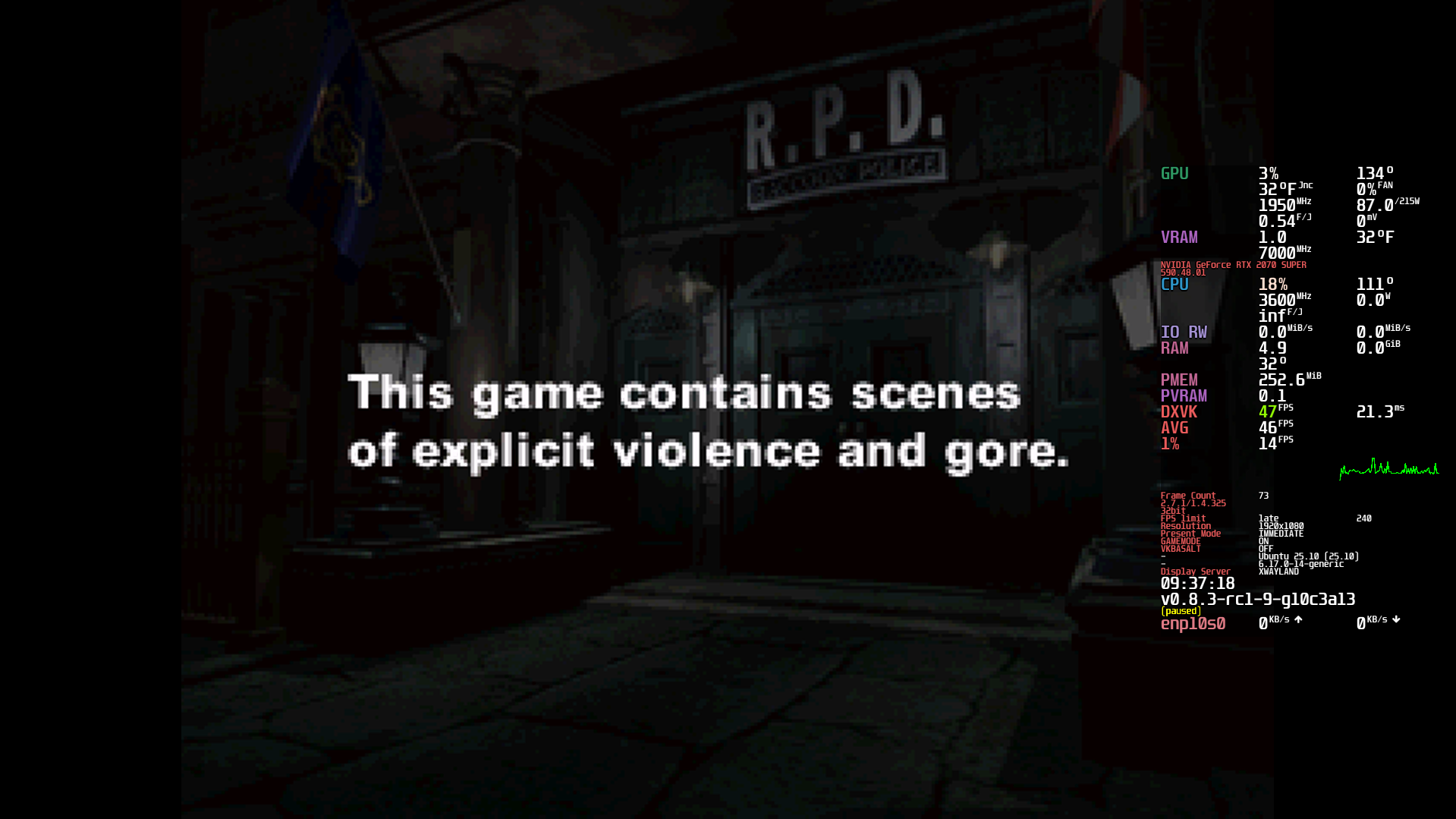
    This was the real problem.

    Classic RE2 is a 32-bit game.

    My MangoHud installation only had 64-bit libraries, so Wine couldn’t hook into it.

    That’s why I kept getting:
    Code:
    ERROR: ld.so: object 'libMangoHud_shim.so' from LD_PRELOAD cannot be preloaded
    It wasn’t a Lutris issue.
    It wasn’t a game issue.
    It was missing 32-bit MangoHud.


    The Fix: Recompile MangoHud With 32-bit Support​

    I cloned MangoHud and rebuilt it properly:

    Code:
    git clone --recurse-submodules https://github.com/flightlessmango/MangoHud.git
    cd MangoHud
    ./build.sh clean
    sudo ./build.sh install
    After installing, I verified:
    Code:
    /usr/lib/mangohud/lib64<br>/usr/lib/mangohud/lib32
    Both must exist.

    Especially:
    Code:
    lib32/libMangoHud.so
    lib32/libMangoHud_shim.so
    Once both were present, MangoHud finally worked in RE2.


    Final Working Setup​

    • Wine (not Proton)
    • DXVK enabled
    • Voodoo enabled
    • MangoHud compiled with 32-bit support
    • NVIDIA Vulkan driver active
    • Waylands
    Now it runs:
    D3D9 → DXVK → Vulkan → MangoHud overlay
    And everything works perfectly.


    Important Lessons​

    • Old Windows games = almost always 32-bit
    • MangoHud MUST have lib32 installed
    • If you see preload shim errors, check 32-bit libs
    • DXVK works even for classic RE games
    • DirectDraw errors are usually DDraw/Voodoo related

    Result​

    Resident Evil 1-3 classic GOG now run on Linux with:
    • FPS overlay
    • GPU monitoring
    • Vulkan backend
    • No DirectX errors
    Honestly feels amazing getting a 1998 game running cleanly on modern Linux + Vulkan.

    2026-02-15-09-37.png
    I almost own all of his audiobooks, and I’m getting close to finishing only 19 audiobooks left. DD makes up 10 of those 19. My next series is AO, since book 5 of RD hasn’t been released as an audiobook yet, so I need to wait for that one.
    2026-02-10-15-36.png
    image.png

    Small realization moment for me recently: I honestly forgot (or never realized) that Libation has a native Linux version. I’d been mentally grouping it with tools I assumed were Windows-only.

    Turns out… yeah, it works great on Linux.

    So at this point, I feel like I’ve got everything I need on Linux for Audible, backups, MP3 conversion, and general library management. Between the native app and the CLI tools, there’s really no gap anymore.

    The only thing I still keep Windows around for is video editing.

    I’ve tried a lot of editors over the years, on multiple platforms, and for my use case nothing touches PowerDirector. I can render a 4K, 1-hour video in ~10–12 minutes, which is something no other editor I’ve personally used can match. That’s why I’ve supported it for over 12 years, buying every major version as it comes out. If you just want to get videos done efficiently, it’s unbeatable.

    That said, everything else I care about now lives comfortably on Linux. Between native tools like Libation and solid open-source/CLI options, I’m finally at the point where Linux isn’t “almost enough” it’s just enough.
    2026-02-10-12-46.png


    I wanted to share a small win I had recently, in case it helps someone else.

    I managed to get Book Lib Connect (Audible downloader) running successfully under Wine on Linux. It launches cleanly, connects to Audible, downloads audiobooks, and exports them correctly. So from a functional point of view, it does work in Wine.

    That said, this isn’t my ideal solution.

    The tool only outputs M4B, and my end goal is MP3, so this setup is more of a fallback option for me in case I can’t get my preferred tool working later. Still, having a reliable backup that runs on Linux is a big plus.

    I’m still experimenting with other options that better fit my workflow, but I figured this was worth sharing since Audible + Linux can be a pain point.
    If anyone has recommendations for Audible → MP3 workflows on Linux (native or Wine), I’m definitely open to suggestions.
    Thanks, and happy to answer questions if it helps someone else
    Hi all,

    I recently posted a video showing an audiobook editing and tracking application I built myself using Python + Flask. A lot of people ask why I went through the trouble instead of just using Audible, Goodreads, or existing apps, so I want to explain the reasoning.

    First yes, I do use Audible.

    But I don’t treat it as my main ecosystem. I buy audiobooks there, then convert them for personal use. This does involve removing DRM, which is technically against their guidelines. I understand that. But my reasoning is simple:

    I paid for the audiobooks.

    I don’t subscribe for the “free with subscription” titles I only convert books I actually purchased. My goal is not piracy or redistribution. I just want to listen to the content I legally own on whatever device or software I choose instead of being locked into a single platform.

    Platform lock-in has always been something I dislike, especially as a Linux user. I prefer ownership and flexibility over controlled ecosystems.

    Once you move audiobooks into your own local library, another problem appears:

    There is no good system for managing large self-hosted audiobook collections.

    Audible manages purchases but not true ownership workflows.
    Goodreads tracks reading but is not a media manager.
    Media servers like Jellyfin, Plex, and Kodi can read metadata but are not designed for deep editing or personal tracking.

    So I built my own tool.

    The application:
    • Edits audiobook metadata cleanly
    • Adds cover art
    • Tracks what I’ve read vs not read
    • Shows author and series overview
    • Keeps my reviews connected to the files
    • Supports Jellyfin, Plex, and Kodi metadata structures
    • Runs locally on Linux using Python + Flask
    The idea was to create a personal “RPG-style” library overview where I actually understand my collection instead of losing track of hundreds of titles.

    This project came from a simple need:

    After conversion, I needed a workflow that gives me control over my own library without depending on any external service.

    Curious if others here manage audiobooks locally and how you handle metadata and tracking.

    KGIII
    KGIII
    I paid for the audiobooks.

    I don’t subscribe for the “free with subscription” titles I only convert books I actually purchased. My goal is not piracy or redistribution. I just want to listen to the content I legally own on whatever device or software I choose instead of being locked into a single platform.

    I am not a lawyer. I am certainly not your lawyer. The following is not legal advice. If you choose to seek legal advice, you should consult with a qualified legal representative.

    But, from what I'm seeing, you're 100% in the clear. I have had to deal with copyright, trademark, and patents before.

    The courts in the United States have rigorously upheld the right of a person to make backup copies of media they have purchased. As far as stripping out the DRM, this is incidental to you making backup copies that will work across hardware in the future.

    Additionally, you are backing up your library because the company may remove from the servers the content that you purchased, without your knowledge or permission.

    So, you're probably good to go. I have had to deal with the various ways to protect your property, be it physical or intellectual. Based on what you said, and assuming that it is accurate, you're good to go. The right to make backup copies has long since been settled by the US courts.

    If you're not in the US, the results would likely be similar. I can only speak of the US courts. Many countries have similar copyright laws, largely for the convenience of trade and commerce.
    kibasnowpaw
    kibasnowpaw
    Just adding a Denmark/EU perspective here, since US law doesn’t always translate directly

    In Denmark we have something called “private copying” under the Danish Copyright Act (Ophavsretsloven). The general idea is that a private person can make copies of legally acquired media for personal use, for example backups or format shifting, as long as:
    • The original copy was obtained legally.
    • The copy stays strictly for private use.
    • It is not shared publicly or used commercially.
    BUT there is an important detail many people miss.

    Under Danish law and EU copyright directives that Denmark follows technological protection measures (DRM) also have legal protection. That means while private copying exists, actively bypassing DRM is not automatically guaranteed to be legal. This creates a bit of a grey area in practice.

    So historically, making private backup copies has been accepted in principle, but removing or circumventing DRM protections can be legally more complicated because EU law protects those systems.

    So from my understanding (and based on how Danish law works), it’s not as simple as “backup copies are always allowed regardless of DRM.” It depends on how the copy is made and whether DRM protection is being bypassed.

    Not legal advice obviously just sharing how the Danish/EU side of copyright approaches this.

    (Transparency note: this reply was structured with assistance from GPT/AI for wording and clarity, but the viewpoint and interpretation are mine.)
    I honestly don’t understand why more people on Linux don’t use TTS.

    I rely on text-to-speech all the time, especially to review my own writing before posting anything. It helps me catch tone issues, awkward phrasing, and things spell-checkers won’t. It’s one of the reasons I can stand behind what I post.

    Since native Linux TTS tools never quite fit my needs, I just solved it myself. I run TextAloud through Wine, gave it its own dedicated Wine prefix, added a proper icon, registered it in the application menu, and pinned it to my toolbar like any other program. From a usability standpoint, it behaves just like a native app.

    One small tweak was needed for audio stability: I set PULSE_LATENCY_MSEC=150, otherwise I’d get occasional audio popping. After that, it’s been rock solid.

    It’s fast, reliable, and fits perfectly into my workflow. For me, TTS isn’t an accessibility extra it’s a productivity and quality-control tool. Once you get used to hearing your own text read back to you, it’s hard to go without it.


    2026-02-03-15-38.png
    • Like
    Reactions: Iamgeese
    dos2unix
    dos2unix
    I would use it, but I'm too lazy to type anything in the first place :-), but seriously I tend to go the other way more often, audio to text. I use "whisper", a python module, it works pretty good.
    Iamgeese
    Iamgeese
    I will keep that in mind becuase I didnt even know
    kibasnowpaw
    kibasnowpaw
    @dos2unix
    Some people like to write some people like to talk and thats fine we all uses tools thats fit there use case I don't really talk not even at work or in public that much but I'm good at listen so I need sound in also why I used audiobooks and not books.
    I’d better go back and start editing some of the hundreds of gameplay videos I have lying around and begin releasing them. I may not game as much this year I’m not sure yet. It really depends on a lot of things, and there’s so much going on lately that I don’t really feel like I have the time or the money.

    I’ll be releasing a good portion of DOOM Eternal, though not all of it, since I haven’t finished editing the entire game yet. There will also be parts from other games released in between while I work on the remaining edits.

    Here is DOOM Eternal – Part 3, played on a GTX 1080.

    I want to be clear about why I’ve stopped using and supporting Patreon.

    I used Patreon for what it was originally meant for: supporting developers and creators I liked. That part was never a problem. The problem started the moment I was shown a popup telling me that because my profile is marked 18+, I now have to verify my identity using a photo or government-issued photo ID (passport, etc.).

    At that point, my decision was immediate.

    I chose to delete my Patreon account entirely and block Patreon at the network level. Not temporarily. Not “until they change it.” Permanently.

    People will say “they have to follow the law.” That may be true but that has absolutely nothing to do with me. Laws that apply to a company do not obligate me to keep using their service. I’m not required to accept new risks just because a platform decided to change its rules.

    I will never use or support any site that demands photo ID or identity documents as a condition for participation. The moment a service crosses that line, I’m out. No debate, no negotiation, no exceptions.

    Once you hand over identity documents, you lose control. You don’t control how long they’re stored, who can access them, or what happens when there’s a breach and there will eventually be breaches. When that happens, the consequences are carried by the user, not the platform.

    This isn’t about hiding anything. It’s about basic security boundaries.

    Blocking Patreon at the router level isn’t a protest or a stunt it’s simply enforcing my own standards. If a service no longer aligns with them, it doesn’t exist on my network.

    What other people choose to do is their business. If you’re fine with it, that’s your call. I’m not here to convince anyone.

    This is my stance:
    The moment a platform asks for photo ID, I leave and it gets blocked.

    Simple as that.
    Took me a long time to get TTS to work in wine i had wine 11 wish is wow64 and this only works in 32bit so i had to install wine 10 to make a wine32 folder and the main problem is wine SAPI5 is difference from windows SAPI5 so you need to copy the windows SAPI5 into wine or do what i did i had to use an really really old post to found out what i was looking for you can fine it here

    now i just need to find a way to make installed exe voice to work so i can use good voice instead of windows voices if that even possible.

    2026-01-31-14-18.png
    kibasnowpaw
    kibasnowpaw
    i think im 90% there im sure its because i get the 0x80045001 / “0 seconds which is unsupported audio format the voice is 22hz HQ so it has to be something to do with that unless i missed something.
    kibasnowpaw
    kibasnowpaw
    nope that was not it the only thing left is that it cant find blog.dll and i tired everything check while installed and check inside the installer and i cant find a blog.dll anywhere so im not even sure why it look for it i may have to try e-mail Acapela to see what they have to say about it and if it is a file it need maybe get it from them even if i don't think that's a option.
    kibasnowpaw
    kibasnowpaw
    I finally got an old NextUp/Acapela voice (Heather22k_HQ / “NextUp-Acapela Heather22 US English Voice”) working in Wine 10 on Linux with TextAloud 3.

    What went wrong (my mistake):
    I tried to get it working in an existing Wine prefix before installing speechsdk (SAPI). After a lot of experimenting, the prefix ended up “poisoned” and uninstalling/reinstalling the voice didn’t fully fix it.
    I also tested other (older) SAPI voices I have, and they worked, so it wasn’t “Wine can’t do SAPI” it was my broken prefix / install order.

    What fixed it:
    Start over with a fresh 32-bit Wine prefix and install dependencies in the right order, then install TextAloud, then install the Heather voice.

    Steps that worked for me:

    Code:
    # 1) New 32-bit prefix
    export WINEPREFIX="$HOME/.wine-heather"
    export WINEARCH=win32
    wineboot -u
    
    # 2) Winetricks deps (order mattered for me)
    winetricks -q d3dx9
    winetricks -q msvcirt
    winetricks -q speechsdk
    winetricks -q corefonts
    winetricks -q dotnet48
    
    # Optional reboot of the prefix (helped after dotnet)
    wineserver -k
    wineboot -u
    
    # 3) Install TextAloud 4
    wine /path/to/TextAloud4-setup.exe
    
    # 4) Install the Heather voice
    wine /path/to/Heatherue.exe   # or the extracted MSI

    After doing this in a new prefix, TextAloud detects the voice and it speaks normally.

    Weird behavior to be aware of:
    Sometimes the Heather voice “disappears” from the voice list after installing another voice, and then it comes back if I install a voice again (or reinstall the voice). So if it vanishes, try installing/reinstalling a voice package and re-check.

    Hope this helps anyone else trying to run older NextUp/Acapela SAPI voices under Wine.


    2026-01-31-22-42.png
    I think I am almost there. At this point, I genuinely believe I can stay on Linux long-term. I have even switched my main PC to Ubuntu Server 25.10, running XFCE on X11 as my desktop environment.

    Most games work without major issues, as long as they do not rely on Windows kernel-level drivers, which many modern anti-cheat systems unfortunately require. My workflow is slightly unconventional: instead of using Proton through native Steam, I primarily run Steam inside Wine and then launch games directly through Wine itself. This is something I have always done, and it still works well for the majority of titles.

    There are, however, a few exceptions. Games such as GreedFall and Horizon Zero Dawn have issues related to color depth and full-range color output when running under Wine. At present, there is no functional fix for this in Wine, and if there were, I would have found it. In these cases, I use native Steam with Proton, sometimes combined with specific launch commands, as in the case of GreedFall, where forcing full color range resolves the problem. These are the only titles that currently require Proton for proper visual output.

    For video editing, I use Kdenlive. While I prefer PowerDirector, it is effectively unusable under Wine due to serious instability and rendering problems, particularly during encoding and conversion. Given the difficulty of achieving reliable results, I chose not to invest time into making it work and instead adapted my workflow around Kdenlive, which runs natively and reliably on Linux.

    For media management, I use TinyMediaManager, which I strongly prefer over Media Companion. Although TinyMediaManager has a free tier with limitations, I chose to purchase it because I value the software and its capabilities. It is roughly twice the price of FileBot, but it also offers significantly more functionality. I intentionally avoid FileBot primarily because it transitioned from a free model to a paid and subscription-based system. I have a strong dislike for software that adopts subscription pricing after being free, which is also the main reason I no longer use Adobe products. What once was a one-time purchase has become an indefinite recurring expense, which I fundamentally disagree with.

    I also ended up abandoning Plex entirely. My current setup directly connects my router, firewall, Pi-hole, and Plex server to my TV. Even when playing media locally on the same machine, forcing direct play and disabling transcoding, Plex would still initiate video transcoding without any notification. The only reason I discovered this was through its transcoding logs. As a result, I replaced Plex with Kodi. Since I only consume media within my home and never remotely, Kodi is a far more logical solution. Additionally, Kodi’s Trakt.tv integration is significantly better than Plex’s. It allows episode-by-episode rating, which Plex lacks. As a result, I previously only rated full series as a whole. Now I can rate individual episodes easily, which fits my viewing habits far better.

    At this stage, the final missing piece in my Linux transition is finding a reliable Audible downloader and converter that works natively on Linux. Alternatively, I may attempt to make my existing solution function under Wine, although encoding and conversion processes tend to be unreliable in Wine based on my past experience.

    One final observation: every time I use Windows, my Pi-hole logs show a dramatic increase in blocked requests. Recently, the two most aggressive sources of blocked traffic were Windows itself (now replaced by Ubuntu) with 8,074 blocked queries, followed by my iPhone 13 with 4,685 blocked requests. The contrast between Windows and Linux in this regard is stark and reinforces my decision to move away from Windows entirely.
    Hey everyone,
    been away for quite a while, but I’ve been deep into experimenting with Ubuntu Server 25 lately really learning how it works on a deeper level. I ended up turning it into my own router, firewall, WireGuard VPN, and Pi-hole server, all sitting between me and the internet. So basically, I don’t even own a router anymore my PC is the router.

    After getting that setup running perfectly, I decided to take things further and see if I could turn Ubuntu Server into a gaming OS. Since it comes with almost nothing but server tools, it gave me the freedom to build everything from scratch without extra junk or interference.

    The best part is how it performs. I built it on an old 13-year-old rig Rampage IV Extreme motherboard, i7-3820 CPU, GTX 1080, and 16 GB RAM and it runs like a dream. I’ve been playing DOOM 2016 and DOOM Eternal locked at 60 FPS, smooth as a PS5. And yes everything is running under Wine, even Steam. I’ve always preferred it that way and never liked native versions.

    Anyone who’s talked to me here before knows that’s how I roll building things from the ground up and making them work my way. Feels good to be back and finally share what I’ve been up to.

    Videos:
    Part 1 – Turning my PC from Ubuntu Server 25 into a Gaming OS

    Part 1 – Running DOOM 2016 on Ubuntu Server (Wine)

    Part 1 – Running DOOM Eternal on Ubuntu Server (Wine)
    The first 3 hours are me making it work I had an older Wine (v9) and a missing sound driver that I had to build myself. The last hours are actual gameplay once everything was stable.
    I've forgotten how this game played, as I haven't touched it for years. Surprisingly, it runs quite smoothly on 'Wine'. For those unfamiliar, 'Wine' is a software that allows users to run Windows applications on other operating systems. I'm still really impressed with version 8.15 of 'Wine'.

    Wine 8.15 is out, and it's a game-changer. If you're new, Wine lets you run Windows apps on non-Windows systems. This update introduces TEXT print processor support and improvements in MSHTML and Wow64. I've been a fan since its 7.x days, and this version is even better. It fixes numerous bugs too. If you're into Linux gaming or need Windows software on other platforms, check out Wine. It bridges the gap seamlessly.
    Why is compiling on Linux so challenging? It took me five hours to compile Goverlay because I faced issues getting Lazarus to work. Eventually, I managed to compile Lazarus and install the libqt5pas.deb file. It was quite the ordeal!
    Got a new capture box so I can record and live stream old consoles like ps1 games and take it with me when I go visit my friend so i can live stream what I play with no problem.
    313428216-431454375817781-4226096678195482381-n.jpg
  • Loading…
  • Loading…
  • Loading…
Top