Edward B

Edward B

New Member
Joined
May 28, 2026
Messages
6
Reaction score
7
Credits
70
This is just a quick intro. I'm Edward from the UK but in Indonesia at the moment - and likely for ever.
I have just (almost) scrapped Windows 11 as I'm totally sick of it. I keep an offline laptop for audio editing (Audacity is perfect) and some powerpoint features that I can't manage on my Samsung S8 tablet.
Most of my work uses Google's office suite but I do have a legal version of Powerpoint with a once only payment, lifetime license.
I've been aware of Linux for some while but I have yet to explore it in any details. A convergence of random events have put me in a position to make a boot disk and give it a try. One of the guys at work has just installed Linux on an oid laptop and my sister in law just gifted me an old (and very slow) Windows 10 laptop.

My uses are :
Audio editing
Creating presenations (Some have audio and video content)
Spreadsheets and word style documents.
The internet (preferably with a few adverts as possible)
Avoiding AI unless I want it for whatever task (usually Gemini to make pictures)

Suggestions as to which version of Linux to install are very welcome. I'll read a lot of threads and see what I can learn.
Please explain things as if I was five years old. I'm an absolute beginner but I learn fast.


Added
The Internet here is anything from quite fast to absolutely terrible. The upshot is I can't guarantee a working connection so online stuff such as Google Slides isn’t an option unless I download and present locally. That cuts out any use fo media unless I use Ppt.
I usually deliver presentations using my S21 or Tab S8. The are stored on the devices and presented from a licenced copy Microsoft's PowerPoint for Android, but always offline.
 
@Edward B :-

Welcome to Linux.org.

Before we have a hope of knowing what to suggest, we DO need to know what the specs of this old Windows 10 laptop are.....make/model, CPU, amount of RAM, amount/type of storage, etc, etc...

We need YOU to help US to help you. Won't work, otherwise, as we'd only be guessing!


Mike. ;)
 
I have few details, but it's a Dell inspiron running Windows 10. I'll try to boot it up and find out more but It's very difficult to use.as it's very, very slow.
All the stickers are unreadable.
 
I have few details, but it's a Dell inspiron running Windows 10. I'll try to boot it up and find out more but It's very difficult to use.as it's very, very slow.
All the stickers are unreadable.
Boot it from Linux Mint USB stick to check how it works, by default it will load directly to live desktop mode where you can test things without writing anything to hard drive. Mint works on almost everything unless you are very low on RAM. If you have W10 there, Mint should work too.
 
Thank you. I have something to start with now. I will find out how to do as you suggest (hopefully from my Tab S8) and report back. I have to go into Jakarta tomorrow so it might end up being on Saturday afternoon.
 
I have few details, but it's a Dell inspiron running Windows 10
Welcome
I, too, run an inspiron the 5490. My distro of choice for that machine is LMDE7, but it is more than capable of running any 64 bit distribution, if you give me the full modle number off the makers plate on the back i can look it up for you
 
I've moved this thread to 'Member Introductions'. That seems more appropriate, as this isn't really a question thread.

Welcome aboard!
 
Welcome to the Fourms!
 
@Fae3iSUx :-

Boot it from Linux Mint USB stick to check how it works, by default it will load directly to live desktop mode where you can test things without writing anything to hard drive. Mint works on almost everything unless you are very low on RAM. If you have W10 there, Mint should work too.
Hmm. Y'know, it's a bit pointless telling the OP to do the above, since - by their own admission - they are a COMPLETE NOOB where Linux is concerned.

You may as well try and describe the colour blue to a man born blind. He won't have a CLUE what you're talking about.

Many long-term Linux users tend to take for granted that everybody knows how to do the kinds of things WE all do every day (often without even thinking about it). That's not necessarily the case for others. "Familiarity breeds contempt", y'know?

It does help to at least read a thread through before you jump in with suggestions...

Just sayin'.


Mike. o_O
 
@Fae3iSUx :-


Hmm. Y'know, it's a bit pointless telling the OP to do the above, since - by their own admission - they are a COMPLETE NOOB where Linux is concerned.

You may as well try and describe the colour blue to a man born blind. He won't have a CLUE what you're talking about.

Many long-term Linux users tend to take for granted that everybody knows how to do the kinds of things WE all do every day (often without even thinking about it). That's not necessarily the case for others. "Familiarity breeds contempt", y'know?

It does help to at least read a thread through before you jump in with suggestions...

Just sayin'.


Mike. o_O
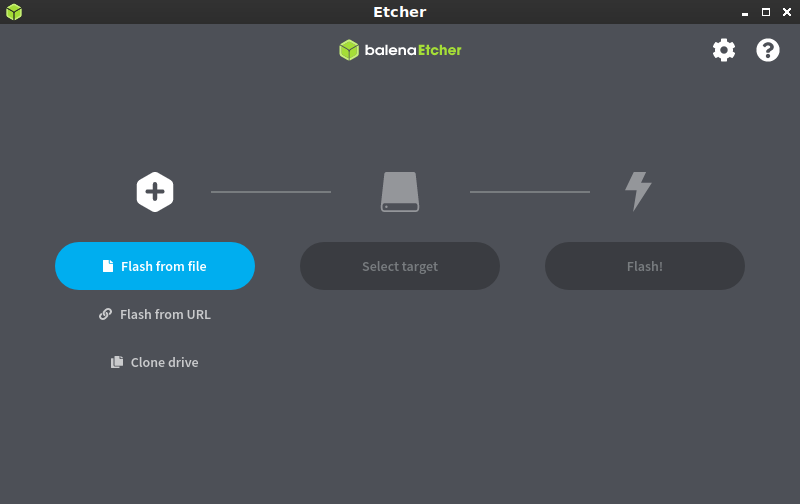
Ianything is unclear I am sure Edward will be back with questions how to flash a USB stick with Mint. And he will get all the assistance he needs :) Gotta start somewhere.
 
Ianything is unclear I am sure Edward will be back with questions how to flash a USB stick with Mint. And he will get all the assistance he needs :) Gotta start somewhere.
That and a lot of YouTube. I once flashed a disk for Google Chome whatever it's called, and that worked.
My computer time started with a ZX81, moved through a module on computer literacy (BASIC), through a Dragon 32 - a bunch of us built modems for our ham radio gear and sent data to each other in the early 80s - and eventually to Windows 3.11.
I also completed a Course in writing HTML.
That history is a long way short of making me an expert, but I can generally take a stab and, if luck is on my side, make things work.

I got as far as windows 8.1 (I was happy with that once I'd turned off updates), then a brief stab at W10 that tested my limited patience and with ended with me slinging a brand new laptop across the room because of a mad update. I bought a Samsung Tab S5e.
I gave Chromebook a shot and have been very happy with them, but the massive improvements on newer versions of Android (and a big corruption scandal) means Chromebooks are a dead duck in Indonesia. I still have four, but two are looking a bit jaded, and the tablet was never much good. That will be left at work once my new office is ready in July.

Android was perfect but I see it heading down the enshitification path that Windows took, so I'm looking for something to replace (or supplement) it - a belt and braces thing so I'm ready for the future.
I still cling to Amateur Radio for a hobby but I added Geopolitics (disinterested observation) to the short list of unusual passions I have. AI is a serious issue when it comes to searching controversial topics as it's so wildly inaccurate and hardly knows truth from fiction, but Google is stuffing it everywhere.
I'm hoping Linux has less (preferably no) AI.
The usual privacy concerns are there, but hardly a thing for me as I don't care what advertising tries to sell me. I ignore the lot anyway so, unless they popup me to insanity, I just skip them. It would be a bonus if Linux doesn't send my data everywhere, but not desperately important.
 
Please explain things as if I was five years old.
Hi little fella. Where's your mom and dad?

Sorry, but you sort of asked for that. :D

Welcome aboard.

I suspect a Windows 10 vintage Dell laptop will have no problems with most linux distros. The other guys here will probably have better recommendations for what distros might be good starting points. Assuming it's in decent condition, if that laptop is really painfully slow, it may be that the disk had little or no free space. If you're going to whack Windows entirely, that becomes a non-issue, but best to boot a live Linux from a USB stick and do dome exploring first. Again, others here are probably better able to guide you in that.

The skills you learned on the ZX-81... yeah, probably not gonna help much in the modern world... Though that experience does put you in good company. The first computer I had that was my very own was a Timex/Sinclair 1000 and, while I do miss it, I don't exactly yearn for those days (except in as much as I was younger and had more hair then).
 
In a nutshell:
First read this:

then this : (did i say nutshell ?....(I lied)
Install on a hard drive or a solid state drive..(ssd is faster) For Linux, the file system, or format, is usually ext4.

Not something you have to worry about. The Linux installer will automatically format the space you are using for Linux to ext4

The ""oh yea its just like windows , just burn it into a usb stick then boot in bios and boom" "" ....is largely correct....the really Incorrect part is "" its just like windows""....Linux is NOT windows, and never will be.


The simplest, most sure way to put aside all your fears and trepidation is to ""burn" it into a usb stick then boot it on your PC.... and there you have Linux, LIVE version. (Also known as the Test version....use it to Test out your pc's hardware and also see if YOU like it

Use Balena Etcher to 'burn' the Linux .iso to a 8GB usb stick bigger than 8GB is fine....just not smaller)

(Balena Etcher) Linux Mint Cinnamon/Xfce/Mate LMDE 7


(IMPORTANT....go into bios and turn off secure boot and fast boot. Read below.....
Most newer models show "UEFI only" because the platform does not support Legacy Boot mode.


Under Storage, SATA/NVMe Operation, check that AHCI/NVMe is selected.
Under Boot Configuration, Secure Boot, Enable Secure Boot, check that this is set to OFF. Also Fast Boot. OFF
Click the Apply Changes button at the bottom and then the Exit button.
Under the System Configuration section, SATA Operation, check that the dot is selected for Advanced Host Controller Interface (AHCI).

If any of these do not apply to your particular PC/Laptop, either ignore or ask for guidance for your particular situation.


This will not affect any install of windows already on the pc

To get into bios, tap the following key depending on laptop/desktop make:

To get into BIOS...

Acer: F2 or DEL
ASRock: F2 or DEL
ASUS: F2 for all PCs, F2 or DEL for motherboards
Dell: F2 or F12
ECS: DEL
Gigabyte/Aorus: F2 or DEL
HP: F10 or ESC
Lenovo (Consumer Laptops): F2 or Fn + F2
Lenovo (Desktops): F1
Lenovo (ThinkPads): Enter then F1
MSI: DEL
Microsoft Surface Tablets: Press and hold the volume up button
Origin PC: F2
Penguin: F2 (bios)
Samsung: F2
Toshiba: F2
Zotac: DEL

Then:

Insert the usb stick when your pc is turned Off....then start it and boot to that usb stick by tapping the relevant key for your pc/

This may take more than a few attempts. Don't lose patience. Tap gently, don't break the keys !


The key to tap to get to BOOT menu

Acer: Esc, F12, F9
ASUS: Esc, F8
Dell: F12
HP: Esc, F9
Lenovo: F12, F8, F10
Penguin: F7
Samsung: Esc, F12
Toshiba: F12
Sony: F11
MSI: F11
Gigabyte: F12
Intel: F10

Now...pay attention:
When Linux boots, it will be in LIVE/TEST mode. It is NOT fully installed, yet. This test mode will NOT interfere with any windows installed.

You can play around with it, navigate your way all around it, over it in it....knock yourself out!
It will be a bit slower than a fully installed system. ....but you will get a good idea how it reacts with YOUR pc, and your hardware.
Check sound....(youtube(via firefox browser) , Internet, all keys work ? screen resolution, ...all the normal everyday things that usually work for you....test them all. Play a video, etc. connect to facebook etc etc

Please Note: if you reboot or turn your pc off or you get a power failure, Linux will be gone....Kapoof !.....The LIVE version does not survive a reboot. If you want to go again....just repeat the boot procedure to the usb stick and it will be there again (This does not happen in the FULLY installed version)

NOTE: On the desktop, there will be an icon, with the name ""Install Linux Mint"

If you double click that it will start the procedure to FULLY install Mint on your pc.

Dual booting is not something I have much experience of, so I will not comment. (when I started with Linux, I wiped windows completely.....installed Linux straight over the top of windows...Kapoof!....windows gone, Forever)

To completely wipe Windows and Install Linux ONLY.....double click the install Linux Mint icon and follow the prompts. Install media codecs when asked. Password is up to you....Log in automatically is cool..... The password does not need to be complex...Just remember when using Linux, if you cross into the Terminal, (code etc) you will need to type in your password countless times...so an easy to type password makes a great deal of sense. (Got kids etc etc??...introduce a number into the password to increase its safety from prying little fingers.)

I don't wish to underestimate the importance of passwords. If your pc spends its time in a safe environment, then maybe you can afford to use a simplistic password..... but in open ares, coffee shops etc etc etc....keep your password secure

You will come to a screen which will offer your choices about the Installation TYPE you are going to do

1) ..Install Linux Mint alongside Windows Boot Manager... documents, music, and other personal files will be kept. You can choose which operating system you want each time the computer starts up

2) ..Erase disc, and install Linux Mint (ONLY)...Warning: This wil delete all your programs, documents, photos, music and any other files in ALL operating systems. This will automatically partition your drive....just sit back and watch the magic happen.

3) ..Something else. You can create or resize partitions your self, or choose multiple partitions for Linux mint.


(If there is data/music/anything of importance to you on the drive...SAVE IT elsewhere... even if you end up dual booting....save info elsewhere ! (better safe than sorry) An external drive is a must have to save wanted data etc to.


When the Install has finished, you can choose to continue messing around in Test mode....OR.....reboot your PC, take the usb stick OUT when prompted to do that.....

You are now running Linux Mint. FULLY installed.

........... ..........................

1st step?......turn on the firewall.

click on Terminal (it is down on the left side.....hover your mouse over it...one click will open it

Copy and paste this: (accuracy matter...copy and paste ensures no typos with letters or spaces

sudo ufw enable

hit enter

type in your password....hit enter again

Your Firewall is ON

No need for adjustments. (yes it works....the only time you will need to do that again is if you reinstall)

(You really want to check if it is actually on? (copy and paste again, please)

sudo ufw status

See?...I told you !


You can now look shocked......you have just used...code ! (Shock horror !)

And, there is currently no need for an AV when using Linux.
That may change in the future, but I cannot see it on the horizon.

Linux is inherently safe. You will realize why upon gaining experience with it and reading more, usually on the better forums, like : www.linux.org

+++++++++++++++++++++++++++++++++++++++++++++++++++++++++++++++++

 
As a point of information, mummy and daddy are pushing up daisies, as I will likely be doing in 10 to 20 years.
Since my ZX81 days, my black curly hair and bright white teeth have swapped adjectives.
My favourite computer days were defined by my Dragon 32. They were fun.
 
sudo ufw enable

hit enter

type in your password....hit enter again

Your Firewall is ON

No need for adjustments.
And as the user advances there are some fine tuning settings to be manually configured if they wish. I don't recall whether they're in
Code:
/etc/ufw
or what it's been a long time since I used ufw. Ta-da (though there are more options). But there are a number of permissive options in there by default which (should) really be disabled/reconfigured when the user is sure of what they're doing; according to their network setup. The same goes for sysctl settings which a number of goodies should be added to the config.

Otherwise, for most beginners, default is fine.
 
Last edited:
Welcome to the Forum.
1780030890490.gif
 
I've moved this thread to 'Member Introductions'. That seems more appropriate, as this isn't really a question thread.

I disagree, David - the predominant nature of the Q&A and responses from Members is of a support nature.

I'm moving this to Getting Started.
 
We have landed.

We have landed and you can unbuckle your seatbelts and begin to gather your luggage.Thank you for flying Air Wizard and we hope to see you again soon.

...and welcome to @Edward B

Chris Turner
wizardfromoz


Follow Linux.org

Staff online

Members online


Top