....and now it's upgrade time for the Pavilion desktop : new GPU + CPU!

MikeWalsh

Well-Known Member
Joined
Aug 29, 2022
Messages
2,149
Reaction score
3,037
Credits
29,711
Well; now then :-

For the last year or so, the bulk of my upgrades / improvements / new purchases have been on the replacement Latitude I bought about 14 months back, in early September 2024. More RAM, better, more decent storage - and more of it! - new webcams, and other accessories......y'all know the drill, I'm sure.

For what it is, for a 13-yr old machine the E6430 is going great guns, and I'm really pleased with it. It was time to turn my attention to the main box.....in case the old girl was feeling 'left-out'! :D

~~~~~~~~~~~~~~~~~~​

One thing I'd been meaning to sort out for a while was the GPU. I've been happy with the Nvidia GT 710's performance, but there's always been one very slight niggle.....and that was an all but unnoticeable diagonal 'displacement' (that's my term for it; "tear"? "artifact"? I confess, I don't know the terms for these; gamers would know in an instant, but I'm no gamer) across the top two-thirds of the screen from one side to the other.

In normal use, you can barely see it.....but you know how it is; once you're 'aware' of something, you ALWAYS 'see' it....yeah?

With this Pavilion, I can't go crazy with a GPU; HP have saddled it with a dozy, slimline, low-output PSU that ya can't upgrade for love or money, 'cos nobody makes replacements for it. And it only puts out 180W.....which was the reason for the GT 710 'passive-cooler' in the first place; 'Kepler'-based, it consumes just 19W, through the slot itself.

Anyways; I've gone up a generation. I'm now on a 'Pascal'-based card, and into the GeForce 10-series. Not a GTX1050 or 1080, nowt like that; I've gotta keep that power consumption as low as I can, so this is the 'cooking', entry-level Pascal GPU, the GT 1030. This pulls just 11W more than the GT 710, for a total of 30W.

~~~~~~~~~~~~~~~~~~~~~~​

I had to move my add-in SATA card across one slot; this card is just a fraction longer than the GT 710, but it's got a massive hunk of aluminium hanging off the side. Yep; I've gone for another 'passive-cooler', 'cos the whine of GPU fans drives me nuts. One of these:-


....made by a company called Inno3D. Who I'd never heard of, but when it turned up this morning and I took a quick look at it initially, I was rather impressed with the standard of construction. It's definitely very well-made.
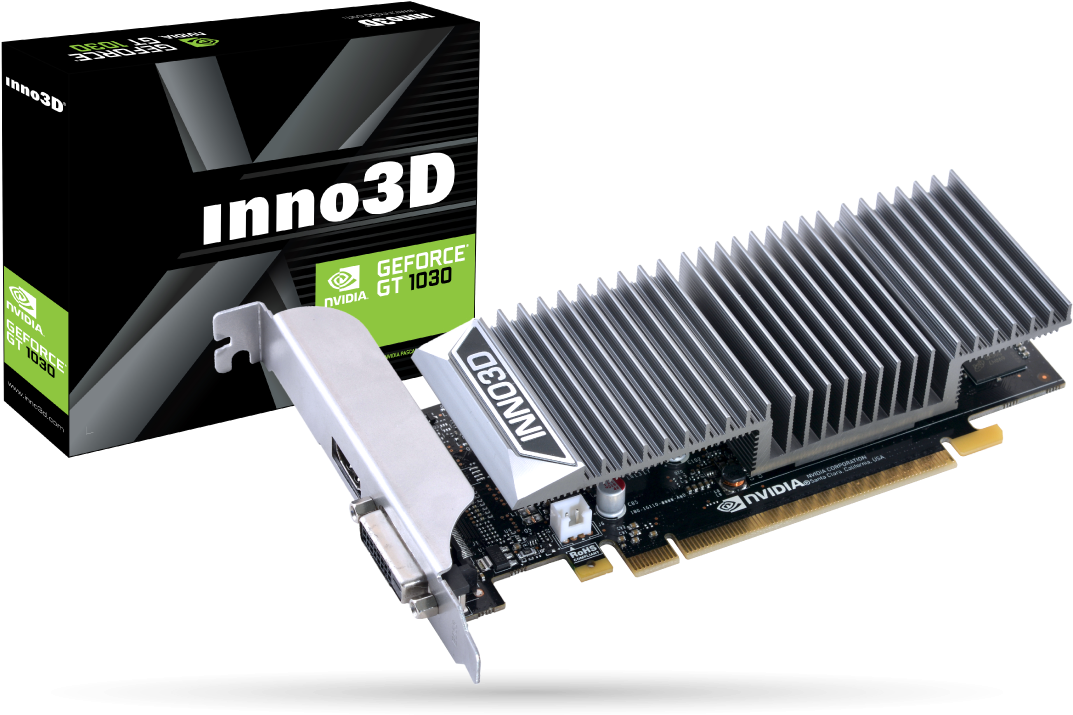
Inno3d-Ge-Force-GT-1030.png


Now it's installed, the best bit is that none of my various drivers will need replacing! I did a LOT of research earlier today - spent quite a bit of time on Nvidia's website, tracking info down - and it turns out that every driver in use across the kennels ALL support this card anyway.

There's also one BIG advantage to that huge, chunky heatsink. This thing runs as cool as a cucumber! The GT 710 used to average high 40s / low 50s....and the other day, I saw it as high as 73C when I was trying out an indie game I'd downloaded from itch.io. So far, the highest I've seen on this is just 36C...

It was nice though; firing-up Puppy, and this thing just 'worked', WITH the existing official drivers, with NO messing about. I call that a result!
good.gif


Mike. ;)
 
Last edited:


My new box had a wine, so I told the wife to go in the other room :eek:
 
One place I'm already noticing a BIG difference is in Google Earth. It wasn't exactly slow with the GT 710.....and a lot faster than with 'nouveau'!.....but the thing simply flies with the new GPU. Punchy, responsive.....and it's all instantaneous now.

Nice one.


Mike. ;)
 
Must have a look on my new box it's on board graphics but a big step up from the last one, I also allotted it 64mb of ram instead of the default 32mb
 
@Brickwizard :-

The ancient Compaq was 'maxed-out' at just 4 GB - this WAS DDR1, of course.....but even so, I think I remember allocating 128 MB to the ATI Radeon XPress 200. I also tweaked the setting on the Athlon64 X2's HyperTransport on-die memory bus; it was set at 600 MHz, so I cranked it up to its 1 GHz max. That alone made a huge difference to how responsive it became afterwards...


Mike. ;)
 
so I cranked it up to its 1 GHz max
you can't have as much fun these days, I can remember getting my firs 56kb v90 modem, some American make, I managed to crank it up to just over 90kb yet the phone company didn't notice.
 
Last edited:
@Brickwizard :-

you can't have as much fun these days
Nah, you're right there; you can't. One reason, of course, is that everything is cranked up close to its limits OOTB. There's very little headroom left to play with, even in the "unlocked" variants.

I always found with older kit - more so AMD than Intel, strangely enough - that even on 'locked' CPUs, there were a whole host of lesser BIOS settings you could still tweak to your heart's content. It was totally possible to effect a considerable performance improvement even without messing with the voltage and/or bus multiplier.

That's one thing I wouldn't mind regressing through time for..!! Hardware is - shall we say - less "accessible" these days. It's usually a case of being stuck with using it in whatever condition it leaves the factory...


Mike. ;)
 
Last edited:
Enjoy your new upgraded system Mike!
@f33dm3bits :-

I will, Maarten.....but I shall be even happier when I get this silly 180W PSU replaced in the next few days.

I didn't think it was possible to upgrade the dozy thing, but I'd heard through the grapevine that it was.....so some digging unearthed a post on the HP Support Forums from somebody else who wanted to upgrade their 590-series Pavilion. Coincidentally they, too, wanted to install a GeForce 10-series GPU, though a bit "hotter" than mine (a GTX 1650 ti).

The post was only a few months old, and it led me to a link on Amazon for a company that do 400W replacements for these Pavilions. No, it's not much by today's standards, I know.....but that'll more than double what I'm stuck with at present, AND put my mind at ease!

(Running a PSU calculator the night before last showed I was right on the limit with this new card.....and that's NOT a situation I'm comfortable with).

By all accounts, the replacement should be relatively straight-forward & painless. We shall see...


Mike. ;)
 
Last edited:
I didn't think it was possible to upgrade the dozy thing, but I'd heard through the grapevine that it was..

Yeah, there are companies who provide alternative power supplies. Dell also does the proprietary power supply thing.
 
With the efficiency of modern fabrication of graphics chips etc a lot of high powered graphics cards require less and less power supply power.

I used to run dual geforce-8800-gtx-768mb-graphics-cards sli configuration using only a 650 watt power supply without issues.


Graphics cards now are way more powerful and use less power supply power.

Your 400 watt power supply should be more than enough to run that card in your current desktop imo.
 
Yeah, there are companies who provide alternative power supplies. Dell also does the proprietary power supply thing.
@KGIII :-

Mm! I have quite a bit of experience with HPs in one form or another, and I've yet to see ONE of their machines that uses a standard, off-the-shelf PSU.

As for Dell; yup. Have to agree. They're JUST as bad in that respect.


Mike. o_O
 
@The Duck :-

Aye, pretty much all electronics are becoming less power-hungry as time goes by....though I do wonder about, say, the top-end RTX-series Nvidias. 450-600W seems to be standard with those.

With the standard PSU having such a low output, I knew I didn't have much headroom with the GT 710. I knew the GT 1030 would leave even less, even though it's JUST 11W more. But I didn't realise quite HOW close to "the edge" that would put me.

With the new 400W one I have on the way, it'll give me peace of mind at last.....and still leave me some room for future improvements if required.


Mike. ;)
 
As for Dell; yup. Have to agree. They're JUST as bad in that respect.

Fortunately, the 'free market' knows this, and you can also buy aftermarket power supplies in Dell's format.

I don't know how many they sell. I'm not sure how many people look for these and then bother upgrading an old desktop. I can't imagine it's a huge percentage, but Dell and HP have made a zillion computers. So, surely a small percentage must add up.
 
I have a few full size HP desktops and they use the standard ATX power supply's.

I have a few SFF HP desktops that use the little proprietary power supply and when they fail the whole desktop goes in the trash can.

Most folks buy oem desktops are data cruncher's and not gamers or video buffs that need high powered graphics cards and generally not going to upgrade.
 
@The Duck :-

Yah, agreed; most who buy an OEM desktop ARE folks who will just use it as it comes, for whatever they use one for.

Me, I'm something of an outlier. I've always gone with OEM machines, though the must-haves that I look for are a decent CPU and a new enough generation of RAM, along with the ability to 'max-out' that RAM to a decent amount. The DIY scene has never really appealed to me, though I will 'modify' an existing machine pretty much as far as I can take it....

Everything else is up for debate as to what I do about it. Large quantities of storage, yes; that goes without saying.

I'm no 'gamer', so I don't want a hyper-powerful, top-end GPU anyway. That's not what I want a better one for.

~~~~~~~~~~~~~~~~~~~~​

With me, it's all to do with video editing. My 'go-to' app has for years been Openshot.....and more recent releases now have the ability to "offload" much of the encoding 'grunt work' associated with rendering to a discrete GPU, if one is detected. Simple reason for this is because the 'parallel processing' nature of a GPU is very well suited to this kind of workload.....and a GPU will handle it far more elegantly than a CPU can.

For this to work, the 'official' drivers ARE required.

I wanted something with a little more "oomph" than what I had.....but I didn't have any intentions of going daft with it (hence why I've only gone as far as the GT 1030). It will do what I need, quite happily; for me, a GTX or RTX is just overkill. The 1030 was more or less the final release in the 10-series; as such, it benefited from much of the development work that went into the earlier, more 'top-end' cards, despite being a 'cooking' variant.

It's also quite a physically small card.....less than half-an-inch longer than the 710.....so it fits into a mid-tower case just fine. The 2 GB of GDDR5, though small by gaming standards, are quite enough for the rendering work I put it to.

Nah, I've been thinking about & looking into this 'upgrade' for a while now. Believe it or not, there IS "method in the madness"!


Mike. ;)
 
Last edited:
Well. THAT was easy.

I think that had to have been the simplest PSU swap I've ever performed. I know many of us find fault with HP for all sorts of niggling reasons, but I'll give 'em their due; the desktops, at least, are remarkably easy to work on.

  • Remove the cover
  • Unscrew and tip the drive "tray" back on its pivots
  • Remove power & data cables - 2 x storage, 1 x optical. Slide optical drive out of its bracket, and unplug cables from mobo
  • Lift away the drive "tray" with attached drives and put it to one side

==================================

  • Unplug 2 x 4-pin + 1 x unusual 7-pin micro-connector
  • Release cables from clips
  • Remove 3 screws
  • Depress a clip, and slide the PSU forward, and...
  • ...lift it away.

And then refitting is the above in reverse, of course. Simples! (as the UK TV meerkats would say).

Noticeably, there is ONE major difference between the two PSUs. The new 400W one has a pair of 6+2 connectors, marked PCI-e.....obviously for any user-fitted GPUs that may need them. These are absent from the 180W original.....but given the very low output, not surprising. It's barely got enough power to run itself, never mind a powerful GPU!

I'm a LOT happier now. Onwards & upwards....


Mike. ;)
 
Last edited:
Mm. Now then:-

Following my remarks here:-


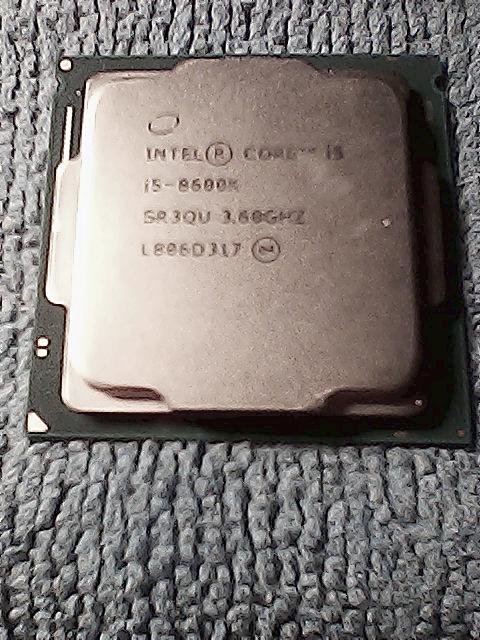
.....about the LGA 1151 Core i5-8600K (6-core; NO hyperthreading, just 6 real cores), I went ahead and ordered the one I found on eBay, for GBP £42.23p.

This has come from a firm based up in Staffordshire, UK, called PCs4U.co.uk. They appear to specialise in refurbishing complete office/business desktops and laptops.....and the same for those stripped-down for parts, along with various selected accessories.

It turned up this morning. Extremely well-packaged - you could have dropped a heavy weight on this and you wouldn't have hurt it - it's in really nice condition. My guess is this has been in one single machine, and one only; the heatsink is immaculate, with none of the scratches & gouge marks I've often seen on second-hand CPUs. Essentially, it appears to be "as-new".

DSC-0000020.jpg


(Sorry for the crap picture quality. It's astounding how hard it is to get lighting, etc, "just so" when you're taking indoor pictures 'on-the'fly'...)

TDP's a bit higher here; 95W against the current Pentium G5400's 58W. Still, the socket's designed to handle a range of TDPs, so long as your PSU can deliver.....and the new one now will (and still leave me a reasonable amount of "headroom"). I'm not anticipating any major issues, though I'm still in two minds about re-using the bog-standard Intel heatsink.....

It's a few years since my last CPU swap.

This probably won't be going in this side of Xmas. I won't be rushing into it. A bit more research is on the cards yet, but I DID want to grab this particular one before it disappeared (it had quite a few 'watchers' when I came across it, so I could see it going AWOL before too much longer!) :)

Watch this space.


Mike. ;)
 
Last edited:
Core i5-8600K (
it should be OK, but my CPU compatibility chart says there is a 10% chance it may not, I have bought several re-furb CPU's over the years and they all have looked brand new and apart from 1 I got for my previous HP pro-desk that didn't work,[it had a 5% fail rate, and it failed on mine] but I got full refund as i had dealt with the seller before
 
it should be OK, but my CPU compatibility chart says there is a 10% chance it may not
@Brickwizard :-

What's your compatibility chart telling you about this one, Brian? In case I didn't mention it, this HP mobo has the H370 chipset. Dunno if that helps at all..?

I'm assuming I also need to turn off H/T in the BIOS/UEFI.....or is that strictly necessary, IF H/T doesn't exist in the first place?


Mike. ;)
 
Last edited:


Follow Linux.org

Members online


Top