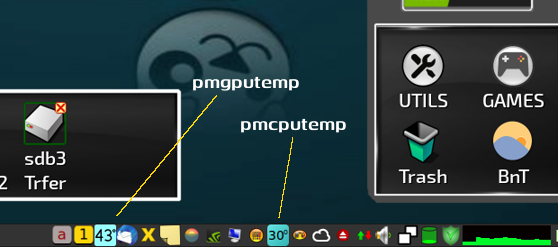
Harking back to my last posted desktop screenie, here:-
.....I have an update. Just a small one, but it may be of interest to some of you.
~~~~~~~~~~~~~~~~~~~~
I got my first ever dedicated GPU back in 2020, shortly after the old Compaq desktop rig died and I treated myself to my first new machine in I can't remember how long.....the current HP Pavilion mid-tower desktop rig.
This only came with 4 GB RAM as supplied, and of course, the on-die Intel graphics steal some of that as pseudo-VRAM. I'd upped that to 8 GB, but at the time I didn't see me installing much more.....although that's since been covered here elsewhere. To offset this, I wanted just a basic GPU with its own dedicated VRAM - I'm not a gamer, and apart from a bit of video-rendering, don't use it for much else - so a 'cooking' Asus GeForce GT 710 passive-cooler fitted the bill. For me - and 'our Pup' - this was fine.
I also had to be careful with power consumption; the Pavilion uses a weird, slimline PSU of just 180W due to size restrictions, and it's all but impossible to upgrade. The GT 710 draws just 19W, through the slot itself. It all works very nicely, especially with the official drivers compiled/installed via our native GetNvidia utility and the official .run file.
~~~~~~~~~~~~~~~~~~~~~
About a year or so back, I looked into a tray-based method for ascertaining the GPU temperature at the click of an icon, and codged together NvidiaTrayTemp:-
A GTK-dialog banner at the top of the screen displays the GPU's core temperature at a click, displayed for 8-10 seconds. It works with the official driver AND 'nouveau', so works for everybody with an Nvidia card, regardless of how it's running.
I did the above because I hate digging through menus to find the Nvidia info GUI. This way it's there in the tray in front of you, ready to go at a single click....
Fast-forward to early autumn this year...
Our chief steward, Mick Amadio, who took over the reins when Barry stepped-down as head honcho in 2013, wrote a small utility many years ago called
pmcputemp (poor man's CPU temperature readout), which places a simple 'live', auto-updating icon in the notification area that gives a continuous CPU temp readout using a bunch of SVG images. I got looking at Micko's script, and realised that the detection script I'd written for the tray utility could be easily modified to work with this. However, I didn't know how to translate the output to work with the tray icon, so I enlisted the help of one of our members who's a wiz with this kind of thing.....an Aussie who goes by the handle of
ozsouth.
Between us, we did some experimenting, and Oz hacked & re-compiled the source code Micko had put up on Github when he wrote pmcputemp all those years ago.....along with a couple of wee scripts to tie everything together. Result? I now have a continuous GPU temp readout in the tray as well as the CPU temp readout. We've called it
poorergputemp.
As with pmcputemp, the icon changes colour throughout the temp range, getting 'redder' & 'hotter' as the temps rise and everything turns more toasty! Oz also re-worked the original SVG numeric images to make everything just that little bit larger & clearer.
Frankly, Dave outdid himself with this one. Me, I think it's great for what I wanted. Neat, huh?

Mike.