
I tried your suggestion to no avail. Tried manjaro as well,no go.@noelw, just saw your latest post. It is possible the necessary driver is just niot present in the kernel.
AS well as looking at MX Linux, you could also wait for @Brickwizard to see this post, and see what he can suggest. Because I just mentioned his name, he will see the post next time he comes online

You are using an out of date browser. It may not display this or other websites correctly.
You should upgrade or use an alternative browser.
You should upgrade or use an alternative browser.
No Sound
- Thread starter noelw
- Start date

@Mike-W0BTU, have you tried changing the kernel ?
I did, thank you.
I even tried a couple of zero-latency kernels, neither of which booted.
And Debian has had several kernel changes. Each time, I hope that this new one will solve it, but nothing ever happens.
Makes no difference at all. Thanks for all your suggestions.Noel. as a last resort you could try going back to the older sound server which was called Pulse Audio.
Code:apt purge pipewire pipewire-bin systemctl enable --user pulseaudio sudo reboot
One line at a time....press enter between each one etc
Makes no difference at all. Thanks for all your suggestions.
Ah, I did too! No difference.
What version of Debian did you first install? It was 12.4 for me.
Thanks for all the help with this problem. I have resigned myself to the fact it cannot be sorted at this point. I will wait till something appears to rectify this. In the meantime it is back to Ventura. I will be waiting with baited breath. Thanks again for all your help good people.
Ah, I did too! No difference.
What version of Debian did you first install? It was 12.4 for me.
https://github.com/davidjo/snd_hda_macbookpro. This did look promising I must admit.
12.4 as well. It has been fun trying though.
That release didn't include pipewire. So, I installed it manually. If that's the case with you (was it?) perhaps ...

I keep one of these in my spares box, basic ones are comparatively cheap, mine is similar to this oneI just found out about a usb soundcard. A little research is in order. Any thoughts on this. Ta
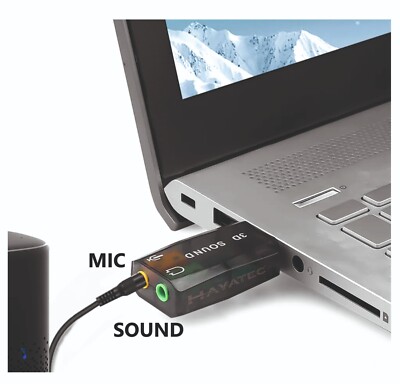
MINI JACK PC HEADPHONE MIC TO USB ADAPTER External Sound Card for Laptop Macbook | eBay UK
Upgrade your audio setup with the MINI JACK PC HEADPHONE MIC TO USB ADAPTER and enjoy clear and enhanced sound quality effortlessly. Simply plug the Sound Adapter into your USB port and connect your headphones, mic, or compatible audio device.
www.ebay.co.uk
Possibly a silly question but do these put their volume control on the taskbar/panel. Thanks for this BTW.I keep one of these in my spares box, basic ones are comparatively cheap, mine is similar to this one
MINI JACK PC HEADPHONE MIC TO USB ADAPTER External Sound Card for Laptop Macbook | eBay UK
Upgrade your audio setup with the MINI JACK PC HEADPHONE MIC TO USB ADAPTER and enjoy clear and enhanced sound quality effortlessly. Simply plug the Sound Adapter into your USB port and connect your headphones, mic, or compatible audio device.www.ebay.co.uk
you will still have the same sound management app, but you will need to open settings for it and select the usb sound output, later i will try and do a quick pict for you.

Condobloke
Well-Known Member
This may be wayyyyy off base.....but some years ago I was having trouble with sound. I forget the actual detail, which is unfortunate............but.............
I have a 'thing' which is labelled '3D SOUND'
It resembles a usb stick in appearance. One end fits into a usb port, and the other ...see the pics below


On ebay Australia....
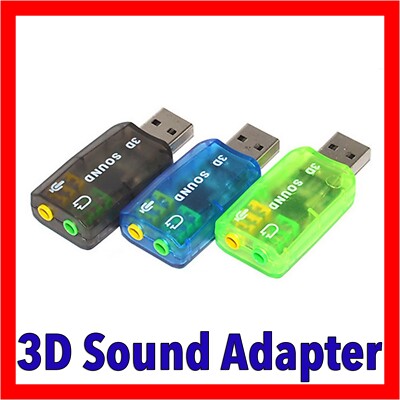
I have a 'thing' which is labelled '3D SOUND'
It resembles a usb stick in appearance. One end fits into a usb port, and the other ...see the pics below
On ebay Australia....
USB 2.0 to 3.5mm mic headphone Jack Stereo Headset 3D Sound Card Audio Adapter | eBay
Connectors: USB Type-A, Stereo output jack, Mono Microphone input jack. 3D Sound USB Adapter. 1 x 3D Sound Adapter (Colour of your choice). USB 2.0 to 3D Audio Sound Card External Adapter Virtual 5.1 CH Mic + Headphone.
www.ebay.com.au
You are very kindyou will still have the same sound management app, but you will need to open settings for it and select the usb sound output, later i will try and do a quick pict for you.
This is a screenshot with the adaptor connected [mint LMDE] note box 1 is the onboard sound, box 2 is the digital adaptor box 3 is the external speakers

Most helpful indeed. I will utilize the usb sound until this is rectified. Again i thank you and i have said this a few times in the past, bloody good people on this site.This is a screenshot with the adaptor connected [mint LMDE] note box 1 is the onboard sound, box 2 is the digital adaptor box 3 is the external speakers
View attachment 25445
A bit of history, I got the adaptor for my HP desktop, I had a similar problem to yourself and not one suggestion worked,, it had been in the machine for about 9 months, I was sorting out my office, unplugged everything to move and clean the desk top, when i put it back i tried the sound without the adaptor and it worked [what ever the problem it seemed to get fixed during one of the updates]I will utilize the usb sound until this is rectified.
Similar threads

- Replies
- 5
- Views
- 1K

- Replies
- 0
- Views
- 460





