
Micro SD card gets disconnected

Trynna3

Active Member
Joined
Jun 5, 2024
Messages
470
Reaction score
234
Credits
4,500
It happened several times on my LMDE now. The micro SD card with music I have inserted to the micro SD card port randomly gets disconnected by itself. On average once in every 2 weeks or so, but that is just a wild estimate on my side.
Why is it happening? Both Nemos shut down by themselves and then I found out the SD card got unmounted? Not sure it is the right word for it. I had to remove it and insert back in to appear in the connected devices by itself, again. No updates have been happening at this time, just updating some track info in Clementine, or searching for tracks...


Lots of possible answers, so let's take the common ones,
How old is the SD card the normal life span depends on quality of the card and the number of read writes it has done, this can be a low as 2 years [on dash cams and professional cameras that get a lot of use, to 10 yrs for cards just used for storage with occasional access.

Re-sync the card.. Unmount, remove re-boot machine and reinsert card.

Are the contacts clean, remove card and carefully wipe contacts with soft dry cotton or linen [lint free] cloth, DO not use Synthetics.

Try the card in another machine, if it has the same problems then it may be corrupt or dying
 
Last edited:
Lots of possible answers, so let's take the common ones,
How old is the SD card the normal life span depends on quality of the card and the number of read writes it has done, this can be a low as 2 years [on dash cams and professional cameras that get a lot of use, to 10 yrs for cards just used for storage with occasional access.

Re-sync the card.. Unmount, remove re-boot machine and reinsert card.

Are the contacts clean, remove card and carefully wipe contacts with soft dry cotton or linen [lint free] cloth, DO not use Synthetics.

Try the card in another machine, if it has the same problems then it may be corrupt or dying
Thanks, the card is quite new, had it for about a couple months. I am amending tracks on it, so I guess it gets overwritten in various places quite a lot. I am nearing the end of my 'mission', so it will be more read only from then on and backed up elsewhere. The laptop is also in a good state so I don't expect dust or stuff blocking the contact.
 
yeah that sounds like your micro SD card is throwing little tantrums now and then. could be flaky contact in the card slot (they wear out), or LMDE’s power management messing with it—like it thinks the card’s idle and tells it to nap. also, some SD cards just don’t play nice for long periods of mounting. try disabling autosuspend for the card reader or see if dmesg shows errors when it happens. if it’s random but repeatable, might be hardware gremlin more than software. annoying, I know.
Could this be it? i don't see any date or time, so I am blank. sdb is indeed the sd card.

[172228.671679] sdb: detected capacity change from 243507200 to 0
[172229.022277] sd 1:0:0:0: [sdb] tag#0 access beyond end of device
[172229.022283] I/O error, dev sdb, sector 71371969 op 0x1:(WRITE) flags 0x0 phys_seg 1 prio class 2
[172229.022286] Buffer I/O error on dev sdb1, logical block 71369921, lost async page write
[172229.022292] sd 1:0:0:0: [sdb] tag#0 access beyond end of device
[172229.022293] I/O error, dev sdb, sector 71371984 op 0x1:(WRITE) flags 0x0 phys_seg 1 prio class 2
[172229.022294] Buffer I/O error on dev sdb1, logical block 71369936, lost async page write

or in colour:
1750160332566.png
 
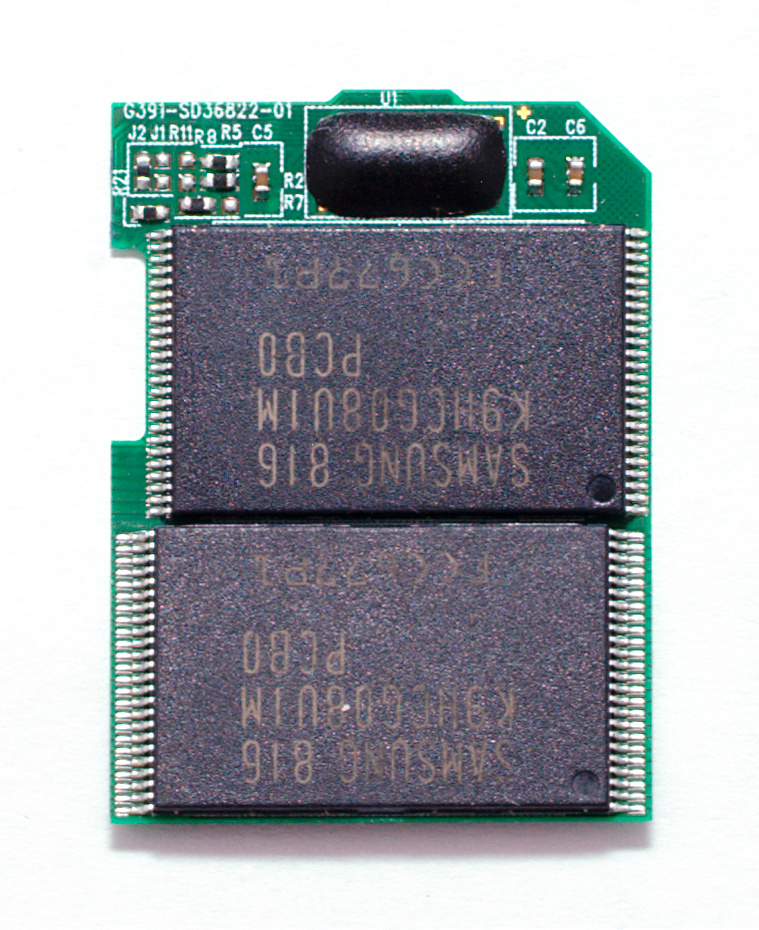
Sounds to me as though whatever passes for the card's "controller" is on the blink. I hesitate to call it a controller 'chip'; it's more likely a single integrated circuit along with the NAND flash silicon, all created in one piece.

(Okay; older SD cards had a separate 'controller' chip. Modern ones - especially microSD/microSDHC - do indeed have it on the same circuit as the NAND flash chips......mainly due to space constraints, though under a blob of epoxy to keep it 'separate'):-

Pretec_16GB_SDHC_without_cover_20090420.jpg


Quite how you get into the 'micro' variants I don't know. You can't separate the case halves like you can on the full-size ones, 'cos the circuitry is embedded into the card material similar to a bank card's PIN chip.

My guess is there isn't much you can do to 'fix' the issue unless it's the reader causing the problem. If it's the card, probably cheaper to chuck it & replace it.


Mike. o_O
 
what filesystem on SD card?
Did you try running file system check tools? (at time when SD card works). Forgot to mention, you will need to manually unmount SD card when doing file system check.
If i had this sort of issues - i would run fsck tool and if found errors - would reformat.

If during reformat I would get errors - I would assume hardware failure on reader of SD card or card itself, likely card.
After short usage, if problems after re-format happened again I would use fsck tool again. If same errors again - i would beyond doubt assume hardware fault.
 
Last edited:
I am amending tracks on it, so I guess it gets overwritten in various places quite a lot. I am nearing the end of my 'mission',
When i fancy a new selection of music in the car, I build the folder with the music in the order I want it on my desktop, then when finished write the whole thing in one go [My car uses USB's but its the same principle]


Follow Linux.org

Members online


Top
