
You are using an out of date browser. It may not display this or other websites correctly.
You should upgrade or use an alternative browser.
You should upgrade or use an alternative browser.
How to locate an external HDD connected to the PC?
- Thread starter DiaNobb
- Start date
theLegionWithin
Well-Known Member
from the terminal, lsblk - if it's not in the list, disconnect the drive & reconnect it & check again - failing that, reboot.

CaffeineAddict
Well-Known Member
It won't be shown in file manager if it's not formatted.
It won't be shown also if file system isn't auto mounted.
It won't be shown also if file system isn't auto mounted.

Open the graphical disk tool(gnome-disk-utility) which is installed by default with Cinnamon and see if your external disk is listed.

 www.fosslinux.com
From there you should be able to mount it if it has a file-system. With what file-system is the external disk formatted if you already have data on that?
www.fosslinux.com
From there you should be able to mount it if it has a file-system. With what file-system is the external disk formatted if you already have data on that?
How to Install and Use the GNOME Disks Utility on Ubuntu
I breakdown how to surgically manage your storage using GNOME Disks. From predictive SMART failure audits to LUKS encryption, learn how to secure your data today.
www.fosslinux.com

Condobloke
Well-Known Member
click on menu
type in disks
click it open
Do you see the external hdd there ?
If so, click on the gear wheel....

then Edit Mount options. Set it as the pic below shows

click ok to close
Reboot
Does it now appear ?
type in disks
click it open
Do you see the external hdd there ?
If so, click on the gear wheel....
then Edit Mount options. Set it as the pic below shows
click ok to close
Reboot
Does it now appear ?

Thanks.from the terminal, lsblk - if it's not in the list, disconnect the drive & reconnect it & check again - failing that, reboot.
The names listed are:
sda
sdb--sdb1
sdc
sr0
I do not know which one is the external hard drive.
DiaNobb
Thanks.It won't be shown in file manager if it's not formatted.
It won't be shown also if file system isn't auto mounted.
"It won't be shown in file manager if it's not formatted."
Do not know what "file manager" is. The disk was formatted in Disks.
"file system isn't auto mounted." Do not understand. I am a newbie.
DiaNobb
Thanks.Open the graphical disk tool(gnome-disk-utility) which is installed by default with Cinnamon and see if your external disk is listed.
From there you should be able to mount it if it has a file-system. With what file-system is the external disk formatted if you already have data on that?How to Install and Use the GNOME Disks Utility on Ubuntu
I breakdown how to surgically manage your storage using GNOME Disks. From predictive SMART failure audits to LUKS encryption, learn how to secure your data today.
There are Graphics and Graphics Tablet in the menu. Which one is the "graphical disk tool" to be opened?
DiaNobb
Condobloke
Well-Known Member
click on menu
type in disks
click it open
External HDDs and SSDs come Formatted and Auto-Mount...the same for Flash Drives...it's the Internal ones that are not.
The Disk Utility is installed by default in Linux Mint...type...disks in the search box and hit Enter to open it.
The Disk Utility shows Drives Mounted and other things but you don't need to use it to Format an External Drive or Flash Drive.
When you plug in a Flash Drive or External Drive it's shown on the Desktop...in Disks and Computer...here's my Flash Drive in Disks...

Here it is in Computer...


The Disk Utility is installed by default in Linux Mint...type...disks in the search box and hit Enter to open it.
The Disk Utility shows Drives Mounted and other things but you don't need to use it to Format an External Drive or Flash Drive.
When you plug in a Flash Drive or External Drive it's shown on the Desktop...in Disks and Computer...here's my Flash Drive in Disks...
Here it is in Computer...
CaffeineAddict
Well-Known Member
Do not know what "file manager" is.
I'm baffled, you should really have learned so far what a file manager is,Do not understand. I am a newbie.
or at least searched the web for meaning.
Thanks.External HDDs and SSDs come Formatted and Auto-Mount...the same for Flash Drives...it's the Internal ones that are not.
The Disk Utility is installed by default in Linux Mint...type...disks in the search box and hit Enter to open it.
The Disk Utility shows Drives Mounted and other things but you don't need to use it to Format an External Drive or Flash Drive.
When you plug in a Flash Drive or External Drive it's shown on the Desktop...in Disks and Computer...here's my Flash Drive in Disks...
View attachment 29541
Here it is in Computer...
View attachment 29542
View attachment 29543
The external USB hard disk is in Computer and Disks. In Computer, it appears as a document. In Disks, it is a drive just like other drives listed on the left of the page. It shows as an empty just like your USB SanDisk.
Cannot save any file to my USB external HDD.
DiaNobb
I don't think you know what you're looking at...in Computer it's shows what it is...if you double click it...all on the Drive will be shown...so how can it be empty.Thanks.
The external USB hard disk is in Computer and Disks. In Computer, it appears as a document. In Disks, it is a drive just like other drives listed on the left of the page. It shows as an empty just like your USB SanDisk.
Cannot save any file to my USB external HDD.
DiaNobb
In Disks...you can't open the Drive to show what's on it...but it shows information about it...it's that simple.
theLegionWithin
Well-Known Member
Thanks.
The names listed are:
sda
sdb--sdb1
sdc
sr0
I do not know which one is the external hard drive.
DiaNobb
can we get a screenshot of the terminal showing the result of lsblk? also, what is the size of the usb drive?

or as your using Mint, inxi -dscreenshot of the terminal showing the result of lsblk?
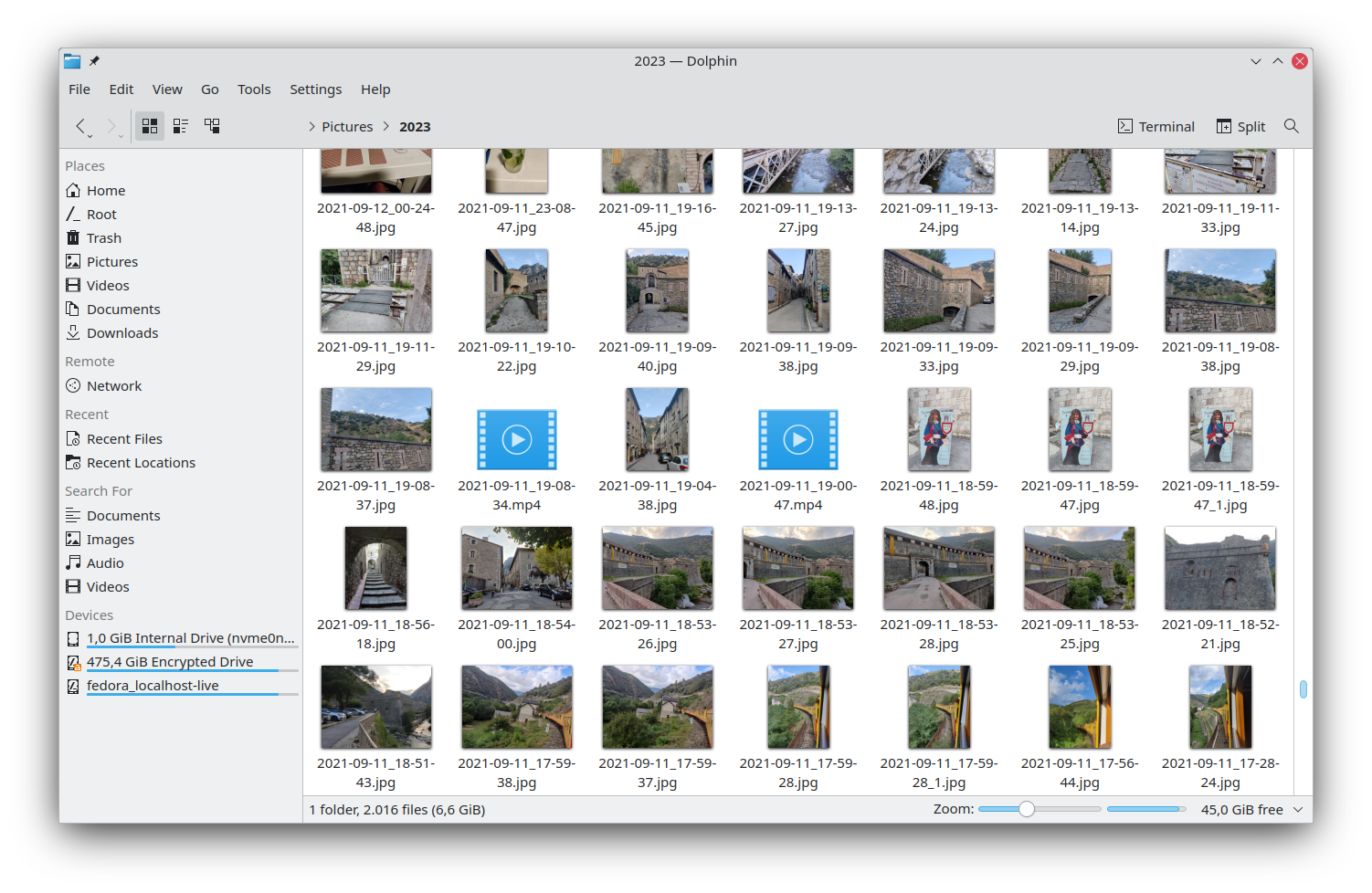
Even Windows has one, it looks like this.I'm baffled, you should really have learned so far what a file manager is,

Here's one of the one of available Linux file-managers.

Thanks.click on menu
type in disks
click it open
Do you see the external hdd there ?
If so, click on the gear wheel....
View attachment 29534
then Edit Mount options. Set it as the pic below shows
View attachment 29535
click ok to close
Reboot
Does it now appear ?
"then Edit Mount options. Set it as the pic below shows"
Every letter is in grey, including the Edit Mount Options.
DiaNobb
Condobloke
Well-Known Member
Is the external plugged in ?
Similar threads
- Replies
- 37
- Views
- 3K

- Replies
- 16
- Views
- 2K

- Replies
- 19
- Views
- 2K

- Replies
- 7
- Views
- 763




