Going to try Wine

Trynna3

Active Member
Joined
Jun 5, 2024
Messages
470
Reaction score
234
Credits
4,500
There are a couple pieces of software that don't have Linux equivalent, like Canvas Workspace. I want the downloaded version, not the cloud online version, as the downloaded one has more functionalities.
The AI says "For more recent versions, you might need to add the WineHQ repository. Follow the official WineHQ guide for Debian-based systems." Is it true? I installed wine via terminal: sudo apt install wine.
Has anyone here got an experience of this software running in Wine and having problems?
I am yet to set up Wine for Win11 environment. New to this, like a freshly hatched chick.

Also, there are many games in my account on the bigfish website, which I used to play when I had Win7. I also played some on Win10. If I download some of those games again, will it be better in Wine Win7 set up or Win10 set up? It's been ages since I played such a game. So far I have a Virtualbox and Win11Pro installed in it but I want to give Wine a go.


I find that play on linux works well it's a frontend for wine but it allows you to install wine from the oldest version to the newest. See here. playonlinux
It also installs programs in their own virtual file so it's easy to work with.
If your using debian this page will tell you how to install it.
s
if you using ubuntu or other ubutntu base distro it should be in the repository. Good luck.
 
WineHQ Packages
Although Debian offers its own Wine packages, these are often several versions behind.

To make installing the latest version of Wine as easy as possible, WineHQ has its own Debian repository. Should a newer version of Wine give problems, it is also possible to install an older version of your choice.

The WineHQ repository only offers packages for AMD64 and i386. I you need the ARM version, you can use the Debian packages.
Preparation

If your system is 64 bit, enable 32 bit architecture (if you haven't already):

sudo dpkg --add-architecture i386

Add the repository

Download and add the repository key:

sudo mkdir -pm755 /etc/apt/keyrings

wget -O - https://dl.winehq.org/wine-builds/winehq.key | sudo gpg --dearmor -o /etc/apt/keyrings/winehq-archive.key -

Select your Debian version and download the WineHQ sources file:
Debian Testing

Debian 13 (Trixie)


Debian 12 (Bookworm)


Update the package information:

sudo apt update

Install Wine and install one of the following packages:

Stable branch

sudo apt install --install-recommends winehq-stable

Development branch

sudo apt install --install-recommends winehq-devel

Staging branch

sudo apt install --install-recommends winehq-staging
When done installing then run from the terminal -
this will prompt you to install Mono

then run -
wine iexplore
this will prompt you to install Gecko
 
Debian 12 (Bookworm)
Waw, that was quite a comprehensive tutorial. Thanks for that. I'll try it when I have a chance. I already installed Wine as I mentioned. Should I remove it? I have LMDE and I understand it is based on Bookworm.
 
Waw, that was quite a comprehensive tutorial. Thanks for that. I'll try it when I have a chance. I already installed Wine as I mentioned. Should I remove it? I have LMDE and I understand it is based on Bookworm.
If you installed from the repositories then it is most like version 8.0 not the latest which is 10.0

Not yet. Should I? How do they differ from Wine?
Wine is the actual compatibility layer used to run windows applications. Bottles is essentially a wine manager that simplifies using Wine with pre-defined configs they call environments
 
I see, I have
wine-8.0 (Debian 8.0~repack-4)

So I'll remove it and try bottles and wine. Thanks.
 
Making progress with Mono. I went for Win11. If I want Win 10 along, what do I need to do?
 
When I install wine...I run this command...
Code:
sudo apt install wine

This is my version in Mint Cinnamon 22.1...
1749879571384.png

Wine...playonlinux and Bottles aren't that great...you'd be better off using a windoze VM.
1749879762634.gif
 
The 'portable' WINE versions I build for the Puppy community are all AppImage-based, and need but a couple of symlinks to set 'em up. It's simple enough to script these; all they ever do is to 'link' into the system.......they never install.

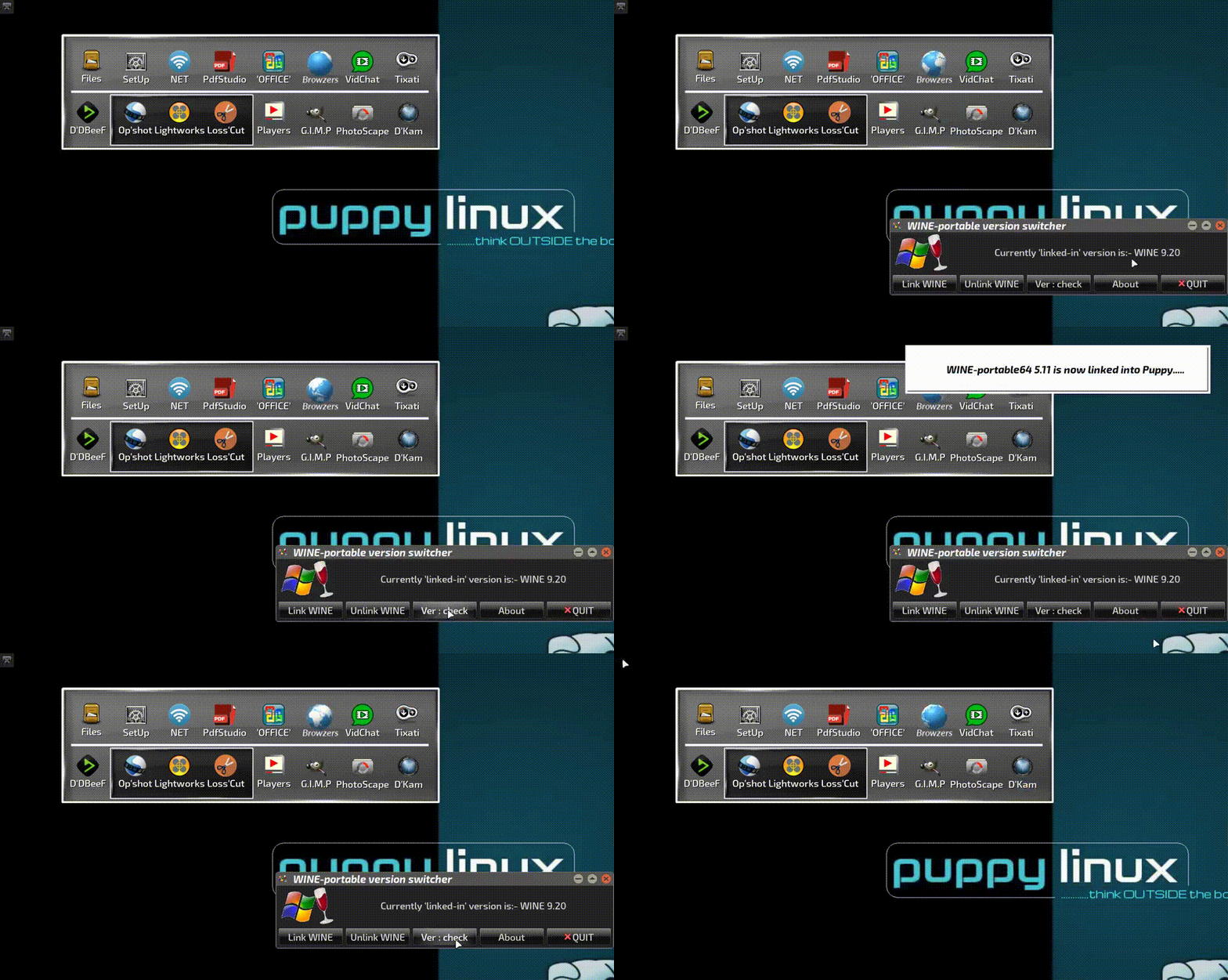
I have around a half-dozen of these WINE 'portables' set-up, so I built myself a GUI 'switcher' which permits quick swapping between WINE versions. Once linked-in, the script then checks for the presence of a 'prefix' in your ~/user directory; if one is found, it tells you you're 'good to go'.....if not (i.e., a fresh 'install'), it runs winecfg & sets a new one up for you.

The 'switcher' can also call a 'version checker', which lets me know which one is currently 'linked-in'.

The following GIF was taken a few months ago, but it serves to illustrate how it all works:-

GIFCap-93.gif


These things really are the simplest way I've yet found for running individual or multiple versions of WINE. I had to add the 'version checker' in, 'cos the version shown in the GUI won't update in real-time without the GUI closing, then opening again. It's a YAD limitation.

Well, as I always say.....it works for me. But as Bob says above, YMMV; it very much depends on what you actually want to run under WINE. Some stuff runs flawlessly; other things - like system utilities - are a waste of time, because for many items there just IS no direct POSIX-compliant equivalent to whatever Windows system file/location/item your app is calling for...a lot of Windows system locations/calls are quite unique to M$.

A VM definitely has its place for anyone who needs both Linux & Windows in their life.


Mike. ;)
 
Last edited:
WINE is always better in BOTTLES

stock-vector-drunk-woman-with-bottle-of-alcohol-vector-illustration-cartoon-509238652.jpg
 
Did someone say wine.
1750037967938.gif


Follow Linux.org

Members online


Top