Solved 22.3 final - no updated menu.

Solved issue

Davewall

New Member
Joined
Jan 14, 2026
Messages
16
Reaction score
7
Credits
104
I was running 22.2 and got the message that 22.3 was finally available - took a backup via timeshift and updated.
Disappointed to find that there was no new menu showing - just the old one I had modified.
Went back to 22.2 and tried again with the same result.
Seems unusual since so many people are discussing the new menu and I can't even see it.


G'day Davewall, Welcome to Linux.org

That is most unusual.

Give me some time to investigate

What time do you call it a day there ,.....how long from now?

I am in Australia....4pm ....it is late where you are ?
 
Welcome to the Forum.
1768366534823.gif


You don't have to upgrade every time a new version of Mint comes out. I don't upgrade...I do a clean install every 5 years and always wait about 3 mths after the new version is available to avoid bugs.

My next clean install will be Mint Cinnamon 23.1 in 2029 when support for 22.1 runs out. I always do a clean install on my spare SSD...just in case there are bugs or other problems and always have a System image on hand.
1768367322763.gif
 
I'll try to answer the question that the OP actually asked (cool for your purposes, though, Bob :) ), which was about upgrading.

@Davewall another welcome to linux.org, from your 3rd Aussie ;)

You said

...- took a backup via timeshift and updated.

Good for the Timeshift precaution.

Did you actually upgrade, or just update?

If you are not sure, in Terminal, you can give us the output of

Code:
cat /etc/issue

or

cat /etc/*release

or else open the Welcome window and tell us what it says bottom right-hand side.

Cheers

Chris Turner
wizardfromoz
 
Are you trying to upgrade using the mint update manager?
Did you open the update manager and select edit and then upgrade to mint ** from there?
It may not upgrade if your current version is not fully up to date [ run sudo apt update && apt upgrade -y and try again]

Upgrade the operating system [from the Mint docs]


Upgrading to Linux Mint 22.3 is fast and easy.


In the Update Manager, click on the Refresh button to check for any new version of mintupdate or mint-upgrade-info. If there are updates for these packages, apply them.


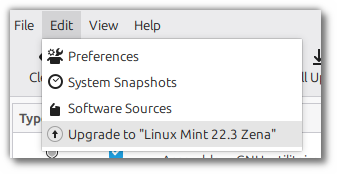
Launch the System Upgrade by clicking on “Edit->Upgrade to Linux Mint 22.3 Zena”.


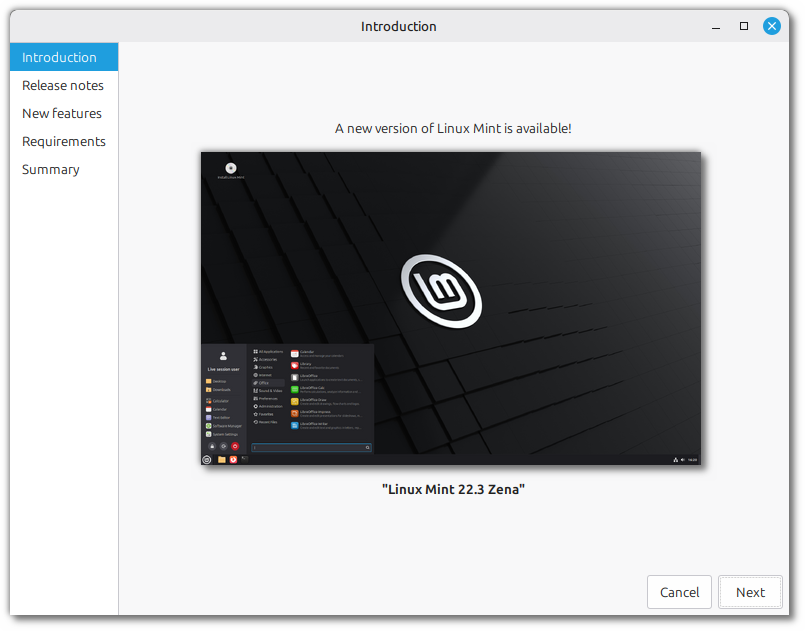
Follow the instructions on the screen.


Showoff, lol.

That's where I was leading, but you show it better.

C
 
16939bbe9676e0f0fdfca42bf2321c2a-1729547503.gif
 
G'day Davewall, Welcome to Linux.org

That is most unusual.

Give me some time to investigate

What time do you call it a day there ,.....how long from now?

I am in Australia....4pm ....it is late where you are ?
Apologies - I'm in Sydney..
 
Are you trying to upgrade using the mint update manager?
Did you open the update manager and select edit and then upgrade to mint ** from there?
It may not upgrade if your current version is not fully up to date [ run sudo apt update && apt upgrade -y and try again]

Upgrade the operating system [from the Mint docs]


Upgrading to Linux Mint 22.3 is fast and easy.


In the Update Manager, click on the Refresh button to check for any new version of mintupdate or mint-upgrade-info. If there are updates for these packages, apply them.


Launch the System Upgrade by clicking on “Edit->Upgrade to Linux Mint 22.3 Zena”.


Follow the instructions on the screen.


I made sure the System was completely updated - then took a timeshift and then followed as above in Update manager and selected Upgrade to Linux Mint 22.3 Zena - it took about 20 mins or so & told me to reboot which I did and no updated Menu.
 
I'll try to answer the question that the OP actually asked (cool for your purposes, though, Bob :) ), which was about upgrading.

@Davewall another welcome to linux.org, from your 3rd Aussie ;)

You said


Good for the Timeshift precaution.

Did you actually upgrade, or just update?

If you are not sure, in Terminal, you can give us the output of

Code:
cat /etc/issue

or

cat /etc/*release

or else open the Welcome window and tell us what it says bottom right-hand side.

Cheers

Chris Turner
wizardfromoz
Bear with me - i'm logged in on Win 10 - I'll add the username & password to FF in Linux and answer the above.
 
I'll try to answer the question that the OP actually asked (cool for your purposes, though, Bob :) ), which was about upgrading.

@Davewall another welcome to linux.org, from your 3rd Aussie ;)

You said


Good for the Timeshift precaution.

Did you actually upgrade, or just update?

If you are not sure, in Terminal, you can give us the output of

Code:
cat /etc/issue

or

cat /etc/*release

or else open the Welcome window and tell us what it says bottom right-hand side.

Cheers

Chris Turner
wizardfromoz
david@HPmint:~$ cat /etc/issue
Linux Mint 22.3 Zena \n \l
 
I will show you two screen prints, one is the new cinnamon DE and on the older version, do you have either of these
Screenshot from 2026-01-12 10-28-10.png
Screenshot from 2025-12-24 12-29-09.png
?
 
Mines the bottom one with the search box at the top - i can't get screenshot to copy it - it just disappears when I click.
Actually - with a delay it works.
 

Attachments

  • Screenshot from 2026-01-14 20-22-01.png
    Screenshot from 2026-01-14 20-22-01.png
    88.7 KB · Views: 45
I wonder...

Had you customized the menu in the previous version? If so, maybe it's respecting your customizations. You can right click on the menu icon and hit the configure option. In there, you can make a variety of changes.
 
Mines the bottom one with the search box at the top -
That's the old one it is similar to [and this may be the answer] Mint with Mate Desktop, which has not been updated. [the cinnamon DE can be found in the software repository if you want to change to it
 
I wonder...

Had you customized the menu in the previous version? If so, maybe it's respecting your customizations. You can right click on the menu icon and hit the configure option. In there, you can make a variety of changes.
Yes - I had - I removed the Lock option - so - how do I get the new version and make the same changes.
 
That's the old one it is similar to [and this may be the answer] Mint with Mate Desktop, which has not been updated. [the cinnamon DE can be found in the software repository if you want to change to it
Do you have a specific name for it - there's a number of likewise named items in there.
 
1768433640232.png
 
Any clues as to how I get this to replace the original - I installed it & rebooted and nothing changed - I'm am very much a newbie as far as Linux is concerned, ??.
I also deleted it again - then removed the menu (from the remove menu option) - downloaded the cinnamon DE again & installed it - then rebooted again with same result - the old menu keeps coming up.
 
Last edited:


Follow Linux.org

Staff online

Members online


Top