

Hiya, gang. Unusual for me to actually start a thread, since I'm usually pretty self-sufficient by this point in my personal Linux journey, butttt.....even I get a bit "hornswoggled" at times by tech stuff.
Now then; print servers. More specifically, USB-to-Ethernet/wi-fi print servers. Wee boxes you can plug a USB-only printer into, which then make 'em visible over the network via the router.....essentially, turning them into 'wireless' printers.
Does anybody have any experience with these things? Like this kinda thing...
BACKGROUND:- I think most of you are aware that my old USB-only Epson SX218 all-in-one is around 15 years old. It still works as well as it ever did, and I see no point in throwing it away just for the sake of it. Most of you will like as not say, "Put it out to pasture, and just buy yourself a wireless printer.....and be done with it". Uh-uh. That's not me. I've never thrown stuff out that still works.....and I'm not about to start now.
I have just two machines in my home network. The printer is connected to the big desktop rig in the bedroom, and the Latitude in the front room communicates with it via printer software over the network.....in my case, it's this thing (the p910ND print server daemon).
I know that, in theory, CUPS is supposed to be visible across the LAN.....but for a fair number of us running Puppy - including yours truly - it never quite seems to behave itself the way it should. Accordingly, one of our senior members, who's developed an entire series of small, Puppy-specific utilities over the years, found & adapted the above-mentioned daemon for Puppy use.
If any of you have ever used the CUPS browser interface to set your printer up - like we do in Puppyland! - on the initial "Add Printer" screen you'll see a radio button for the 'AppSocket/HP JetDirect' option:-
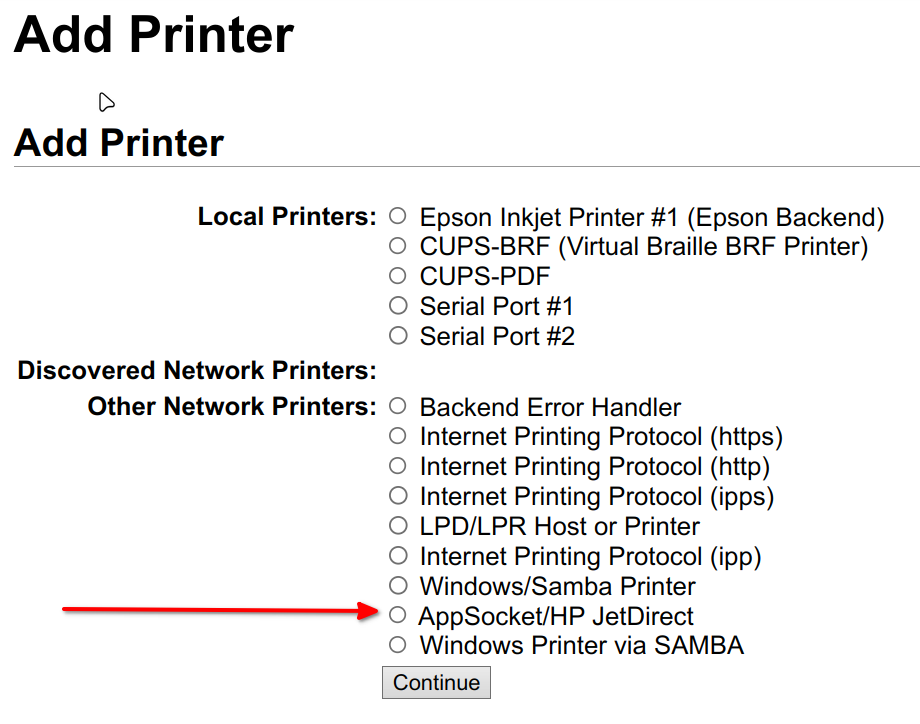
"HP JetDirect" is the MacOS name for this print server protocol....."AppSocket" is what Linux knows it as. Basically, you set it up on the 'client' machine normally using CUPS, as though the printer was connected directly to it.....and then p910ND (installed on both machines) sends it - over the network - direct to the USB-connected printer on the host, completely bypassing the host CUPS installation.
It works very well indeed.
However, I would like to be able to set the printer up so that on the rare occasions we get visitors, should anybody want to be able to print something from their smartphones, etc, they can see the printer and print straight to it. With me so far?
I guess the only real question I have is this:- How does Linux (or for that matter, ANY OS) "see" and handle these things? I'm assuming these little USB print servers must be 'plug'n'play' (pNp), because they're connecting direct to the printer.....which has no OS, and therefore no kernel from which to assign drivers. You plug the printer in, switch it on & then it's visible in your router, via direct Ethernet connection (OR in some cases wireless, though I don't quite see how it would connect).....
Any info would be very much appreciated, guys. Please; don't just respond with a glib "Buy a wireless printer, mate", because that's NOT what this query is about. If it should turn out to be the ONLY option, then I will of course explore it.....but this thread is about an alternative, readily-available option that's been around for quite a few years.
I'm curious as to how well it works (if it works at all under Linux).
TIA.
Mike.
Now then; print servers. More specifically, USB-to-Ethernet/wi-fi print servers. Wee boxes you can plug a USB-only printer into, which then make 'em visible over the network via the router.....essentially, turning them into 'wireless' printers.
Does anybody have any experience with these things? Like this kinda thing...
~~~~~~~~~~~~~~~~~~~~~~~
BACKGROUND:- I think most of you are aware that my old USB-only Epson SX218 all-in-one is around 15 years old. It still works as well as it ever did, and I see no point in throwing it away just for the sake of it. Most of you will like as not say, "Put it out to pasture, and just buy yourself a wireless printer.....and be done with it". Uh-uh. That's not me. I've never thrown stuff out that still works.....and I'm not about to start now.
I have just two machines in my home network. The printer is connected to the big desktop rig in the bedroom, and the Latitude in the front room communicates with it via printer software over the network.....in my case, it's this thing (the p910ND print server daemon).
I know that, in theory, CUPS is supposed to be visible across the LAN.....but for a fair number of us running Puppy - including yours truly - it never quite seems to behave itself the way it should. Accordingly, one of our senior members, who's developed an entire series of small, Puppy-specific utilities over the years, found & adapted the above-mentioned daemon for Puppy use.
~~~~~~~~~~~~~~~~~~~~~~~~
If any of you have ever used the CUPS browser interface to set your printer up - like we do in Puppyland! - on the initial "Add Printer" screen you'll see a radio button for the 'AppSocket/HP JetDirect' option:-
"HP JetDirect" is the MacOS name for this print server protocol....."AppSocket" is what Linux knows it as. Basically, you set it up on the 'client' machine normally using CUPS, as though the printer was connected directly to it.....and then p910ND (installed on both machines) sends it - over the network - direct to the USB-connected printer on the host, completely bypassing the host CUPS installation.
It works very well indeed.
However, I would like to be able to set the printer up so that on the rare occasions we get visitors, should anybody want to be able to print something from their smartphones, etc, they can see the printer and print straight to it. With me so far?
I guess the only real question I have is this:- How does Linux (or for that matter, ANY OS) "see" and handle these things? I'm assuming these little USB print servers must be 'plug'n'play' (pNp), because they're connecting direct to the printer.....which has no OS, and therefore no kernel from which to assign drivers. You plug the printer in, switch it on & then it's visible in your router, via direct Ethernet connection (OR in some cases wireless, though I don't quite see how it would connect).....
Any info would be very much appreciated, guys. Please; don't just respond with a glib "Buy a wireless printer, mate", because that's NOT what this query is about. If it should turn out to be the ONLY option, then I will of course explore it.....but this thread is about an alternative, readily-available option that's been around for quite a few years.
I'm curious as to how well it works (if it works at all under Linux).
TIA.
Mike.
Last edited:





