

Condobloke
Well-Known Member
FASTBOOT.....On most W11 machines, it can be found in the UEFI/bios under power
 www.guidingtech.com
Why Linux fails to load/install direct to HDD/SSD, common reasons
1] Corrupt download [check SHA sum]
2] bad burn to installation medium [try again] [if you used Rufus then try Balena Etcher or Ventoy
3] Windows 8.2 and higher quick start/fast boot or secure boot not disabled [doesn't normally apply to older versions]
4] defectiveusb stick/pen drive/DVD
5] hardware fault,
5A] If old style HDD run integrity check.
5B} if SATA SSD check for hidden partition at the beginning of drive [this will stop Grub from loading] delete that partition, before re-installing Linux
If M2.NVMe check, your system is NVMe compatible [not all older systems are compatible]
-------------------------------------------
error: bad shim signature.
error: you need to load the kernel first.
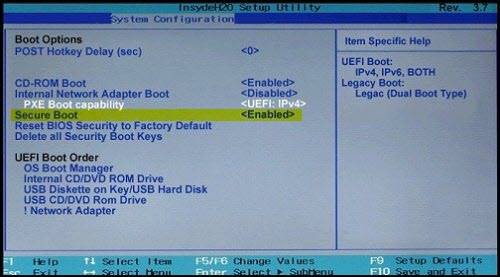
Those errors normally occur when secure boot is enabled in the BIOS/UEFI. If you disable secure boot there, then normal booting should occur.
HOW TO DISABLE SECURE BOOT WIN 10/11
 www.thewindowsclub.com
4 Ways to Disable Fast Startup on Windows 11
Do you want to disable fast startup on your Windows 11 computer? Here are a few different ways for the same.
www.guidingtech.com
Why Linux fails to load/install direct to HDD/SSD, common reasons
1] Corrupt download [check SHA sum]
2] bad burn to installation medium [try again] [if you used Rufus then try Balena Etcher or Ventoy
3] Windows 8.2 and higher quick start/fast boot or secure boot not disabled [doesn't normally apply to older versions]
4] defectiveusb stick/pen drive/DVD
5] hardware fault,
5A] If old style HDD run integrity check.
5B} if SATA SSD check for hidden partition at the beginning of drive [this will stop Grub from loading] delete that partition, before re-installing Linux
If M2.NVMe check, your system is NVMe compatible [not all older systems are compatible]
-------------------------------------------
error: bad shim signature.
error: you need to load the kernel first.
Those errors normally occur when secure boot is enabled in the BIOS/UEFI. If you disable secure boot there, then normal booting should occur.
HOW TO DISABLE SECURE BOOT WIN 10/11
How to Enable or Disable Secure Boot in Windows 11/10
If your PC faces hardware problems, you can troubleshoot by disabling Secure Boot in Windows 11/10. You can enable Secure Boot later.
www.thewindowsclub.com





