'Upgrade to "Linux Mint 22.3 Zena" is available

Condobloke

Well-Known Member
Joined
Apr 30, 2017
Messages
13,216
Reaction score
11,145
Credits
94,857
For those already running Linux Mint 22.2 (Zara)....if your install is completely up to date.....you will have installed the latest Update Manager.....its version has shifted from 1.2.9 to 1.3.0
Clicking on the Edit button in the Update Manager will reveal "Upgrade to "Linux Mint 22.3 Zena"


Take note, this will be the Official Release, NOT the beta version.

Please make sure you have your PC/laptop etc Completely up to date before applying the upgrade
Please, take a Timeshift snapshot BEFORE you apply the Upgrade ....or take a Backup.

As yet, no notification of this has come from Linuxmint.com Yet
Edit to add....it did come later in the day

Our Linux Bot tells me that https://www.linux.org/threads/9to5linux-linux-mint-22-3-“zena”-is-now-available-for-download-here’s-what’s-new.61105/ also has shown it to be available.
 
Last edited:


In the system tray (the clock area) 'System Reports' has also announced the 'Upgrade to Linux Mint 22.3 Zena"
 
New Features: https://www.linuxmint.com/rel_zena_whatsnew.php

READ them.

an example....
In addition to its “System Information”, “System Reports” and “Crash Reports” pages, the tool received 4 new pages to show you more information and help you troubleshoot common issues.


The “USB” page shows a detailed view of all plugged-in devices, including their type, name and ID (which uniquely identifies the device and its manufacturer).


Devices are grouped by USB controller, so you can see where each device is plugged and compare its connection speed and power usage with the controller's maximum connection speed and total power capacity. This helps troubleshoot common USB issues such as slow transfers or random disconnections.

Read it.....it may have something that affects YOU
 
1768175741374.png

At the top you can show or hide the boot menu and set how long it stays visible before booting the default option. This is very useful if you're dual-booting or if you're using multiple kernel series.


In the second section you can add boot parameters. This is sometimes needed when dealing with hardware/driver issues.
 
I have upgraded to LM 22.3

Due to storm activity in Australia, the process was somewhat slow (this is a known occurrence where I live, it sometimes is also related to storms elsewhere in the world....not a biggie....life and internet still goes on....despite me grumbling)

However, it is of note that when starting the Upgrade, the mirrors in Software Sources were changed. I have always used fastly and anu.edu.au....out of the blue they have changed to : packages.linuxmint.com and archive.ubuntu.com/ubuntu

I can rationalise the reasoning behind that, as being that Linux Mint have not distributed the Upgrade to all of the available mirrors. That is fair enough. But...achive.ubun tu etc is in the UK....England.....and that is about as far from Australia as it is possible to get !!

So, I altered the Software Sources in the update manager to suit me
The result was still somewhat slow, but steady. I have a connection which downloads at 530 MB/sec ....the rate achieved was nowhere near that.....which in turn could be explained by the huge number of users downloading what I was downloading!!
Rant over.

LM22.3 is installed....and so far I have yet to find any downside. it is slightly quite a bit quicker, all my settings remain the same from what I have seen......what's not to like.?

No doubt this post will eventually attract the naysayers/the grumblers who wont upgrade for a thousand and one reasons....none of which I have seen come to fruition....or happened so long ago, as to be suitable for inclusion in a history book, somewhere.

From my perspective, this is a worthwhile Upgrade for conscientious users, who have covered their backside by either taking a Timeshift snapshot or an image backup BEFORE setting the Upgrade wheels in motion. Those 'backups' are generally necessary to overcome pebkac.

Do yourself a favour. RTFM


and


I found the whatsnew link, illuminating.
 
Don't let fear of the unknown hold you back.

It appears to be quite stable, thus far. I have been using it all morning with no hiccups (that's 9 hours constant use)

The new menu can be altered without a great deal of trouble. I actually like it, but not everyone does, of course.
 
Alright, let's give it a go!
 
Took 8 minutes! Everything went well.

Startup was faster, Brave launched faster, items from the menu launch faster. Impressive.

As far as I can tell so far all settings made earlier seem to be the same.
I see the menu layout has been changed. That would take a minute to get used to.

All in all it looks like everything went without a hitch. Feels rock solid so far.
 
Mint 22.3 is now available for down load or upgrade.
upgrade path here's how.
 
Also, I just updated my Mint system.

I did not do the clean install route. I never do, unless something breaks. The stat / command says that I did a clean install in 2023. All updates since then have just used the update mechanism.
 
Oh, and I went from 21.x to 22.3 directly. I didn't install 22.1. I'd figured that 21.x (21.2, I think) was still supported, so I was not in a rush. I had a few minutes to babysit the system, so I did the upgrade to 22.2. It did not offer a path to 22.1 in the GUI. I'm not sure that there was a path to do so.

The point is, it is successful. It was as painless as it always is. I've been doing this for years, though I did have to do a clean install of Lubuntu in 2020, so six years ago. That was because there was no supported upgrade from the previous LTS build (as they'd essentially changed the whole thing and incorporated LXQt instead of LXDE).

I elaborated because I know someone was curious about this in the recent past. However, I suck at remembering usernames (and I read a whole lot of comments). So, yeah, I figured I'd 'document' this in this thread. I install once and just keep on upgrading as new releases happen. I don't think it has caused any issues for at least the past decade.
 
Hmm...

Open a Chromium-based browser. Right-click on the X, in the upper-right corner.

Do you experience any odd behavior?

This isn't new, but I was hoping an upgrade would fix it. It may also be a 'me' thing, as it's a pretty bastardized system, where I've done any number of stupid things to see if I can resolve a problem for a forum user.

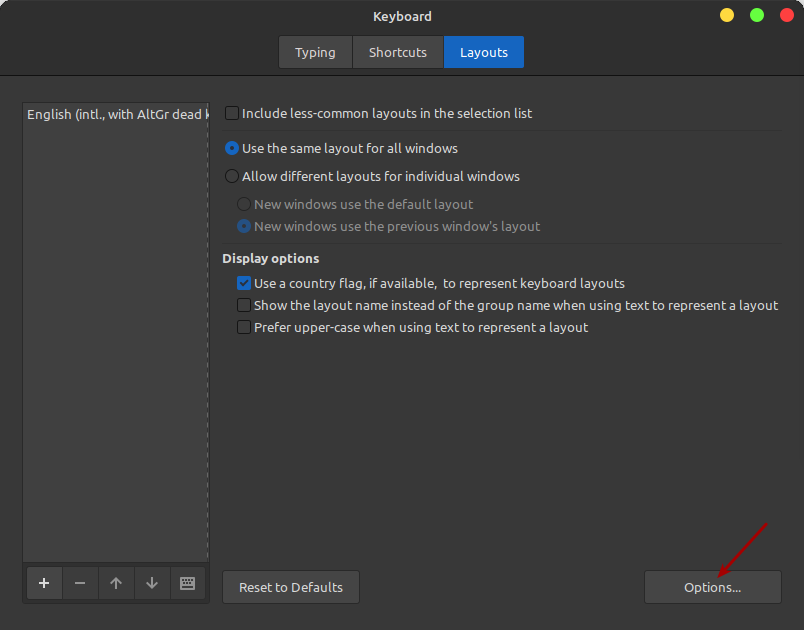
Also, the upgrade changed the whole keyboard thing. They disabled one of my settings during the upgrade. Specifically, they re-enabled the CAPS LOCK key. I do not want the CAPS LOCK key to do anything!

They then moved the settings. They're in a whole other location.

Open the Menu > search for keyboard > click on XKBoptions > click on the + button > click on Caps Lock behavior > it should now be obvious.

This is how it was once done:


I used this way this time, so that they (hopefully) won't break it again:


It's a wee bit annoying that they'd disable your settings rather than retain them. It's fine that they moved stuff around. I can deal with that, and I don't mind change. The new way might be easier for some people. But, yeah, it's annoying that they'd change the setting. Try as I might, I can't think of why they'd want to do that. I've updated many times since 2023, and they've never overwritten my settings like that.

It's not a breaking change, just an annoyance.

In modern times, I have zero use for the CAPS LOCK key. I have plenty of fingers and don't type in all-caps on a regular basis. In fact, I never type anything long in all caps.
 
Do you experience any odd behavior?
Could not use any menu entries (minimize, close, etc). Never thought this was actually a thing but I thought I'd humor you.
When I left clicked while the drop down was still there (the "v" thingy that replaced the x) it closed. Is this the odd thing you mentioned?
 
Could not use any menu entries (minimize, close, etc). Never thought this was actually a thing but I thought I'd humor you.

Yup. That's what I'm seeing. If you accidentally (or intentionally, I suppose) click on it then you can't actually use any of the options it shows. You have to close it some other way just to clear out that menu.

That's the odd thing that I noticed. It's broken, or at least causes it to break.

I have a knack for finding bugs. Speaking of which, I really should resume my testing of Lubuntu. I now have enough bandwidth. I'm not sure that I have the time, though I suppose I could test less frequently.

If someone has the ability to recreate this AND has a Mint account, they could mention it on their forums, or whatever they use for bug reporting. I suppose I'm obligated to report it if nobody else will. The bug has existed for quite a while. I was hoping the upgrade would fix it, but it did not.

I'm a strong proponent of reporting bugs, but they once lost my data because their forum was hacked. It just rubs me the wrong way to give them more of my data, though I suppose I could just try to give them as little data as possible.
 
I have a knack for finding bugs.
Cool, so am I but I usually don't report them 'cuz I always think it must be some error on "my side" or something.

Maybe I should though.
Haven't found any so far when I upgraded Mint today. That being said my use of Mint is not very profound as I use it mostly as a host system for VM's which I use as a daily driver.
I'm an every day user by default . At times I can't be bothered to fire up a VM and use Mint for a while and it always just works.
Toying around with many distros will make you learn things for YOUR purpuse and usage and that's what it's all about.

And Mint s just peace of mind. If I want adventure and STILL be able to use any OS for my needs I'd run whatever distro comes to mind, set it up in minutes with my personal preferences and go for the ride.
 
Maybe I should though.

This is just MY thoughts on the matter...

I think we all belong to a community of sorts. We're not just 'netizens', we're a part of the Linux community.

With this freedom, this access to the OS we all love, it's our job to support it as much as it supports us. We are obligated to give back in some form or as we are able.

It is MY thoughts that we're obligated to report bugs as we find them. I've been slacking on this, and that's my fault. I waited to see if it went away on its own. It did not. Today, I looked to see if others could replicate the bug.

Now that I know the bug exists for more than just myself, I'm obligated to ensure that the bug is reported.

That is my duty as a Linux user.

By the way, just answering questions on a forum is an action that is certainly giving back.

Heck, even asking a good question can be considered giving back. If the post is answered, it then becomes a resource for others. See the StackExchange sites as a good example.

So, somebody needs to report this bug. If need be, I'll figure it out and do it.


Follow Linux.org

Members online

No members online now.

Top