
You are using an out of date browser. It may not display this or other websites correctly.
You should upgrade or use an alternative browser.
You should upgrade or use an alternative browser.
can't run firefox
- Thread starter claster
- Start date

If you have installed the firefox browser from the mozilla website from a tarball, for example from: firefox-133.0.tar.bz2, then the correct command to start it from the directory in which it's located is:My O.S. is Ubuntu 20.04
I'm trying to run firefox-133.0 at the cmd line prompt: >./firefox-bin
I received the following error message: "libxul.so, undefined symbol: gdk_window_show_menu".
I also tried firefox-120.0, except the result was exactly the same.
How can I fix this?
Code:
./firefoxIf re-installation also leads to failure, then one ought to check the checksums of the download which for this version of firefox are here:
If you want to retain use of the terminal from which firefox is started you could run:
Code:
./firefox &
There are a few reasons one might wish to run firefox from a terminal. The distro may not run the latest firefox. One may prefer a feature present in the latest firefox. One may wish to run a second firefox on the system, or a third or more. One may not be running a DE at all, rather just a window manager. There are other reasons too numerous to mention, but you get the driftWelcome to the Forum. View attachment 23164
Since Firefox comes installed by default on most Distros...just click the icon...why would you want to run it from the Terminal. View attachment 23165


Your OS (Ubuntu 20.xx) and FF's latest libs likely aren't compatible.
Options:
Options:
- Recommended: Upgrade/reinstall Ubuntu to the latest. I know it's a hassle, but you will need to do so anyway, thus you may as well do so now.
- Recommended 2: Upgrade to the latest FF available in the repos because it will resolve those dependencies for you or let you know if it cannot.
- Band-aid: See if there's a backport for libgtk-3-0 (should probably be 3.24.xx at least) and then try and run what you downloaded again.
- Easiest: Download the AppImage (AppImage's have all dependencies included most of the time and most dependencies included all of the time... most...)

Hello @claster
Welcome to the Linux.org forum, enjoy!
Others have given you good advice. And Firefox is already installed on ubuntu. and should run fine.
If you wish to use a newer version you can add Mozilla's ppa and install or upgrade from there.
Another approach is to add FF 133 is to install the snap package see here:
Welcome to the Linux.org forum, enjoy!
Others have given you good advice. And Firefox is already installed on ubuntu. and should run fine.
If you wish to use a newer version you can add Mozilla's ppa and install or upgrade from there.
warning this ppa is for daily builds That is Alpha or beta software and it may not be complete of work correctly.Firefox and Thunderbird daily builds : “Ubuntu Mozilla Daily Build Team” team
Ubuntu daily (or even multiple builds per day) for various mozilla projects and branches. For questions and bugs with software in this archive, please contact ... or visit #ubuntu-mozillateam on libera. The builds are maintained by the Ubuntu community and not Mozillalaunchpad.net
Another approach is to add FF 133 is to install the snap package see here:

Firefox 133 Released with Assorted Improvements
Mozilla Firefox 133 was released today, furnished with some new features and UI refinements long-time users are sure to appreciate. In the 4 weekswww.omgubuntu.co.uk
Last edited:

I'm using Lubuntu 24.04.1 as one of my daily drivers running Firefox 133.0.3 Snap version without any problems.
I know most Linux users are not fans of Snap packages although I've not had any problems using Firefox Snap.
I know most Linux users are not fans of Snap packages although I've not had any problems using Firefox Snap.

@Fanboi :-
I run a whole range of Puppies, ranging from bang up-to-date current ones right back to some from a decade (or more) back.....Tahrpup 64 being one of the oldest (based on Ubuntu 14.04 LTS), and - daft as it may sound! - one of my favorites.
Until the last release or two, mainstream Firefox has been running fine here.....still does in the 'current' Pups. But in Tahrpup64, I started getting those same gdk_window errors around 6-8 weeks ago.
This suggests one of two things. Either Firefox now expects a very much newer build of gtk-3.0, OR it's moved on to the more up-to-date gtk-4.0. Since Puppy hasn't yet progressed to gtk-4.0 - we've only just got the Woof-CE 'puppy-builder' scripts at Github fully updated to gtk-3.0; Puppy was for ages running under gtk-2.0 - I'm inclined to believe it's the former.
Opening a terminal beside the downloaded AppImage, and running the
.....argument confirms what I suspected. This is NOT a "true" AppImage.....not as you and I understand the term, where everything required is included. All this guy's done is to turn the main Firefox directory itself into an AppImage. There's nothing else there, so FF is still hunting around the system to find the rest of its dependencies, including - of course! - a sufficiently new enough build of gtk-3.0.
So; it's a dependency mis-match, as you quite rightly concluded. The OP needs to update to a newer OS build (unless the backport suggestion bears fruit).
We've recently started using the results of the current Midori project. The lead dev, ponchale, has been friendly with a couple of our senior Puppy members for some time, so we got "first dibs" on when the new build initially became available last year. This has been completely re-hashed, and is now based on up-to-date FF code. It's no longer the 'old', WebKit-based browser many of us had got used to. They've stripped-out a lot of the unnecessary, current FF crud that's responsible for much of its present 'bloat', with the result that it is BLAZINGLY fast on any half-way modern hardware......really, back to how FF used to be some years back.
Initially, yes; it WAS a bit "rough around the edges", but it's been rapidly and continuously refined & polished. It's definitely worth taking a good look at nowadays. The Wikipedia article will link you to the current Astian webpage for "new" Midori:-
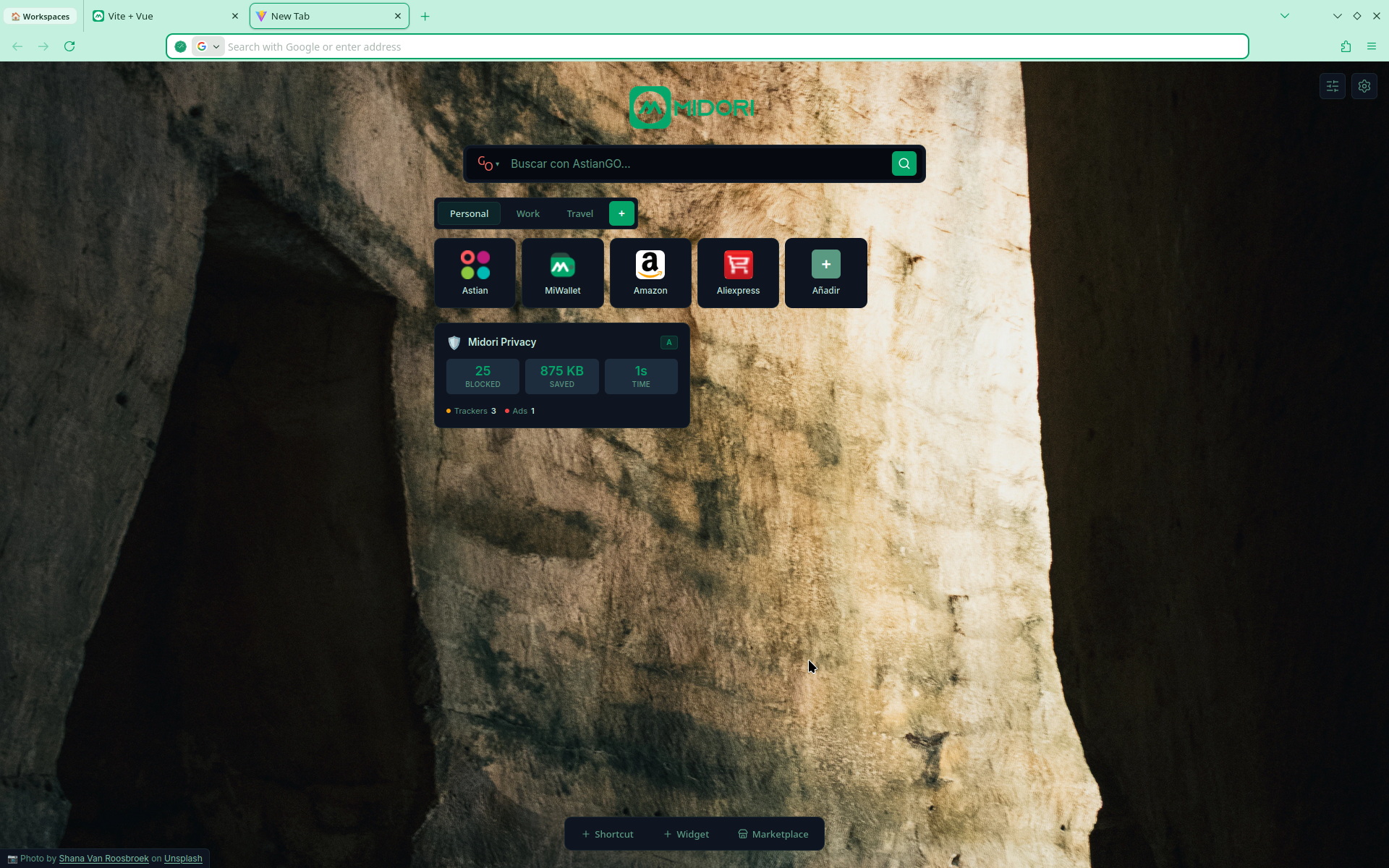
 astian.org
It's the first FF derivative for a LONG time that I'm truly interested in, since they've recently included the very same "workspace" tab organisation feature that has kept me so firmly wedded to Opera for the last couple of years. Seriously, DO take a look. You might be pleasantly surprised!
Mike.
Ayup. It's definitely a gtk-3.0 (4.0?) issue.
- Band-aid: See if there's a backport for libgtk-3-0 (should probably be 3.24.xx at least) and then try and run what you downloaded again.
- Easiest: Download the AppImage (AppImage's have all dependencies included most of the time and most dependencies included all of the time... most...)
I run a whole range of Puppies, ranging from bang up-to-date current ones right back to some from a decade (or more) back.....Tahrpup 64 being one of the oldest (based on Ubuntu 14.04 LTS), and - daft as it may sound! - one of my favorites.
Until the last release or two, mainstream Firefox has been running fine here.....still does in the 'current' Pups. But in Tahrpup64, I started getting those same gdk_window errors around 6-8 weeks ago.
This suggests one of two things. Either Firefox now expects a very much newer build of gtk-3.0, OR it's moved on to the more up-to-date gtk-4.0. Since Puppy hasn't yet progressed to gtk-4.0 - we've only just got the Woof-CE 'puppy-builder' scripts at Github fully updated to gtk-3.0; Puppy was for ages running under gtk-2.0 - I'm inclined to believe it's the former.
Opening a terminal beside the downloaded AppImage, and running the
Code:
--appimage-extract.....argument confirms what I suspected. This is NOT a "true" AppImage.....not as you and I understand the term, where everything required is included. All this guy's done is to turn the main Firefox directory itself into an AppImage. There's nothing else there, so FF is still hunting around the system to find the rest of its dependencies, including - of course! - a sufficiently new enough build of gtk-3.0.
So; it's a dependency mis-match, as you quite rightly concluded. The OP needs to update to a newer OS build (unless the backport suggestion bears fruit).
~~~~~~~~~~~~~~~~~~~~
We've recently started using the results of the current Midori project. The lead dev, ponchale, has been friendly with a couple of our senior Puppy members for some time, so we got "first dibs" on when the new build initially became available last year. This has been completely re-hashed, and is now based on up-to-date FF code. It's no longer the 'old', WebKit-based browser many of us had got used to. They've stripped-out a lot of the unnecessary, current FF crud that's responsible for much of its present 'bloat', with the result that it is BLAZINGLY fast on any half-way modern hardware......really, back to how FF used to be some years back.
Initially, yes; it WAS a bit "rough around the edges", but it's been rapidly and continuously refined & polished. It's definitely worth taking a good look at nowadays. The Wikipedia article will link you to the current Astian webpage for "new" Midori:-
Midori Browser: light, safe private and awesome web browser
Midori Browser is a light, fast, and secure web browser that respects user privacy and security with an ad and tracker blocker included.
astian.org
It's the first FF derivative for a LONG time that I'm truly interested in, since they've recently included the very same "workspace" tab organisation feature that has kept me so firmly wedded to Opera for the last couple of years. Seriously, DO take a look. You might be pleasantly surprised!
Mike.
Last edited:
@The Duck :-I'm using Lubuntu 24.04.1 as one of my daily drivers running Firefox 133.0.3 Snap version without any problems.
I know most Linux users are not fans of Snap packages although I've not had any problems using Firefox Snap.
Hey! who cares? If the Snap packages work for you - and you're happy with 'em - then who gives a monkeys' what other people's opinions are?
If it does what you want, that's great. It just demonstrates, once again, one of Linux's greatest strengths.....the fact that's there's so many different, available ways of achieving the same outcome. There's bound to be a method, somewhere, that'll satisfy everyone.
Mike.


Condobloke
Well-Known Member
So far so good !You might be pleasantly surprised!
Midori may just fill the 'space' brave has been making for itself.....and not doing such a great job of it lately....
@MikeWalsh
I tried Midori years back. I think I discovered it on E17 DE with this weird little distro, Bodhi (which was definitely not ready back then -- IDK if it's still active). I tried Midori on my full Debian and minimum antiX systems and I will say it was blazingly fast on both. It didn't display some pages perfectly, but I thought at the time, "Jeez, this has so much potential!". So this is excellent news it's still being developed and has reached this stage. Definitely going to give it another looksie and see how things improved. Would be nice to escape the continuous bloat. And if Midori works out, I definitely won't miss FF other than sentimental reasons, especially since they stopped allowing your WM to take full control of how it displays the window decorations (the FF buttons are a mess, they look Gnome-ish, but in a bad way, and I think its target is HIDPI users because man they are ~2x my WMs decorations).
I tried Midori years back. I think I discovered it on E17 DE with this weird little distro, Bodhi (which was definitely not ready back then -- IDK if it's still active). I tried Midori on my full Debian and minimum antiX systems and I will say it was blazingly fast on both. It didn't display some pages perfectly, but I thought at the time, "Jeez, this has so much potential!". So this is excellent news it's still being developed and has reached this stage. Definitely going to give it another looksie and see how things improved. Would be nice to escape the continuous bloat. And if Midori works out, I definitely won't miss FF other than sentimental reasons, especially since they stopped allowing your WM to take full control of how it displays the window decorations (the FF buttons are a mess, they look Gnome-ish, but in a bad way, and I think its target is HIDPI users because man they are ~2x my WMs decorations).
Condobloke
Well-Known Member
give Midori a run, @bob466 ....Impressive.Firefox runs ok but isn't as good as it use to be.
Condobloke
Well-Known Member
Condobloke
Well-Known Member
That accounts for the increased speed !It's no longer the 'old', WebKit-based browser
Similar threads

- Replies
- 17
- Views
- 4K


- Replies
- 13
- Views
- 4K



