How can I optimise my cooling?

Kernel_chilli

Active Member
Joined
Apr 12, 2023
Messages
117
Reaction score
38
Credits
1,517
Hello,

I want to optimise my cooling to the point it is as efficient as possible, as right now I am unsure if my setup is as good as it could be. I dont get any thermal issues of any sort, but I would like to set it up as well as I can.

I have the Corsair 4000D, with 3x120mm fans pulling air on the front.
Going to the top there are 2x120mm fans pushing air out. These are right in the middle of the case, pushed together and centered above the Noctua Redux tower cooler & the single 120mm pushing air through the fin stack.
1x120mm fan on the back, also pushing air out.
The GPU has 3 fans pushing through the heatsink, with one fan (Furthest away from the I/O) blowing through a cut out in the backplate. The PC is in a fairly cool room, and it is (usually) dust free, although I have to admit I have not cleaned it at all this year - that is tomorrows job!


If you do not get thermal issues, do not worry.
If it ain't broke, don't fix it!
I would only worry about cooling if I'm going to start overclocking. Even your CPU cooler is more than adequate for normal tasks .
I don't know if linux has an Afterburner app or something else to check thermals when gaming at max setting .

Greetz Roelzxr
 
I have the Corsair 4000D, with 3x120mm fans pulling air on the front.
Going to the top there are 2x120mm fans pushing air out. These are right in the middle of the case, pushed together and centered above the Noctua Redux tower cooler & the single 120mm pushing air through the fin stack.
1x120mm fan on the back, also pushing air out.
The GPU has 3 fans pushing through the heatsink, with one fan (Furthest away from the I/O) blowing through a cut out in the backplate

Wow! :D

Is this a gaming machine with a big power-hogging video card? It would be interesting if you posted more specs.

When I was younger I didn't mind fan noise, but that thing sounds like it would drive me crazy with its noise.

I'm in agreement with post #2. I suggest that you monitor the actual temperatures, and compare them with the manufacturer's maximum rated chip temperatures. You might find that everything is cool enough with most of the fans off.

Lots of airflow generally attracts lots of dust.
 
I have the Corsair 4000D, with 3x120mm fans pulling air on the front.
Going to the top there are 2x120mm fans pushing air out. These are right in the middle of the case, pushed together and centered above the Noctua Redux tower cooler & the single 120mm pushing air through the fin stack.
1x120mm fan on the back, also pushing air out.
My only comment would be: put the fans at the top a bit more like behind the CPU and ensure the CPU fan, and all the fans, are in the direction of the air stream.

The problem with a fan right above the CPU is that you either will pull the air out of the CPU radiator too soon, reducing the cooling of the cool air being pulled at the front, or you won't do anything with it if it's trying to pull the air out of an aluminium wall -- depending on the design of the CPU heat sink.

You want to ensure that the airflow through the CPU heat sink has enough run for it to grab the heat out of the chip. By putting the top fans more like behind of the CPU you make the airstream to the CPU faster, but without pulling it out too soon.

You want to have something like this, the idea being that the warm air will be drawn at the top rear part of the case. In this picture, the tiny arrows are the arrows in the fan cases that tell you how the air will made to flow.

PXL_20260311_225725555~2.jpg


Anyway is a minor comment, as it depends too much on the design of the case and motherboard and may not be possible in the end. And from experience, my top fan is amost always at a very low speed, the big, important one extractor is the rear one.

What is most important for this is how efficient your CPU is. The more TDP, the more all these things would matter.
 
Last edited:
I made a mistake in the drawing. GPU are clearly closer to the rear wall of the case, in the above picture the GPU should be attached to the rear. I will try to butcher it.

There. More or less.
 
If you do not get thermal issues, do not worry.
If it ain't broke, don't fix it!
I would only worry about cooling if I'm going to start overclocking. Even your CPU cooler is more than adequate for normal tasks .
I don't know if linux has an Afterburner app or something else to check thermals when gaming at max setting .

Greetz Roelzxr
it isnt broken at all, so there really is no need to fix it!
Overclocking is not something I will be doing at all, for the games I play and the things I use the computer for I would not stand to gain anything. The CPU cooler is more than enough for my tasks I agree, when I built this system I aimed at making it as powerful as I could for the money I had, but a large part of this was also overkill cooling.
In my mind, the better the cooling potential (whether it hit its potential or not) was far better than having something that could keep only just keep it all as cool as recommended, or worse, would lead to not enough cooling and a hot system.
Lact checks the thermals for you on the GPU, not too sure on CPU software to do the same but I have a full day to day to mess about so I'll have a look.
 
Wow! :D

Is this a gaming machine with a big power-hogging video card? It would be interesting if you posted more specs.

When I was younger I didn't mind fan noise, but that thing sounds like it would drive me crazy with its noise.

I'm in agreement with post #2. I suggest that you monitor the actual temperatures, and compare them with the manufacturer's maximum rated chip temperatures. You might find that everything is cool enough with most of the fans off.

Lots of airflow generally attracts lots of dust.
Fair point on more specs, here they are:
Asus ROG Strix B550-F
AMD Ryzen 5 5600X
AMD Radeon RX9060 XT 16gb
32GB DDR4 3200mhz
2x1tb NVMe drives
1tb SATA SSD
1tb HDD
750w NZXT PSU

The fans are Corsair SP-120's, I picked these as 1 - I can leave any RGB turned off as its not my thing (no idea if the RGB even works on any of them as they have never been lit up since Ive had them) and 2 - they are very quiet. The CPU cooling fan is a Noctua 120mm which is barely audible even when it is running at its fastest.
With noise in general, it is not noticeable at all if there is any sort of volume coming from the monitor and in game the loudest part was my GPU, but I swapped that out for this one yesterday. I am yet to try anything really demanding, but I'd imagine with it being a step up, having a much larger heatsink and an extra fan that it wont need to spin them up as much as the previous. Even my HDD spinning up is more noticeable than the fan noise.

I am going to be monitoring temps today through a few different things - web browsing, media, and then some heavy gaming and see how it all looks.

And you're right, this thing is a dust magnet - and its especially noticeable as its a white case!
 
My only comment would be: put the fans at the top a bit more like behind the CPU and ensure the CPU fan, and all the fans, are in the direction of the air stream.

The problem with a fan right above the CPU is that you either will pull the air out of the CPU radiator too soon, reducing the cooling of the cool air being pulled at the front, or you won't do anything with it if it's trying to pull the air out of an aluminium wall -- depending on the design of the CPU heat sink.

You want to ensure that the airflow through the CPU heat sink has enough run for it to grab the heat out of the chip. By putting the top fans more like behind of the CPU you make the airstream to the CPU faster, but without pulling it out too soon.

You want to have something like this, the idea being that the warm air will be drawn at the top rear part of the case. In this picture, the tiny arrows are the arrows in the fan cases that tell you how the air will made to flow.

View attachment 30632

Anyway is a minor comment, as it depends too much on the design of the case and motherboard and may not be possible in the end. And from experience, my top fan is amost always at a very low speed, the big, important one extractor is the rear one.

What is most important for this is how efficient your CPU is. The more TDP, the more all these things would matter.
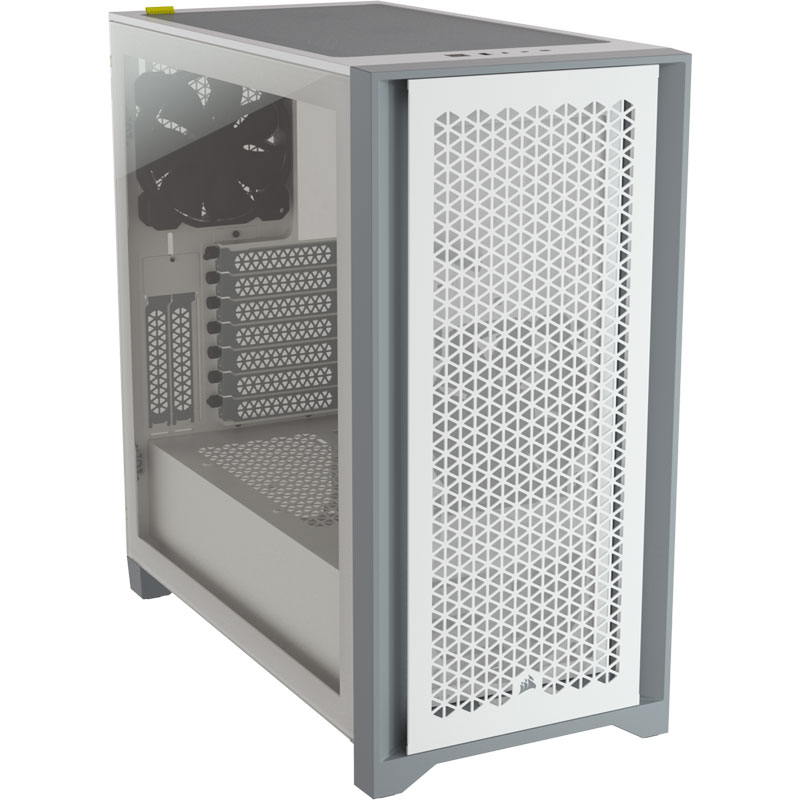
Thank you for the detailed image, and specifically on the top two fans. Im going to monitor the temps today and see exactly what I am getting across a few different things, and then Ill adjust everything accordingly. My case is the Corsair 4000D, designed for really good airflow, its got a mesh front with a metal cover in front - this is it:

The fans I have up top are set to spin at the very lowest I can get them to. If I turn their power down any more in bios they stop completely, and the rear exhaust is on changes its speed depending on the temp of the CPU.
 
I am sure it's going to be OK. I just checked my own build and the top fan (1) is way forward than my own drawing, more on top of the CPU than I am actually recommending --so I will move it to the back to drink my own medicine ¯\(シ)

The system runs cool under decent load.

It's a similar build but with less drives: Ryzen 5 9600X and an AMD Radeon RX 9070 XT. If anything it'd be a tad easier to cool being Zen 5, which is supposed to heat less.

All my fans are noctua, 3x140mm --2 at the front and 1 at the top, and then 1x120mm at rear. The CPU is air-cooled and being only 65W TDP I put a noctua set that mounts a 90mm fan.
 
Spinning hard discs ? Wich games you got on there ? You want to use atleast an ssd for newer games , faster loading times and textures would benefit you more . All my recent games run on ssd's or nvme , my harddiscs 4 in raid 5 , 7200 rpm i think are only for downloads/junk , pictures , movies and old games pre 2010 or dosbox/amiga games .
You have a good setup but using harddiscs for new games .
Your cpu is faster then what your harddiscs can provide i guess .
 
Spinning hard discs ? Wich games you got on there ? You want to use atleast an ssd for newer games , faster loading times and textures would benefit you more . All my recent games run on ssd's or nvme , my harddiscs 4 in raid 5 , 7200 rpm i think are only for downloads/junk , pictures , movies and old games pre 2010 or dosbox/amiga games .
You have a good setup but using harddiscs for new games .
Your cpu is faster then what your harddiscs can provide i guess .
I dont have any games on the Spinny disc, all my big open world games - Cyberpunk, Fallout 4, GTAV are on m.2 NVMe, smaller or older things such as Cities: Skylines, Stick of Truth, Skyrim are all on SATA. The HDD is for storage so thats things like pictures, videos, documents etc.
 
I am sure it's going to be OK. I just checked my own build and the top fan (1) is way forward than my own drawing, more on top of the CPU than I am actually recommending --so I will move it to the back to drink my own medicine ¯\(シ)

The system runs cool under decent load.

It's a similar build but with less drives: Ryzen 5 9600X and an AMD Radeon RX 9070 XT. If anything it'd be a tad easier to cool being Zen 5, which is supposed to heat less.

All my fans are noctua, 3x140mm --2 at the front and 1 at the top, and then 1x120mm at rear. The CPU is air-cooled and being only 65W TDP I put a noctua set that mounts a 90mm fan.
Haha yes, go and fix your cooling!

Yeah our systems are very closely matched but mine should definitely be easier to cool, I dont think my cooling is underpowered or not enough in any way, I just want to make sure Im getting cooling that is as efficient as it can be.
 
I'm a big fan (no pun intended) of water cooling.
My two main desktop systems are both water cooled.

But if you have a laptop, there's not a lot you can do, you get what you get.

I would say about half of our rack mount enterprise servers are water cooled now.
Most use a cooler block, but a few actually use immersion, the entire case gets filled with a
dielectric fluid. Some even go to external coolers...

These typically use less power than air cooled systems, generate much less noise, and even save a little on AC
usage. However they generally cost more than air colling, so how "optimized" do you want to be?
 
I'm a big fan (no pun intended) of water cooling.
My two main desktop systems are both water cooled.

But if you have a laptop, there's not a lot you can do, you get what you get.

I would say about half of our rack mount enterprise servers are water cooled now.
Most use a cooler block, but a few actually use immersion, the entire case gets filled with a
dielectric fluid. Some even go to external coolers...

These typically use less power than air cooled systems, generate much less noise, and even save a little on AC
usage. However they generally cost more than air colling, so how "optimized" do you want to be?
All Im looking for is for anything I may have overlooked to be pointed out, as I have more than enough fans in my PC to cool much hotter hardware than what I have. I have what I believe to be a good setup with my fans, so I am looking more at finding out if I would benefit from moving something/flipping certain fans to push instead of pull, and good RPM settings for each set - front, top, back.

Water cooled builds look cool but they're not for me, I prefer the more basic air cooled systems but I hate the dust that comes with this haha.


Follow Linux.org

Staff online

Members online


Top