I have been building an automatic disc launcher for my GOG offline installers
I recently came across a video showing how to put GOG offline installers onto physical discs. I liked the idea, but I wanted to make something more complete, reusable and mostly automatic on Linux.
Over the last couple of days, I have therefore been building my own game-disc launcher and ISO builder on Ubuntu.
The main launcher is a Windows
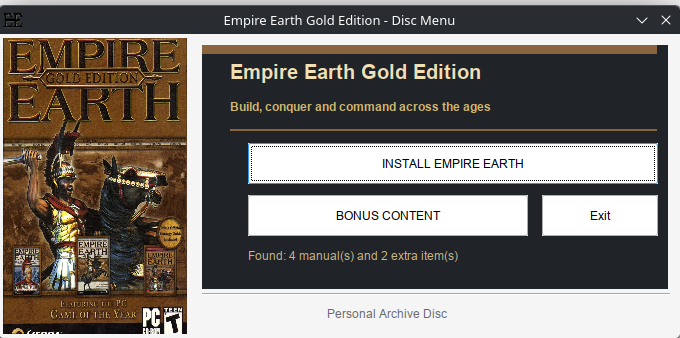
The system now scans the files inside my project folder and automatically builds the launcher based on what it finds.
What it currently does
Reusable folder structure
After replacing the installer, cover, manuals and extras, I only need to run one command:
The script then:
Games I have tested so far
Each launcher gets its own colour scheme based on the cover instead of using the same fixed design for every game.
For example, the Soldier of Fortune launcher received dark brown and beige colours from its cover, while Mina the Hollower received a dark red theme.
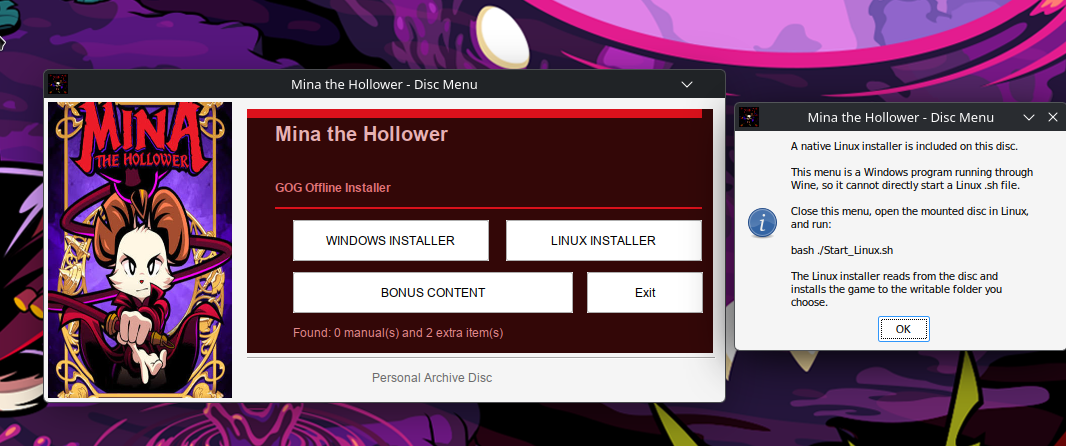
Windows and Linux installers on the same disc
When both installer versions are present, the launcher displays:
The Windows installer can be launched directly from the NSIS menu.
The Linux side required a slightly different solution. The menu itself is a Windows program running through Wine, so it cannot reliably launch a native Linux shell script.
When the Linux button is selected, the launcher explains that the user should close the Wine menu, open the mounted disc in Linux and run:
Using
The Linux GOG installer can then read its data directly from the disc and install the game to a writable location on the hard drive.
Bonus content system
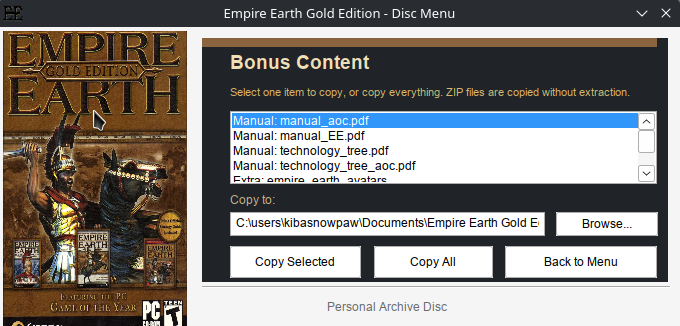
The launcher automatically counts the manuals and extra items found on the disc.
The bonus-content page lists all detected items and allows the user to:
By default, the files are copied somewhere similar to:
I decided not to install extras directly into the game directory because mods, patches, manuals and soundtracks often require different locations.
Physical-disc test
I tested the full process by creating and burning a 662 MB Empire Earth ISO onto a CD-R with my ASUS BW-16D1H-U Blu-ray drive.
The disc was written with:
I then verified the burned disc against the ISO:
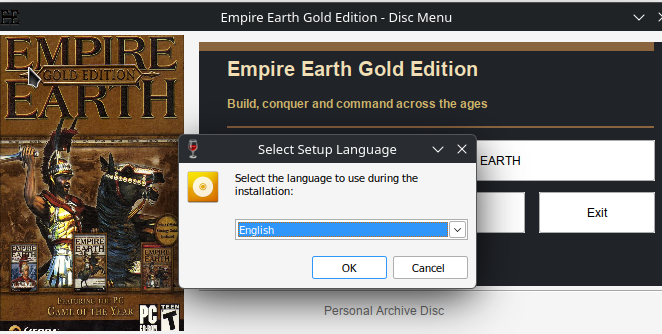
The verification completed successfully. The custom menu ran directly from the disc, and the original GOG installer launched and installed normally.
Purpose of the project
This is mainly a personal archival project for my legally purchased GOG games.
I am not modifying or redistributing the GOG installers. The original installer files and matching BIN files remain unchanged. My custom launcher only detects and starts them.
It started as a basic menu with one installation button, but it has gradually developed into an automatic system for creating customised physical GOG game discs entirely on Linux.
I recently came across a video showing how to put GOG offline installers onto physical discs. I liked the idea, but I wanted to make something more complete, reusable and mostly automatic on Linux.
Over the last couple of days, I have therefore been building my own game-disc launcher and ISO builder on Ubuntu.
The main launcher is a Windows
.exe compiled with NSIS on Linux. It can run normally on Windows or through Wine on Linux. The ISO is created with xorriso, so the entire building process is performed on Ubuntu.The system now scans the files inside my project folder and automatically builds the launcher based on what it finds.
What it currently does
- Detects the game title from the GOG Windows installer.
- Falls back to creating a readable title from the installer filename.
- Automatically uses a smaller font and two lines for long game titles.
- Detects Windows
.exeinstallers. - Detects Linux
.shinstallers. - Shows separate Windows and Linux installer buttons when both are available.
- Uses the game cover as artwork in the launcher.
- Analyses the cover and automatically creates a matching colour scheme.
- Detects multiple PDF manuals.
- Detects ZIP files, normal files and folders placed in the Extras folder.
- Provides a bonus-content menu where files can be copied to the computer.
- Copies ZIP archives without extracting or modifying them.
- Automatically creates
autorun.inf. - Names the ISO after the detected game.
- Gives the mounted disc a matching volume label.
- Creates a native
Start_Linux.shlauncher when a Linux installer is included.
Reusable folder structure
Code:
GOG-DISC/
├── Artwork/
│   └── cover.bmp
│
├── Installer/
│   ├── setup_game.exe
│   ├── matching .bin files
│   └── gog_game_installer.sh
│
├── Manual/
│   ├── manual.pdf
│   └── reference-card.pdf
│
├── Extras/
│   ├── soundtrack.zip
│   ├── wallpapers/
│   ├── bonus-maps/
│   └── patches/
│
├── game.ico
├── autorun.inf
├── Start_Linux.sh
└── GameMenu.exe
After replacing the installer, cover, manuals and extras, I only need to run one command:
Bash:
python3 "$HOME/build_game_menu.py"The script then:
- Detects the game title.
- Finds the Windows and Linux installers.
- Analyses the cover colours.
- Compiles the customised NSIS launcher.
- Creates the Linux launcher when needed.
- Updates the AutoRun information.
- Creates an ISO named after the game.
- Sets a matching disc-volume label.
Games I have tested so far
- Empire Earth Gold Edition
- Soldier of Fortune: Platinum Edition
- Soldier of Fortune II: Double Helix – Gold Edition
- Mina the Hollower
Each launcher gets its own colour scheme based on the cover instead of using the same fixed design for every game.
For example, the Soldier of Fortune launcher received dark brown and beige colours from its cover, while Mina the Hollower received a dark red theme.
Windows and Linux installers on the same disc
When both installer versions are present, the launcher displays:
Code:
[ WINDOWS INSTALLER ] [ LINUX INSTALLER ]
[          BONUS CONTENT          ] [ Exit ]
The Windows installer can be launched directly from the NSIS menu.
The Linux side required a slightly different solution. The menu itself is a Windows program running through Wine, so it cannot reliably launch a native Linux shell script.
When the Linux button is selected, the launcher explains that the user should close the Wine menu, open the mounted disc in Linux and run:
Bash:
bash ./Start_Linux.shUsing
bash also works when the optical disc has been mounted with the noexec option.The Linux GOG installer can then read its data directly from the disc and install the game to a writable location on the hard drive.
Bonus content system
The launcher automatically counts the manuals and extra items found on the disc.
The bonus-content page lists all detected items and allows the user to:
- Copy one selected item.
- Copy every manual and extra.
- Choose a destination folder.
- Copy folders recursively.
- Keep ZIP files in their original form.
By default, the files are copied somewhere similar to:
Code:
Documents/
└── Game Title/
    └── Bonus Content/
        ├── Manuals/
        ├── Soundtrack/
        ├── Wallpapers/
        ├── Maps/
        └── Patches/
I decided not to install extras directly into the game directory because mods, patches, manuals and soundtracks often require different locations.
Physical-disc test
I tested the full process by creating and burning a 662 MB Empire Earth ISO onto a CD-R with my ASUS BW-16D1H-U Blu-ray drive.
The disc was written with:
Bash:
xorriso -as cdrecord \
  -v \
  dev=/dev/sr0 \
  speed=16c \
  -sao \
  -eject \
  "$HOME/Empire_Earth_Gold.iso"
I then verified the burned disc against the ISO:
Bash:
sudo cmp \
  -n "$(stat -c%s "$HOME/Empire_Earth_Gold.iso")" \
  "$HOME/Empire_Earth_Gold.iso" \
  /dev/sr0 \
  && echo "Disc verified successfully"
The verification completed successfully. The custom menu ran directly from the disc, and the original GOG installer launched and installed normally.
Purpose of the project
This is mainly a personal archival project for my legally purchased GOG games.
I am not modifying or redistributing the GOG installers. The original installer files and matching BIN files remain unchanged. My custom launcher only detects and starts them.
It started as a basic menu with one installation button, but it has gradually developed into an automatic system for creating customised physical GOG game discs entirely on Linux.